Welcome, visitor! [ Login | Sign Up ]
You need to login first before you can download this exclusive template.

(Don't have an account yet?
Register for free!)

Blogger Template Info

Aspire Template

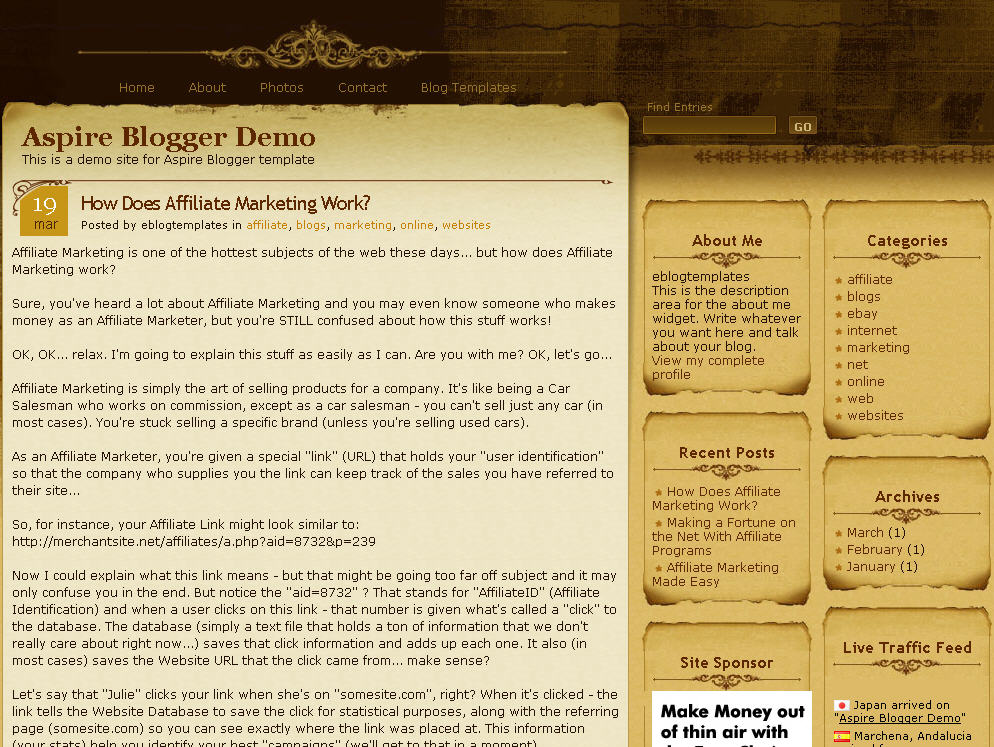
Click to enlarge Aspire Blogger template


Medieval, parchment, and scroll blogger templates seem to be very popular these days so we’ve taken the liberty to find another great one called Aspire. This three-column Blogger template comes dressed up with all the goodies a knight of the round table would want for his blog. You get a search box, recent posts and comments widgets, a custom built date stamp for each post, and more.

In order to get the recent posts and recent comments widgets working, you’ll need to read “How to setup your recent posts and comments” post.

Not to worry, all the images are hosted via our Pro Photobucket account so you won’t experience the “End of the month blogger blues” which happens to thousands of Google Blogspot Bloggers every month.

The dynamic date on each post is handled by a custom written javascript function which is embedded into the template as well. Most other templates you download link to an external .js file so at any point the date might stop working on your blog.

If you like this template you might also enjoy the Parchment Blogger template as well.

Thanks to Info Creek for designing this great theme and also porting it over to the new xml Blogger template for you Blogspot users!

Revision History

4/13/08 – Fixed individual post date so it is center aligned in the date box. Also added new demo site, fixed the layout blogger screen, and added several cool widgets.

5/17/08 – Fixed the “next” and “previous” posts buttons at the bottom of the page. If you downloaded this template prior to this date you can easily fix it yourself. Just search your template code for “.navigation” and then remove the “position:absolute;” entry. Thanks to Allen for finding the bug.

Ready to super charge your blog? Check out our professional premium blogger templates or make money by joining our blog affiliate program!

Want to make your blog stand out from the crowd? I recommend giving your newly downloaded Blogger template a unique and personalized look. Read our Free Blogger Header Images article and find yourself a great custom header image!

If you like this post then please consider subscribing to our eBlog Templates RSS feed. You can also subscribe by email and have new templates and articles sent directly to your inbox.


,,,,,,,,,


Trackbacks

  1. New favicon and template for my Tanah Rata blog | Andrew Ooi on March 8, 2008
  2. Tech Stroke » 16 Premium Look Free Blogger Templates - Wordpress themes Converted to Blogger on September 23, 2008
  3. 120 Best Free Blogger Templates Around | Showcases | instantShift on March 8, 2009

240 Responses to “Aspire”


Jon on Feb 11, 2008, 2:27 pm  

Cool theme! Thanks for sharing and hope to see more :)


ThuThuatBlog.com on Feb 23, 2008, 9:06 am  

Dear,

Please help find JavaScript used to change the date of post. I meet a problem with it.

Click here to see this error!

Thank a lot.


Kristina on Feb 25, 2008, 11:33 pm  

There is an input error in the replace_date()
Open the *.xml file and find this

replace_date('');

Please replace it with this one :

replace_date(”);

It will work fine after you change it :wink:


Josiah Guile on Mar 1, 2008, 12:42 pm  

This is a beautiful template but i am sadly not able to upload it :( i get this error–>

“Your template is invalid because the tag ‘div’ appears inside of the tag ‘head’.”

I dont know what to do! any ideas?


David on Mar 2, 2008, 8:44 am  

Josiah, I’m not sure what it could be. The template works fine for me. Are you using the new xml blogger template or the old classic blogger template? This Aspire template only works with the new xml blogger.


Kristina on Mar 3, 2008, 11:25 pm  

@Josiah Guile
Please see solution #3 in my blog (http://cutiecraft.blogspot.com) for ‘div’ error.
You just need to replace javascript function “replace_date” from the “head” to the “body” :wink:

@ThuThuatBlog.com
Please see solution #1 also in my blog (http://cutiecraft.blogspot.com) :wink:


David on Mar 4, 2008, 12:47 am  

@Kristina- Thanks for the nice write up on the fix. Just moving the script code below the body tag does fix it. I wouldn’t recommend changing the datetimestamp (per your post) because then the date won’t show up properly like your blog. If you change it back, each post will have it’s date stamp again. I’ve actually fixed this download so it works properly and I appreciate your help in pointing it out. Blogger recently made an update which broke several of our templates here. I’m in the process of going through them and making sure they still work.


Kristina on Mar 4, 2008, 7:36 pm  

Hi David,
I have tried to do as you suggested (not to change the “timestamp”) but it didn’t work when I preview it. I wonder how can it work on yours?
As I notice (and a little bit debug), “timestamp” will give us value like “10:02 PM”, but “dateHeader” give value “Monday, March 3, 2008″. I think the value of dateHeader is what we need. doesn’t it?

I think it’s default on blogger, when we have more than one post in a day, the date on second post will not be displayed. CMIIW, but it should be modifiable (but I still don’t know how)


David on Mar 5, 2008, 12:22 am  

Kristina, I’m using javascript to strip out the date from the Timestamp Format so that’s how it works. I’m not sure what you’ve done but if you download the template now and make sure the “Timestamp Format” in your “Settings” => “Formatting” section is set properly (make sure you change Timestamp Format and not dateheader) then it should work as designed. Try that method without altering the template code and let me know.


Kristina on Mar 5, 2008, 6:00 pm  

Hi David,
Cool.. it works now :lol:
Yes, I need to change the “Timestamp” formating in Setting->Format into format like “Wednesday, 5 March 2008″ (before I have something like “11:34 PM”)
I didn’t know before that the blogger setting, also affect the variable in the template. Thanks to you!


sanjay on Mar 7, 2008, 8:47 am  

Hey this template is really good!!! I have got a problem in using this template In my blog the date does not appear .. can some one help me out???

http://www.sanz4u.blogspot.com


sinkiss on Mar 7, 2008, 11:37 am  

i have install your theme, but the date doesn’t show up in the brown block on the posts.


David on Mar 8, 2008, 4:43 am  

@Sanjay, You need to change the date format in your blogger settings => formatting tab.


effendina on Mar 21, 2008, 7:05 pm  

Cool theme! Thanks for sharing it …..
I have got a problem in using this template In my blog the date does not appear can u help me please ? :sad:


David on Mar 21, 2008, 8:22 pm  

effendina, please read the entire article above. It explains how to setup the date for your template.


Swim on Mar 23, 2008, 3:15 pm  

Hey:

Wonderful template and I just love it…My only issue is “how to change the font style and size on the header that says “e Blog templates”?

Please someone throw some light here…
thanx


Rahul Pinnamaneni on Mar 31, 2008, 10:57 pm  

Thanks, I had the same problem with the timestamp but now it’s solved


Sherry on Apr 15, 2008, 1:39 am  

Hi
I copied and pasted the entire thing but got this error message:
“Your template could not be parsed as it is not well-formed. Please make sure all XML elements are closed properly.
XML error message: The document type declaration for root element type “html” must end with ‘>’.”
Any idea how I can solve this?

Thanks


Yogesh Goel on Apr 24, 2008, 8:12 pm  

i tried everything but the post date wouldn’t show by any means. can someone help me with this. all looks fine except for this.

my blog is-
http://yogeshgoel.blogspot.com/


Yogesh Goel on Apr 24, 2008, 8:18 pm  

sry friends…
i did not read the various comments posted here…
i read and i got my problem solved….
thanx a ton for the patience of david to answer all of us here…

thanx once again…


SQT on Apr 25, 2008, 12:40 pm  

I’m having the same problem as Sherry. I can’t figure out where the unclosed html tag is.


Jon on Apr 25, 2008, 2:19 pm  

SQT, make sure you are uploading the file your downloaded and not copy pasting it. When you do copy paste, your windows would usually add extra characters to the file.


Lisa on Apr 26, 2008, 4:23 am  

I’m trying to download this on a .mac and having a lot of trouble. Is this one of those where you CAN’T USE a mac to open this file?


David on Apr 26, 2008, 7:06 am  

@Lisa, I’m not sure actually. The download format is a .zip which I believe should work with a Mac.


Yogesh Goel on Apr 27, 2008, 6:28 am  

everything is great…
all is fine…

one thing one of my visitors noted is the link which all blogger has and this template does not have is the ‘Older posts’ link or say show more posts link….

got it david..
de main problem of nt having a ’show more post’ or ‘older poss’ link is new visitors will think there are no more posts…

so david cud u plz see to this….
this will be a welcome thing for everyone using this tmplate…


Whitney on Apr 28, 2008, 3:43 pm  

I am using a site counter on my blog…Is there anyway to make it centered? If you look you can see that it is off centered? I copy/pasted the html code and it is the same thing I used on my old blog template. ANY help would be great….

Thanks,

Whitney
blissstudio.blogspot.com


James on Apr 28, 2008, 6:40 pm  

add this before your code “” and this after your code ”

that will center your meter.


James on Apr 28, 2008, 6:42 pm  

sorry about that

the same for the end of your code but add / before the word center


James on Apr 28, 2008, 6:44 pm  

sorry it stillnot showing because html is reading as code, I sent you an email
which i going to resend in plain text


Daria on Apr 29, 2008, 6:58 pm  

I adore this template.

Can anyone tell me why part of my links border is missing?

Thanks!

Daria


David on Apr 30, 2008, 12:24 pm  

@Daria, I’m not sure what you mean. Do you have an example?


David on Apr 30, 2008, 1:10 pm  

@Whitney, the stat image is 200px wide which is too large for the widget box. If you make the width something like 140px, then it should look centered.


Ted on May 3, 2008, 3:23 pm  

I love this template!

However, how do I access the dashboard when I’m looking at my blog? Is it hidden?

Probably a dumb question… I apologize. :)

Thanks!


David on May 3, 2008, 8:15 pm  

@Ted, the dashboard menu bar is hidden with this template. You can go to http://www.blogger.com to access your blog there. :-)


Ted on May 3, 2008, 8:33 pm  

Hi David, thanks very much for your fast response!

Yep, figured out about blogger.com. I guess I’ve just been spoiled about having the convenient dashboard available. Ah we1l.

Is there any talk about having the dashboard visible with this template? :) (Figured it doesn’t hurt to ask!) :)


Ted on May 3, 2008, 8:49 pm  

Actually, a more specific question is: how hard is it to modify the template? (even for somebody as non-tech savvy as me)? :)

(ie. removing the top menu, adding a dashboard, being able to have a header graphic?) :)

Thanks!


David on May 3, 2008, 10:40 pm  

@Ted, you can put the dashboard easily back if you like. It’s actually called the Blogger navbar and just do the reverse of what this post says.

Some modifications aren’t too hard to do but always be careful and backup your template first. The best way for you to make changes is to read other posts online or just tinker with a test template.


Ted on May 4, 2008, 6:41 am  

Hi David,

Thanks for your help. I found the line containing “skin” and even removed the section between the remarks “Hide Navbar”, but it only revealed part of the navbar. :)

No worries… I appreciate your attempting to help me.

I’ll stick with “Scribe”… while I like the look of “Aspire” better, Scribe will suffice. :)

Thanks again!


christine on May 5, 2008, 11:24 am  

:oops:
Having problems with the date as well. But unlike others here, I have read the READ ME file. For more than an hour I have been re-doing everything from the start. But the others are right, you have to change the timestamp format, only that and nothing else.

But the problem is, the format I kept on changing was the DATE FORMAT!!!! Arrrrgggghhh!! To others having the same problem, scroll down a little and you’ll see the TIMESTAMP FORMAT.

By the way, I love ASPIRE! That’s why I had to bear doing everything over and over again just to get it right :mrgreen:


Yogesh Goel on May 5, 2008, 7:14 pm  

one thing one of my visitors noted is the link which all blogger has and this template does not have is the ‘Older posts’ link or say show more posts link….

got it david..
de main problem of nt having a ’show more post’ or ‘older posts’ or ‘previous posts’ link is that new visitors will think there are no more posts…

so david cud u plz see to this….
this will be a welcome thing for everyone using this tmplate…


Allen on May 8, 2008, 10:12 pm  

My request would be same as Yogesh Goel.

I hope you can provide us the code to add “older pages”, “newer pages”.
I try to play with the guide I found on internet but none working so far.

Else, this will be a perfect theme for me.


Allen on May 9, 2008, 12:36 am  

After consultation with my friends who studying IT, he told me it seem that
i know.. the thing is actually at its correct position.. but some thing is preventing it from appearing, so the easier way is let it appear up a bit.. although it doesnt look as nice, it works.
there are parents’ and siblings positioning need to be taken into account, so i supposed the author changed the positioning of the parents or siblings made it appear not right


callmekelly on May 9, 2008, 5:58 am  

I’m not sure what’s wrong but the Older Posts section is appearing in the middle of my bottom posts. Please help.


David on May 11, 2008, 7:36 pm  

@callmekelly, sounds like you need to change the .css value for the older posts element. It might currently say “align=middle” instead of “align=left”.


David on May 11, 2008, 7:44 pm  

@Allen, it should already be included. I just checked the template code and it’s there. I also see it appearing at the bottom of your blog. It’s the “next” and “previous” links.

<b:include name='nextprev'/>


Allen on May 11, 2008, 9:35 pm  

Hi David, it appeared in my blog because my friend helped me to modify the code. He moved up the “older page” beside the “comment feed”, coz from what he said…..the code is always there but he has no idea it doesn’t appear at the bottom of the page. What he able to do was moved the “older page” above of its original position.

http://allenultra.blogspot.com is my trial n error blog, there I’m using the original unmodified aspire template and “older post” doesn’t appear, which is same like Yogesh Goel’s blog.


CallmeKelly on May 12, 2008, 6:39 am  

@callmekelly, sounds like you need to change the .css value for the older posts element. It might currently say “align=middle” instead of “align=left”.

Regarding what you said, how do I find the older posts element? I don’t see it. Sorry if that’s a stupid question.


Yogesh Goel on May 12, 2008, 6:53 am  

i give up
is there in my code but older posts or previous posts does not appear in my blog by any means…
can anyone guide with this….plzzzz……

regard and thanx in advance


David on May 14, 2008, 8:21 am  

@Allen, ok…thanks for letting me know. That is strange because it’s in the template code and worked for me. Sorry I couldn’t be of more help guys….


Allen on May 15, 2008, 2:44 am  

David, could you add few more posts at live demo in order to get everything into 2nd page, so that the “older page” will kick in or change the number of posts per page to 1 or 2?

Coz I don’t think your live demo template has enough posts to go to 2nd page.
If the “older page” appear by then, I would glad if you can upload another template code for aspire :)

Anyway, thanks for bringing aspire to blogger


David on May 18, 2008, 5:57 am  

@Allen, I’ve figured out the problem. The link is actually appearing but the .css is preventing it from appearing. Edit your template code and search for “.navigation”. Delete the “position:absolute;” entry and save. It should now appear just like the demo site does.


Yogesh Goel on May 18, 2008, 6:08 pm  

thanx a ton to u david…
finally we got the older posts and previous links….
u have had a great patience in clearing all of us of our doubts and use ur template to the maximum….
its a pride and a great honour to use ur template…
may we be of some help to u then let us know…

regards and thanx once again..
tke cre, b well,
Yogesh


David on May 18, 2008, 7:14 pm  

@Yogesh, I’m glad you are happy now and your blog is working properly.

After viewing your blog though, I did notice you removed the footer link back to eBlog Templates. :-( I would appreciate it if you would put the link back since I’ve provided you a great free template. It’s a small request but much appreciated.


Gary on May 19, 2008, 8:39 pm  

David,

How do I get my photo to be displayed at the very top? Before using this template, I had a picture displayed at the top where the title of my blog is now. I have the photo selected, and it’s been in the page element thing, but it doesn’t show the picture.

Is there a way to show the picture?

Much thanks!


Christine Bean on May 26, 2008, 11:36 am  

Thanks for designing such a fun template!

I used it at http://www.itsagodthingbooks.com

Thanks,
Christine Bean
http://www.christinebean.com


gofree on Jun 1, 2008, 4:07 am  

Hello,

This is one of the best ever converted. As a new trend coming, is there a way to create one big section above the two sidebars to put a large rectangle ads?

Thanks in advance.


David on Jun 1, 2008, 8:35 am  

@gofree, yes of course you can create a big section above but you’re on your own for that. ;-)


Anzhen on Jun 3, 2008, 10:36 am  

its a very nice template.. thanks for this.. im inspired to improved my blog..


Lela on Jun 6, 2008, 1:37 am  

Hi,I can’t find the edit in each of my post. :(


Gabrielle on Jun 6, 2008, 10:21 pm  

Hi David,

I would like to interchange the date and month. How do I do that? I would like the date below the month. Thanks.


Hanush.H.Nair on Jun 9, 2008, 8:20 am  

Help!!

I tried almost everything. But the time stamp wont showup.


Lisa on Jun 9, 2008, 6:25 pm  

I agree with Hanush.H.Nair. I’ve tried EVERYTHING and I can’t get the date to appear on my blog. It’s so totally frustrating. I thought maybe it’s because I have a mac and use Firefox, but that makes no sense right?? Who ever has the date HTML correct, can you PLEASE, pretty please post it. This is the only thing that is missing from my blog and this may sound over the top, but it’s really disappointing.

PLEASE HELP and THANKS IN ADVANCE
Lisa


Lela on Jun 9, 2008, 9:21 pm  

Lisa,
Go to > Settings > Formatting >
Timestamp Format : In front of it scroll for the date that looks like this > Tuesday, June 10, 2008

Save and your done. :)

Lela


Lisa on Jun 10, 2008, 3:55 am  

LEA
It WORKED!!! I’m doing back flips can you tell?!?

I LOVE YOU!!!

Thanks so much. :grin: :lol:
Lisa
http://www.thrulisaslens.blogspot.com


Yogesh Goel on Jun 10, 2008, 8:18 am  

dear all friends who comment over here…

plz for God sake read the comments from starting till end and then write ur problems. many of ur problems shall be solved without even having to comment on.

think abt it…


Hugh on Jun 12, 2008, 7:57 am  

Hey, folks. Fantastic template, and thanks for all of the help with fixes in feedback.

I have more questions about the Navbar. Someone up top mentioned that even after they removed the “Hide Navbar” piece of code, you can only see half the Navbar. Not to mention that the background becomes broken on the right side. I’d love to use this template, but the blog is for my wife and momma in law, and it’d be a lot more convenient for them to keep the control to edit the blog in the upper right hand corner of the Navbar.

Someone else mentioned that I should put the entire blog in a wrapper and move it down, but I’m a little embarrassed to say I can’t figure out exactly how to do that.

Can someone give me advice? I’d like to use this template, but I just want to keep the original navbar across the entire top of the page.

Also, can anyone offer advice on how to add a picture to the title of the blog? I can’t do it through the Blogger interface with this template in place.

Two big questions, I know. Thanks much in advance!


J.Naveen on Jun 25, 2008, 4:59 am  

If anybody facing date problem with their aspire template visit this link http://www.jaininaveen.blogspot.com there I explained the solution in step by step process. Actually the problem with this link http://www.blogger.magznetwork.com/templates/mummys-note/changedate.js that js file is not working.


tubbies on Jun 27, 2008, 2:55 am  

thanks for your template… :smile:


Anurag Bansal on Jun 30, 2008, 5:25 am  

This is really an awesome template.
I got everything worked out, played with the template a little bit.
The only thing which I am not able to figure out is that the very first post on my blog doesn’t show any permalink, rest all the post below it show me that on the blog post title.
When this first post moves down, it becomes OK again. So seems like something which doesn’t convert the very recent post into a permalink.
Anyway to solve this problem.

Thanks for the great template.
Keep doing good work.

Anurag Bansal
http://www.knowliz.com


Michelle on Jul 3, 2008, 12:51 am  

THANK YOU VERY MUCH for sharing this template. I LOOVE it. I’ve had problems with the date and have fixed it now by reading all of the comments above. :D

More power to the creator and thanks again.


J.Naveen on Jul 3, 2008, 4:28 am  

If anybody facing problem with perm link, this is the one kind of solution. only first post of the blog will not get the param link So post an empty post after the your new topic


Yogesh Goel on Jul 13, 2008, 8:41 am  

Hi David,

Sry for the very long delay.
As you said I have now given seperate full credits to u and ur team for the blog design.
Hope now I do not fall in ur negative list.
Better late than never. Isn’t it.

Thanx a ton and sorry once again.

Take care,
Be well,
Yogesh


Tetea on Jul 24, 2008, 7:55 am  

Great template! Thanks a million! :smile:


ady on Jul 30, 2008, 1:53 am  

Hi
I copied and pasted the entire thing but got this error message:
“Your template could not be parsed as it is not well-formed. Please make sure all XML elements are closed properly.
XML error message: The document type declaration for root element type “html” must end with ‘>’.”
Any idea how I can solve this? and I tried to upload it but it displayed “Describe what you were doing when you got this error.
Provide the following error code and additional information.
bX-qarjrd”
I totally can’t use this template.. please help me. :cry:


cesario on Aug 1, 2008, 3:15 pm  

Hi how can i change the home link in top of tamplate and adding aonther link? I use Layout > Page Elements but no add a page elements i the header. Please help… :cry:


fivekitten on Aug 6, 2008, 7:40 am  

I need help. I really like this template and want to use it but I’m can’t seem to get the right hand bar on any of my templates show up on the right hand side in Internet Explorer or Opera – it only works in Firefox. I’ve tried three templates so far and no matter what in IE and Opera the right sidebar ends up being centered in the middle directly below the blog posts. If anyone has a clue why it’s doing this I’d really really appreciate any help!


Sister2brother on Aug 20, 2008, 5:20 pm  

I too thing this blog template is great! It has a nice midevil feel to it.

However in my particular case I have adsense ads at the bottom of my posts and I would like them to be centered and I would like to add some spacing both above and below the adsense ads so they won’t look so cluttered with the posts?


Gary on Aug 27, 2008, 10:18 pm  

How do I insert an image at the very top of the blog? A friend gave me some code but when I put it at the top like he said, it gives me the error about “closing” the code right or something.

Can someone help with that?


Biran on Aug 31, 2008, 1:56 pm  

Thanks for the template it looks great. However, I thought it came with a calender in the sidebar. Is there a calender widget I can get for this. :cry:


Gary on Aug 31, 2008, 2:10 pm  

There’s several of those widgets that aren’t available in blogger.

Not just the Calendar.


realmadrid_rocks on Sep 1, 2008, 1:11 am  

I had downloaded this template earlier and I had to remove it because I couldn’t get the date thing to work but now I did thanks to you guys.Really love this template and want to thank all of you for helping the date tag to work!


jj on Sep 3, 2008, 4:10 pm  

I am trying to increase the length of my header where my blog title goes so that my blog description fits. as of now it is cut off and trails off behind my posts. Where in the template can I change the size? Thanks.


TheJones on Sep 4, 2008, 8:40 am  

I’m still unable to get the navbar to show. I can get part of it but not the whole thing. What do I need to do?


cybertyper on Sep 7, 2008, 6:53 pm  

Please help. I have read some of the posts but am too confused to try to fix the date block in the upper left corner of this template. Could you send me the cut and pasted code and tell me where exactly to put it (please — like “line 37…” or something like that. This is still so new to me.
Thank you very much. :???:


joshboon on Sep 11, 2008, 8:16 am  

cybertyper – you got to go to blogger setting under time format to change it, so that it will appear the date for you.


joshboon on Sep 11, 2008, 8:18 am  

David – many thanks for the great template.

I managed to get the date done up tho. I am wondering that if it is possible to show year of posting as well? Maybe after each blog post?

And also, for 3posting within a day, is there anyway that it will link up together as one rather than having 3 posting shown?

My blog is http://www.frequenz.blogpsot.com


joshboon on Sep 12, 2008, 7:19 am  

How is it possible to have:( Monday, March 24, 2008 ) at end of our blog post? With timing as well.

Hope to hear the answer from you soon. Cheers david.


cybertyper on Sep 12, 2008, 9:00 pm  

Joshboon: Thanks for replying. I was able to fix it and then LOST THE ENTIRE TEMPLATE doing some previewing of other templates. NOW…I cannot even upload it. I am very confused. It worked before but now I get that error: Your template could not be parsed as it is not well-formed. Please make sure all XML elements are closed properly.
XML error message: Content is not allowed in prolog.
I DEFINITELY NEED A STEP-BY-STEP. I’ve been trying to fix this for days! It’s very discouraging.


cybertyper on Sep 12, 2008, 9:39 pm  

:razz: Well you folks….I finally replaced my “lost” template. Now — hahahaha — I can’t remember the “combination” to make the date work. :oops:


Merox on Sep 12, 2008, 11:30 pm  

Hi David, when i go to layout> page elements, the top header don’t show up and i can’t add a new link to the top menu. Why is that?


cybertyper on Sep 13, 2008, 7:29 pm  

I’m back again. Date doesn’t show up. My settings are:
(date header) “Sep 13, 2008″
(timestamp format) “Saturday, September 13, 2008

Isn’t this correct?
tks


ryam on Sep 17, 2008, 10:46 am  

Love it!!!


frawse on Sep 18, 2008, 5:10 am  

oalivevsycdolclupjlyfamhabriuk


Gary on Sep 18, 2008, 3:11 pm  

can someone PLEASE explain to me how to post a banner image above my blog?

I don’t know ANYTHING about code or html or any of that.

Please someone help me out.


bangyos on Sep 22, 2008, 10:38 am  

Nice and cool template.
May i use this?


isanet on Sep 27, 2008, 9:49 am  

Hello David.
I’m from Spain.
Congratulations. Beautiful template.
I would wish to know something more please.
I would like to see Navbar completely and How can I insert “Variable definitions” to define colours and styles from text. I inserted a copy of “Variable definitions” from basic template but I can’t change text type. Why?

Thanks, isa


Joe Moe on Oct 1, 2008, 8:04 am  

Nice template!
I’m currently using it at http://blog.joshuamok.com
thanks for the help.


Julie on Oct 2, 2008, 1:07 pm  

Love this template, but the date isn’t showing up. But others with the same template of the date? Is this just a blip?


sushil345 on Oct 16, 2008, 7:33 am  

hey all thanks to yous posts.mine date esction is working buthow to make recent posts and recent comments section working.they are not showing……..??


Brandy on Oct 20, 2008, 7:26 am  

Can someone please tell me how I can get the calendar widget of the Aspire template for blogger???

Thanks.


Leave a Comment or Review

So what do you think of this Aspire Blogger template? Any suggestions on how to improve it? Feedback is a valuable way to communicate directly to our staff and Info Creek, the template author.

Note: We receive dozens of comments on a daily basis and can't always respond to each and every one. Please only post relevant comments regarding this Blogger template.

If you have questions regarding general Blogger settings, you should visit the Blogger Help site. The Blogger Help Group is also another good resource for finding an answer to your question.

The eBlog Templates Blog Forum is also a great place to look for help from other members.

You can use these tags: <a href="" title=""> <abbr title=""> <acronym title=""> <b> <blockquote cite=""> <cite> <code> <del datetime=""> <em> <i> <q cite=""> <strike> <strong>

Putting spammy or irrelevant links in your comments will result in deletion and potental banning.