
Isn't this free template worth at least $1? |
|
|---|---|
| Your support allows me to continue to provide free templates. Any donation is appreciated. |
WordPress Theme Info
- Author: WP Elements
- Views: 4,728
- Downloads: 0
- Added: Apr 18th, 2008
- Rating:


- Live Demo
Charred Theme
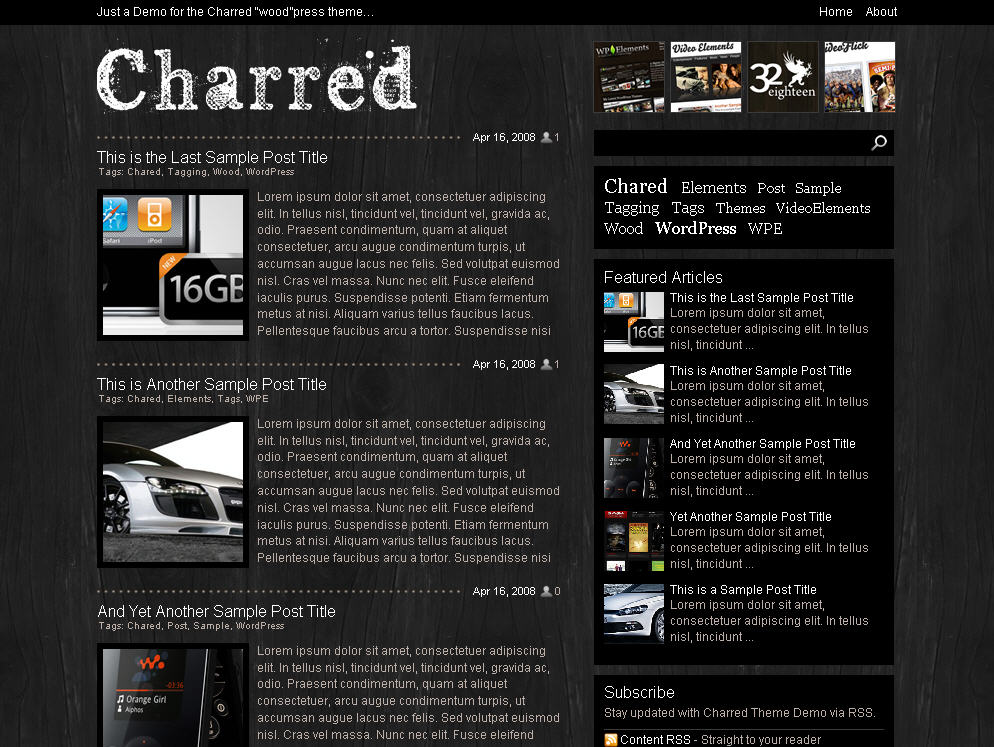
This theme is hot off the press and a really cool black 2-column beauty. Charred is the latest edition to Jason’s WP Elements theme collection and I really like it.
The Charred WordPress theme features post thumbnails which means you’ll have to use WordPress custom Fields when writing a post. If you’ve never used a custom field before it’s pretty easy to learn.
So here’s how it works. When writing a new post you’ll first have to create a 140 x 140 thumbnail image that you want to use for your post. After it’s ready upload it, and then create a new custom field called “thumbnail”.
Here’s a screen shot the theme designer provided:
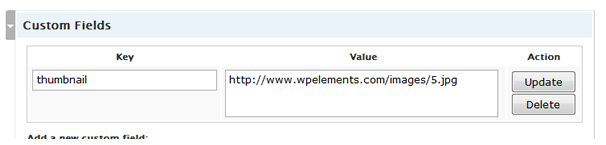
You’ll only need to enter the word “thumbnail” into the “Key” field the first time. For each new post after that, it will automatically appear in the drop down box so just select it. The upload your new image, get the image url, and then paste it into the “Value” field. Don’t forget to click the “Update” action button each time.
If you want to check out the original post from the author, you can find it here. He includes a couple other custom features like how to change the header logo, etc.
Overall this is a great new modern WordPress theme and if you’re looking for a new skin for your site with the ability to add images to each post, this is the one for you.
Ready to super charge your blog? Check out our partners professional premium WordPress themes!
If you like this post then please consider subscribing to our eBlog Templates RSS feed. You can also subscribe by email and have new templates and articles sent directly to your inbox.
Trackbacks
- 30 WordPress Themes - Indexu.de on July 26, 2009
- 10+ Free WordPress-Themes « Scripted-Sheep Development on February 27, 2010
21 Responses to “Charred”
WordPress Sponsors
- Improve Your Blog in 31 Days – Guaranteed
- Build a Better Online Business with WordPress
- 50 Excellent Blog Footers
- Free Instant Blog Logos
- The Definitive Guide to WordPress SEO
- Create Cool Images With a Wet Floor Effect Maker
- Get Paid to Write Reviews on Your Blog
- Why Most Bloggers Are Stuck – Reporters vs Experts
- Yaro Starak’s 10 Great Blog Traffic Tips
- Google Friend Connect – New Social Network
 ads by google commented on
  huh commented on
  huh commented on
cooooool 😯
Awesome. I want it but i’m a blogspot user. Can you convert this template?
why should wordpress have all the nice and beautiful templates?
I hope this theme be converted for blogger
is there any easy to use blogger template editor or web to blogger template converter around
@Hanush, i wish there was such a thing. All Blogger templates need to be manually converted which is a pain.
@Keite, WordPress is the most popular blogging platform so designers like to create templates for it instead of Blogger. They can also sell them so it’s in their best interest to only do them for WP.
I really like this theme!
I change few things and set it as my portfolio blog!
Coming soon!
How could you make it? It’s Unbelieveable! My gf robbed it for her blog! ehehe
it was nice! 😛
but I dont know why The Live Demo not display for me! 😥
Hello again
How can We Have post tumbnail like this template,in other temp?
Please send my answere to my Mail 😉
I’ve been using this template for a while, I customized it. One thing that blows my mind is that I can not seem to get rid of the tag cloud that takes up half of the header??
check it: http://www.nostraboris.com
sniff 🙁
i thought that it was a blogger tempalte.
awesome layout.
there is some like this in bloggeR?
i wish put my logo y png and put thumb like this
Very nice, i will try this one!!
Edit the css for the following and you’ve removed the tag cloud.
.tagCloud {display:none;}
very exclusive Templates
see this link to get more exclusive Template
Thanks a lot.. i;ll use it for my blog 🙂
i just got this theme..Really happy with it but when i install it my categories(posts) dont work.. They just lead to a white page.. Any ideas would be really appreciated..
THX..
Is there a help forum for this theme?
Its really a great theme can I alter the footer ?