
Isn't this free template worth at least $1? |
|
|---|---|
| Your support allows me to continue to provide free templates. Any donation is appreciated. |
Blogger Template Info
- Author: Abdul Munir
- Views: 14,826
- Downloads: 29,833
- Added: Jan 25th, 2008
- Rating:


- Live Demo
Daya Earth Template
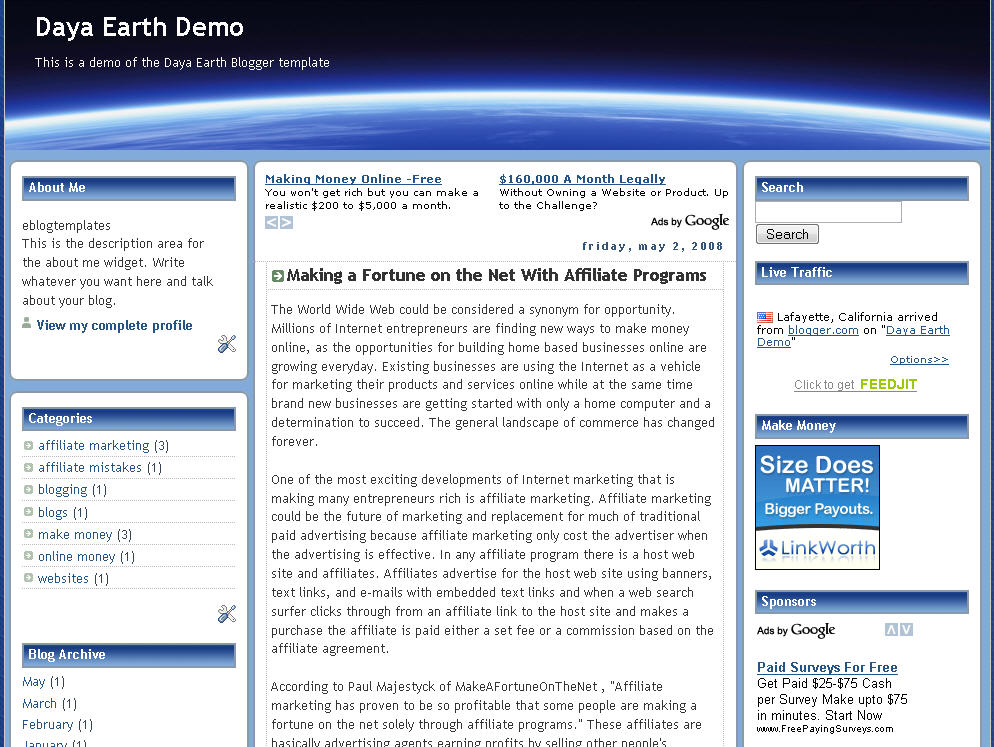
This rounded style template with a nice header image of earth from space is called Daya Earth. It’s originally based off the Rounders Blogger template but evolved into this earth version. It’s got 3 columns so plenty of room to put your page elements or advertisements.
Original design by Abdul Munir but the modified header was done by yours truly.
Revision History
Update 5/2/08 – Created demo site and added new sidebar widgets.
Ready to super charge your blog? Check out our professional premium blogger templates or make money by joining our blog affiliate program!
Want to make your blog stand out from the crowd? I recommend giving your newly downloaded Blogger template a unique and personalized look. Read our Free Blogger Header Images article and find yourself a great custom header image!
If you like this post then please consider subscribing to our eBlog Templates RSS feed. You can also subscribe by email and have new templates and articles sent directly to your inbox.
Trackbacks
- 120 Best Free Blogger Templates Around P.II | Free template joomla, wordpress theme | wordpress tut | joomla extension | blogger blogspot on November 1, 2012
187 Responses to “Daya Earth”
Blogger Sponsors
- Get Paid to Write Reviews on Your Blog
- Yaro Starak's 10 Great Blog Traffic Tips
- Create Cool Images With a Wet Floor Effect Maker
- Why Most Bloggers Are Stuck - Reporters vs Experts
- Google Friend Connect - New Social Network
- Mashable's "70 Fresh & Modern Blogger Templates" List
- Free Blogger Training Videos
- Improve Your Google Rankings in One Easy Step
- "What Blog Template Should I Make Next?" Contest Results
- Top 5 Free Blog Header Image Websites
- Improve Your Blog in 31 Days – Guaranteed
- Build a Better Online Business with WordPress
- Become a Blogger Just Reopened – 5 Days Only!
- Roadmap to Become a Better Blogger
- Free Image Hosting – Photobucket
- How to Install Google Analytics on Blogger
- Improve Your Google Rankings in One Easy Step
- 50 Excellent Blog Footers
- Free Instant Blog Logos
- Create Cool Images With a Wet Floor Effect Maker
- Lyrics: "It was a useful document. Thank you." Blog Videos (66 comments)
- Birthday: "Hello. It worked great for me, thank you." Blogger Ad Code Converter (846 comments)
- paus88: "situs slot yang sangat gacor yang pernah ada di Asia..." Blogger Ad Code Converter (846 comments)
- paus88: "paus88 is the most exciting slot site that has ever..." Blogger Ad Code Converter (846 comments)
- tokovvip: "situs togel hongkong tokovvip yang terpercaya ini..." Blogger Ad Code Converter (846 comments)
- tokovvip: "situs togel hongkong terpercaya hanya ada di tokovvip..." Blogger Ad Code Converter (846 comments)
- Wadud: "Very very helpful. Thank you." Blogger Ad Code Converter (846 comments)
- Maria: "Very effective it is and It helps a lot for me. Thank you..." Blogger Ad Code Converter (846 comments)
- noob: "We carefully select honey to reach you with the highest..." Blogger Ad Code Converter (846 comments)
- Textile Mentor: "This post is very creative I liked it. keep..." Blogger Ad Code Converter (846 comments)
 Lyrics commented on
  Birthday commented on
  paus88 commented on
  tokovvip commented on
I have a problem to install the template…
Blogger give me an error message for recent post and comments…
It seems that doesn’acept feed widget type…
I have used your template. I love the way it looks with my content.
However, is there a way to modify it to show only the preview paragraph of each post on the home page? Instead of showing the entire post.
Please advise if this is possible and how to do it.
You can view my blog at http://dumbwatch.blogspot.com/ if needed.
Thanks in advance.
Perhaps I posted to quickly. Was able to find code modification through links on this site. Thanks!
My home page now looks the way I wanted.
hello Paul,
I like your template. I already use it for my first blog. But i have problem with “Comment”.
My friend gives me “comment” for my article, but the comment doesn’t show up. I didn’t moderate the comment.
please look at my blog
Jeff,
Thank you for the compliment but it is not my template. The designer was Abdul Munir, as stated in the template footer.
As for the problem of comments not showing I think that this is a temporary recurring problem which seems to affect some blogs. I have seen several items about this on various forums and help sites for a long time.
At first I could not see the comments in Firefox or IE8 but when I tried Chrome, Safari and Opera 10 the comments showed. They are now showing in Firefox 3.5 and IE8 on my computer. Hopefully you can now see them on yours.
Another point is that both Chrome and Safari are distorting your graphics in “Linux on USB?” as they may be slightly too wide.
Paul,
Thanks for checking my blog. I don’t know what happen, but the comment is shown now. 🙂 maybe my blog already fixed by the blogger support just now.. hehehe.
And for the graphics, i already try to open on Chrome, and the image become larger. Maybe i’ve to check the html code first.
Thanks a lot Paul
Not sure if my “comment” link works on this template. I’ve tried posting a comment just to test it. Can you please visit http://dumbwatch.blogspot.com/ and try to leave a comment (say anything) and see what happens. I can delete the comment later… just want to see if it works.
Please help. I hate to think I might have to switch templates again. I really like this one.
Tell me if I need to modify the code in some way. I would really appreciate the help.
thnks admin
Great template! Is this compatible with Word Press? Thanks.
Never mind on the last question. I went with blogger and it is working great. Thanks again for the tips on making this template work. For those still having problems, it does work… just keep following Paul’s instructions.
nice template….
very nice, but i want it for free…
Voyage… it is free. However, isn’t it worth at least a $1 for all the work put into it?
Good templates….
how find free template code
i like it. theanks for your articel
This is a nice template..
if you have problem with it.. just change the widget ID [“ID” must be equal with “TYPE”], then just add any number
if ID: “Recent post watever” then TYPE: FEED
then you need to change the ID to FEED#
# is any number you think
sample;
ID: FEED1, TYPE: FEED
ID: HTML1, TYPE: HTML
btw here is the pic i made using this template
http://i33.tinypic.com/21ay9hf.png
anyway my blog required many links so this is not the one I’m looking for.. but its a good template.
See Yah
thanx for template
Placing Meta Tags Is very important to place Top rank on search engines..it is used for indexing.
PLace it before /head
http://www.tipsinside.co.cc/
http://beginners-bloggers.blogspot.com/
why not save daya-earth-blogger
when i upload this template and save system say
Edit the contents of your template. Learn more
We were unable to save your template
Please correct the error below, and submit your template again.
The new widget id “Recent-Posts-Widget1” is invalid for type: Feed
I like this. thanks info
very simply template but nice design for blog
Thank you for information. i like it…
To this issue �The new widget id �Recent-Posts-Widget1� is invalid for type: Feed� i have the solution. I was working all the night to get rid of this issue. Finally, i got succeeded to solve this issue.
Steps:-
Go to blogger.com
sign in with ur account
Edit HTML tab
Upload Daya earth template
now when u try to save this template u will find this error.i.e.,
�The new widget id �Recent-Posts-Widget1� is invalid for type: Feed�
Now using ctrl+F find the recent-posts in browser
when u find it.
b:widget id=�Recent-Posts-Widget� locked=�false� title=�Recent Posts� type=�Feed�
Now when u find the above line just change the id=�Feed3� and leave the rest of the line as same. Remember before u enter Feed3 or Feed4 or anynumber make sure that it is not used before. save the template.. but again it shows an error that recent-comments-widget is invalid
it shows like this
b:widget id=�Recent-Comments-Widget� locked=�false� title=�Recent Comments� type=�Feed�
Do the same process as per above. Now give id as Feed4 or any number be sure that it is not used before. So this process goes on for search box, ads & feedjit.
Remember to change the id same as type with some number. if the type=feed then change id as feed with some number(Feed3 or any number) and if the type=html then change id as html with some number(HTML1,2,�� anynumber)
Now save the template thats it�
template will be saved�
Check My Blog I’ve just uploaded this template with all my problems solved
Please help! I’ve tried many ways to add “Read More/Continue Reading” Widget to my Daya Earth Blogger. But It doesn’t add the widget.
Any solutions?
i want this theme for my web site…
nice, thanks for the template.
I absolutely LOVE this template, its so versatile. Keep up the great work, thanks a bunch!
nice templates. thanks for sharing.
Placing Meta Tags Is very important to place Top rank on search engines..it is used for indexing.
I absolutely LOVE this template, its so versatile. Keep up the great work, thanks a bunch!
nice themes, thanks
its good….
i wait next article
nice post, thanks
great information, thank you
info liga spanyol
thanks broo..i like it