Welcome, visitor! [ Login | Sign Up ]
Isn't this free template worth at least $1?
Your support allows me to continue to provide free templates. Any donation is appreciated.

Blogger Template Info

Daya Earth Template

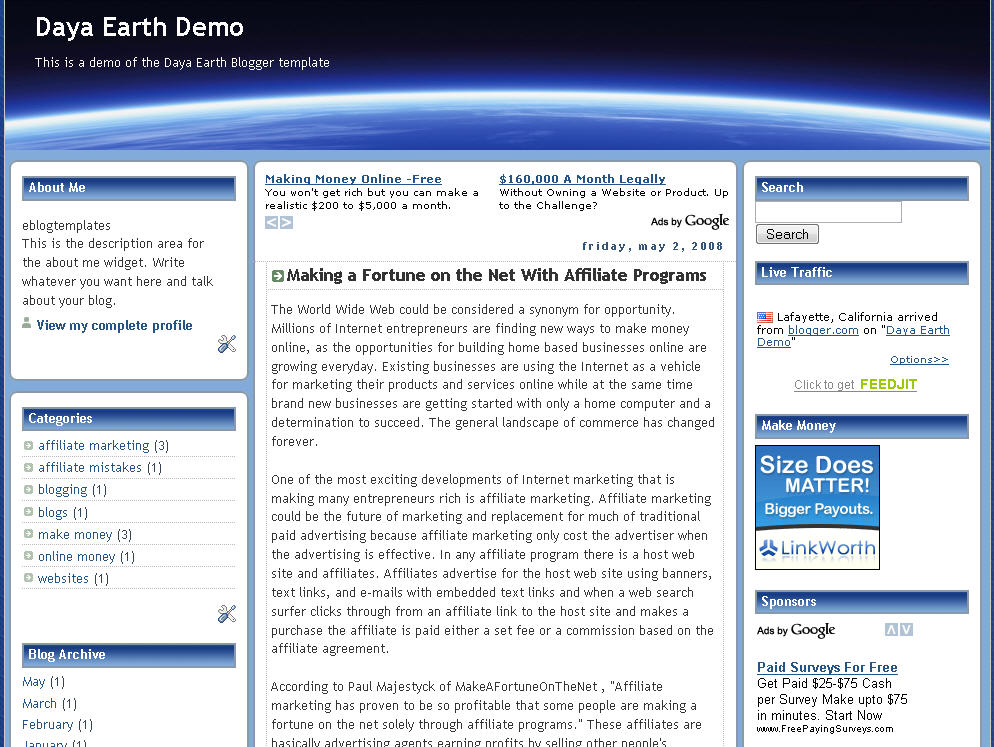
Click to enlarge Daya Earth Blogger template


This rounded style template with a nice header image of earth from space is called Daya Earth. It’s originally based off the Rounders Blogger template but evolved into this earth version. It’s got 3 columns so plenty of room to put your page elements or advertisements.

Original design by Abdul Munir but the modified header was done by yours truly.

Revision History

Update 5/2/08 – Created demo site and added new sidebar widgets.

Ready to super charge your blog? Check out our professional premium blogger templates or make money by joining our blog affiliate program!

Want to make your blog stand out from the crowd? I recommend giving your newly downloaded Blogger template a unique and personalized look. Read our Free Blogger Header Images article and find yourself a great custom header image!

If you like this post then please consider subscribing to our eBlog Templates RSS feed. You can also subscribe by email and have new templates and articles sent directly to your inbox.


Trackbacks

  1. 120 Best Free Blogger Templates Around | Showcases | instantShift on March 8, 2009
  2. Daya Earth Blogger Template Download | DOC-TECH : TECHNOLOGY BLOGGING HEALTH on October 22, 2009

178 Responses to “Daya Earth”


Ryan on Mar 6, 2008, 11:22 pm  

Thanks for this template. I like it…especially the header image. I also added the subscription links from your Ads Theme, which is also great. How do you activate the “Add this blog to my Technorati favorites”?


David on Mar 7, 2008, 4:45 am  

@Ryan, glad you like it. You should copy the “a href” code from the Ads Theme Technorati favorites and use that. It’s a special Blogger url structure.


Ryan on Mar 7, 2008, 4:14 pm  

Thanks David. I figured it out. Blogger was stripping part of the expr:href, so I just hardcoded in the blog URL and removed the expr.


Pramod bloggertempl on Mar 16, 2008, 10:28 am  

how does one convert this into a two column template easily?


debashish on Apr 8, 2008, 10:25 pm  

Hey I like your template…how can i get it from you..i mean how to download this template…from your site please help????

with regards
debashish


David on Apr 9, 2008, 4:39 am  

debashish, click on the “download now” blue button at the top right corner of this post. That will download the .zip file to your computer.


Lana on Apr 26, 2008, 1:16 pm  

I love this template! I’ve changed my template today and this was the right choice. I love th my blog’s new look! :lol:


Jie on Apr 29, 2008, 12:17 am  

:smile: thanks…it’s coOl…


deniseamorim on May 5, 2008, 9:18 am  

Please, how do I modify the color of main-wrapper? Thanks!


Nisha on May 7, 2008, 4:29 am  

Dear abdul,
Thanks for the beautiful template. but im affraid i dont find any ‘sign-in’ or ‘upload new post option’. Please help me. i’m new to this blogging.
Thanks in advance.
Nisha


Stefen on May 14, 2008, 12:40 am  

Cool template, thanks. I’m using it now!

Can I change the ads to mine? can someone tell me how?


David on May 14, 2008, 8:06 am  

@Stefen, yes you can change the ads to your adsense account. You’ll need to edit the template and look for the google code. Make sure to check the “expand widget elements” checkbox before searching for it.


james on May 15, 2008, 4:46 am  

Hi, fantastic template, basically meets all my needs in a very slick design. I only have one problem at the moment. In the post footer, how do I get the post author and timestamp to meet up, at the moment I have a huge gap between the both??

thanks


Stefen on May 16, 2008, 7:17 pm  

Cool, thanks David. I saw from its template code that we could also change the header image :)


David on May 18, 2008, 5:48 am  

@james, I just looked at your blog and it doesn’t have a gap at all. Did you figure out a way to fix it? I’m viewing it in FireFox.


james on May 18, 2008, 10:35 am  

@ David, yes i did manage to fix it, the html didnt actually include the “timestamp” so im not sure how it was appearing in the first place. But i amended the template and all is fine now, thanks


Moises Colon on May 19, 2008, 9:43 pm  

Hello!

this is a great template! Im wondering if anyone of you know how to add tabs to the template?

Tabs for redirect, i mean, to open new web pages on the blog itself?


vimal on May 23, 2008, 10:55 am  

Hi,

This is exactly the kind of template I was looking for since my blog itself has the name world.

I have already made this my template. But can u please tell me how to bring back the navigation bar which has the sign in, upload new post options?
and also tell me the way to delete the ads just below the header.plssssss. It will be very helpful.

Thanks,
Vimal


GumbyTheCat on May 25, 2008, 1:19 pm  

Help! I just installed the Daya Earth template, and I lost my Blogger “New Post”/Login nav bar that used to run across the top of the page! I am totally unable to do anything!


Nisha on May 27, 2008, 8:37 pm  

Dear Vimal,

the main issue with this template is it disappears the navigation bar at the top. The only way i got to add new post it to login to my blog through blogspot.com…. It will redirect you to thedashboard, where you can see layout,newpost and settings option. a bit clumsy, but without nav bar, template looks gr8.. isnt it??

Nisha


torresinc on May 30, 2008, 7:05 am  

Hello David,

The template is working great at Firefox but it is not working well at Internet Explorer: http://pictakex.blogspot.com

Am I doing something wrong?

Ed Torres


Ed Torres on May 30, 2008, 7:28 am  

Never mind!

The site is working now after I uploaded the code again.

Thanks.

Ed Torres


Ed Torres on May 30, 2008, 8:11 am  

Here it is the code in case you want to centralize the image inside the “Make Money” element:

All the best,

Ed Torres


Dark Angel on Jun 5, 2008, 5:11 am  

Hello,

I fell in love with this template when i first saw it – which was 2 days ago!

A couple of things -

1. How do i centre my blog description and the footer?

2. How do i alighn my comments to the left

Thanks!


Lana on Jun 5, 2008, 5:20 am  

Hello, I used this two “blogger help” Blogs to help me organize my blog, I did several changes to my template and I’m satisfied now!

http://www.betabloggerfordummies.blogspot.com/

http://www.hackosphere.blogspot.com/


Dark Angel on Jun 5, 2008, 6:20 am  

Thank you very much Lana!


Sakib on Jun 20, 2008, 6:13 am  

Looks Nice but how can I get rid of your Ads that comes by defaul on my postings? :evil:


fajar on Jul 3, 2008, 5:43 pm  

uwoooooh this cool template, i love it :lol:


direk izlet on Jul 4, 2008, 11:36 am  

good template.. :wink:


rajani on Jul 12, 2008, 1:01 am  

Hi,

I am using this template, it is working fine in firefox but when I open my page in IE7, it does not show the right column. can you have a look at my page and me how to fix the problem ASAP.

Thanks,
http://www.aboutinterview.com


Lana on Jul 12, 2008, 2:35 am  

Hello Rajani,

I use the same template and it works in IE7. I also opened your site in IE7, it shows all three column. Maybe is some mistake in your IE7?

Best Regards
Lana


rajani on Jul 12, 2008, 2:57 am  

Thanx Lana for prompt response. I imported the template again. Now it is working fine.


kuni on Jul 19, 2008, 12:02 am  

how can I change some image of this theme ?


crisp on Jul 23, 2008, 4:08 pm  

how do I delete the googleads under the header?


crisp on Jul 23, 2008, 4:15 pm  

how do I remove the googleads under the header??


adam on Jul 25, 2008, 6:25 pm  

thanks forever, walk together


adam prawiranegra on Jul 27, 2008, 8:48 pm  

thanks, walk together


ridwan maker on Jul 31, 2008, 1:43 pm  

can i remove the ads

hope u help me 4 that

thankx


static brain on Aug 5, 2008, 5:34 pm  

:idea: One suggestion for improvement would be to include the images used for the template in the download, because I installed it for a friend then got all kinds of photobucket account limit exceeded errors and had to read the code, find the images, and then upload to my own server so it would work for a friend. It looked horrible when I saw all those photobucket errors. It would also be helpful to explain in a small text file, included in the download, how to change the code for the photos to work, so that won’t happen again. I am experienced enough to know how to do it, but not everyone is. :roll:


Lana on Aug 7, 2008, 10:34 am  

Something strange happened to my blog yesterday. :cry: Left, right and down on my blog color changed, suddenly something blue-red-white combination with letters appeared. Does anybody know what that might be?? And why that happened? Please, help!!


Lana on Aug 7, 2008, 11:21 am  

Oh, I see that this happened to all Daya Earth users. It’s something about photobucket!

Does anybody know how to fix it?


Dark Angel on Aug 8, 2008, 5:41 am  

I kep getting the message that i need to upgrade my photobucket to Pro as i have exceeded the bandwidth. My whole background is now filled with that message.I tend to think this is a problem with your photobucket account. Is there wa way out of this?


Dark Angel on Aug 8, 2008, 6:03 am  

For the time being, i have removed that photobucket url… hope it works..


Lana on Aug 8, 2008, 7:10 am  

Still the same problem…


Siddharth on Aug 10, 2008, 10:06 am  

Hey that PhotoBucket error is getting on my nerves. Is someone gonna do something abt it?
Thanx in advance.
It really looks ugly bcoz the error boxes show at the borders of my blog.
Plz help.:(
Someone
Anyone:(
Can anyone explain why photobucket is involved?


Lana on Aug 10, 2008, 11:12 am  

This is really getting on my nerves too. And about the photobucket, it’s because in the template you can see that some photos which are included in template are from the author’s photobucket account. I don’t have idea how to fix it. I think the author of Deya Earth has to fix those photos on photobucket.


Lana on Aug 10, 2008, 11:43 am  

OK, I fixed it!! This is what you have to do. Open your Layout settings and then edit HTML.
Then find this

— TERIMA KASIH– */

body {
background-image:url(http://i217.photobucket.com/albums/cc189/layout4all/bg_03-3.gif);
margin:0;
text-align:center;
line-height: 1.5em;
font:x-small Trebuchet MS, Verdana, Arial, Sans-serif;
color:$mainTextColor;
font-size/* */:/**/small;
font-size: /**/small;
}

Now you have to change this part in the bracket and it should look like this

body {
background-image:url(http://i276.photobucket.com/albums/kk25/Lana3103/bg_03-3.gif);
margin:0;
text-align:center;
line-height: 1.5em;
font:x-small Trebuchet MS, Verdana, Arial, Sans-serif;
color:$mainTextColor;
font-size/* */:/**/small;
font-size: /**/small;
}

There was problem with authors photobucket account, he have too many pics there and they want him to upgrade. So I found the photo that is used for the body in our template and uploaded it to my photobucket account. And it works! You can check my site, it looks nice again!


David on Aug 10, 2008, 9:45 pm  

Sorry about that gang. I’ve fixed it in the template if you’d like to download it again. The other option to fix it is edit the template code and replace

THIS:
http://i217.photobucket.com/albums/cc189/layout4all/bg_03-3.gif

WITH THIS:
http://i254.photobucket.com/albums/hh92/eblogtemplates/daya/bg_03-3.gif

Lana’s comment above also resolves the problem. (Thanks Lana!)


Dark Angel on Aug 10, 2008, 10:44 pm  

Hey, Thanks Lana and David!


Joey on Aug 27, 2008, 1:21 am  

This is a very cool template. i like it and use it as my blog template. Thanks to you Munir!


gumbythecat on Aug 30, 2008, 1:59 pm  

I created a new blog, downloaded this template to my PC, then uploaded it to replace the default template. I keep getting various blogger error codes such as:

bX-5jexeh
bX-m5exb7
bX-tfumjv

Other custom templates I can import without a problem.

Any ideas?


malars on Sep 4, 2008, 10:14 am  

Is there a way to upload this template and not have it remove the nav bar from the top?


kathya03 on Sep 7, 2008, 10:57 pm  

hy! i try to use this template and i can’t. when i press the button save and continue it shows me an error: bX-2s7t7f… and i can’t instal the template. why ?


deepak1985 on Sep 18, 2008, 10:52 am  

kooooooooooooool template..iam gonna use this


Dave at Bottomfeeder Baseball on Sep 29, 2008, 12:32 pm  

i really like this template, three questions though:

1) is there an easy way to add tabs?

2) can i change the theme colors from blue to green?

3) can i return the blogger dashboard to the top?

thanks for the help.


Biran on Sep 30, 2008, 6:24 am  

Hi thanks for the template it looks great. In line with other comments i would like to know how to get rid of the adds in the post box.


Biran on Oct 1, 2008, 4:28 pm  

why is it that, all these new templates are set up for money adds. i don’t need to make money of my blog. I just want to use it for spreading the truth. come on lets get away from money and just produce templates for bloggers. I f I want to add money making adds latter on , then i will do that. lets get rid of the adds.


David on Oct 1, 2008, 9:06 pm  

That’s great you’re looking to spread the truth with your blog Biran so feel free to remove the ads. The majority of our visitors are looking for templates with ads already embedded so they can make money. :-)


Biran on Oct 8, 2008, 11:50 am  

Hi David, thanks for the reply, but I dont knot how to remove the adds from the post box. I got rid of the rest. :???:


firmanwy on Oct 13, 2008, 3:08 am  

Good looking blog template. But have to learn about how to install this template to my blogger account.


Emoneymine on Oct 13, 2008, 8:33 am  

The problem happen again!… need to upgrade to pro photobucket!!… can u fix this??? thank you


Mayakanon on Oct 16, 2008, 1:49 pm  

I have just use this templete on my Stars Collection wallpaper blog.

http://starscollection.blogspot.com/

thanks.


kang sidiq on Oct 19, 2008, 2:31 pm  

thanks ;)


Rabia khan on Oct 20, 2008, 7:28 pm  

this is a great template! Im wondering if anyone of you know how to add tabs to the template?


blranilmenon on Oct 23, 2008, 4:27 am  

nice design


jackx on Nov 9, 2008, 9:47 pm  

hey , i use this template in my blog, and it was functional and after a week or so the font looks so smaallllll………any fix? :?: :?:

Rabia Khan:you can setup css menu’s for any template
visit cssmenusamples.blogspot.com


Reed on Nov 18, 2008, 6:39 pm  

How to I remover the google adds at the top ?

What size (hxw) should my header image be? Thanks reed


jackx on Nov 18, 2008, 11:14 pm  

Reed
6:39 pm on November 18th, 2008 (subscribed to comments)

How to I remover the google adds at the top ?

What size (hxw) should my header image be? Thanks reed
…………………..
you need to do a little template editing to do this.
go to layout edit html, check on expand widgets, then using the ctrl+f function find the adsense code, you can search using the keyword “google” it is google ads host or something like that, just remove that portion along with the div id =”munir” portion and also the after that . your header image would be nice if it is of 985*150 pixels


kingmaster on Nov 25, 2008, 2:30 pm  

:mrgreen: :mrgreen: :mrgreen:
hi this template is great and i hav uploaded it to my blog which was very nice and i also some template from this site http://www.directdownloadworld.blospot.com
there are lots of new movies new update everyday for free you can have a go


newBlogger on Nov 28, 2008, 6:57 am  

hi, thx for the nice template. I uploaded it and it looks great. however, some of the built-in icons under the posts cannot be displayed. comment, edit & response icons are not working, . how to fix it?

http://bravotravel.blogspot.com

thx.


adanali dizisi on Dec 1, 2008, 7:13 am  

thnks


Health Insurance Guide on Dec 3, 2008, 8:17 am  

This is the most download theme! i really love it! Thanks a lot for the great themes! ;)


chris on Dec 8, 2008, 1:15 am  

great template i really like this i open a resale rights products store here visit for more info.
http://www.resalerightsproducts.blogspot.com


kakang on Dec 11, 2008, 9:52 am  

great.. i like this desain. look .. im use on myblog http://sangmoneyholic.blogspot.com

i love blue colour…


muugii on Dec 12, 2008, 10:24 pm  

hi Uchriig ni oilgodoggui ee error


chen on Dec 13, 2008, 10:05 am  

hi,
terima kasih untuk template nya, saya sudah download dan sukses hanya ingin bertanya boleh kan saya ijin untuk menghapus kolom search pada template ini? kalau boleh bagaimana menghapusnya?
apakah google adsense yang ada dalam template ini terdaftar pada account saya?
thanks


yoga on Dec 23, 2008, 3:13 am  

terima kasih atas templatenya, sekarang template-nya saya gunakan di blog saya ini. sekali lagi terima kasih


Hacks for Bloggers on Dec 25, 2008, 4:17 am  

this is one of the best templates i have seen. I used it on one of my blogs


me-ebook on Dec 26, 2008, 12:22 pm  

awesome template. It’s simple but so nice to view and suitable for every contents


osmanxx on Dec 27, 2008, 12:20 am  

awesome thme thanks… nice design
some themes error bX-xuyvo5 how make?

http://kalitelidownload.blogspot.com/


chris on Dec 29, 2008, 7:28 am  

http://www.resalerightsproducts.blogspot.com
i change some design really great template


diba on Jan 16, 2009, 4:23 pm  

hi there..i am quite unfamiliar with html codes. i sort of just copy pasted the codes into my blogger edit html after wiping every previous code clean. and it’s not working?

it says: our template could not be parsed as it is not well-formed. Please make sure all XML elements are closed properly.
XML error message: The document type declaration for root element type “html” must end with ‘>’.

could somebody help??


Daniel on Jan 18, 2009, 2:16 am  

Wow the templates are simply amazing. Nice site you have here. Thanks for the free templates David.


Daniel on Jan 18, 2009, 7:25 am  

To remove the ads, tick the “Expand Widget Templates” under the HTML edit.

Then find and remove this code in your main wrapper tag:

blablabla


ipunkbali on Jan 23, 2009, 8:55 pm  

aww… now u have pic on ur avatar. u’re handsome ;) mwaahhh


muthu on Jan 24, 2009, 10:44 am  

Best earning websites realy i earned $27 just 10 days


Prashanth Parameswaran on Jan 25, 2009, 1:15 pm  

Same problem as diba…tried uploading it but blogspot says:
“Your template could not be parsed as it is not well-formed. Please make sure all XML elements are closed properly.
XML error message: Content is not allowed in prolog”.
I have no idea what that means, but can anyone help me out? Thanks


msBun on Jan 28, 2009, 7:13 pm  

It’s good, can i download?


attayaya on Feb 1, 2009, 1:11 am  

hmmmm nice template


Anuj on Feb 4, 2009, 5:24 am  

I have this template on my website. But it has problems when someone likes to post a comment on my site, nothing happens. Also, if opened with internet explorer it shows “Done but with errors on page” ?


my blog on Feb 4, 2009, 5:07 pm  

please help, I also have the same problem with Anuj,my visitor can’t post a comment on my blog.anyway thank’s for the template, it’s cool


sajidfbi on Feb 14, 2009, 9:29 am  

Hi Dear David,
When i tried to upload this Template to my Blog then i got this error message

“We were unable to save your template
Please correct the error below, and submit your template again.
The new widget id “Recent-Posts-Widget1″ is invalid for type: Feed”

In fact i even checked more few Templates from your site to upload in my Blogger but i am getting the same error for all, While what i found in is

Now i don’t know what to do with it.Please David Help me,Thanks in Advance

Waiting for your response,Or if some body else know how to solve this problem then i would be thanks full.
Best regards for all
It’s my Present Blog


Chaz-Rae on Feb 15, 2009, 9:07 am  

I changed out the header images. However, I notice that there is a secondary search bar on the page. its BEHIND the google ad, or top of the center column.

Its annoying to see it as it loads and then it can be seen between columns.

Why are there two search bars?

Does anybody know how to add top tabs to this template?

Will there be any four column models coming out soon?


HBK on Feb 25, 2009, 6:37 am  

The template is cool man…. like it very much… just one thing … the recent post post feeder is not updating automatically…. is there any chance of help from the author…

ps: may it was my fault… :(


Jorge Morales on Mar 1, 2009, 1:53 pm  

recent post error :s


Kyle on Mar 4, 2009, 9:55 am  

Tried to download template and got this response:

The XML page cannot be displayed
Cannot view XML input using style sheet. Please correct the error and then click the Refresh button, or try again later.

——————————————————————————–

The server did not understand the request, or the request was invalid. Error processing resource ‘http://www.w3.org/TR/xhtm...


Tony on Mar 7, 2009, 5:04 pm  

As of march 4 and up I’ve been trying to change the template of my blog and this template or any template is now giving me errors which is strange since I had only deleted the one I had before to see what the other templates looks like and now I can’t put on any templates at all. Even the ones I’ve saved is not working at all and this is one of the messages I keep receiving. does somebody know what is it that I’m doing wrong? I tried to upload these templates using different computers and I still get the same message.

Thanks

We’re sorry, but we were unable to complete your request.

When reporting this error to Blogger Support or on the Blogger Help Group, please:

Describe what you were doing when you got this error.
Provide the following error code and additional information.
bX-si9ejx


RML on Mar 21, 2009, 5:36 pm  

Hey, I keep trying to apply the template on my “test” blog but I keep getting this error:

The new widget id “Recent-Posts-Widget1″ is invalid for type: Feed

I really like the template but it sucks that I can’t get it to work. Anybody have any ideas?


David on Mar 21, 2009, 5:46 pm  

@RML, rename “Recent-Posts-Widget1″ to “Feed33″. You’ll probably get more errors on other widgets so just do the same renaming strategy and you’ll be fine.


RML on Mar 21, 2009, 6:23 pm  

mmm. So for Feed33 it worked, but what about the recent comments feed? Comment33 didn’t work and when I did Feed33 it said:

More than one widget was found with id: Feed33. Widget IDs should be unique.

So what should I enter?


Leave a Comment or Review

So what do you think of this Daya Earth Blogger template? Any suggestions on how to improve it? Feedback is a valuable way to communicate directly to our staff and Abdul Munir, the template author.

Note: We receive dozens of comments on a daily basis and can't always respond to each and every one. Please only post relevant comments regarding this Blogger template.

If you have questions regarding general Blogger settings, you should visit the Blogger Help site. The Blogger Help Group is also another good resource for finding an answer to your question.

The eBlog Templates Blog Forum is also a great place to look for help from other members.

You can use these tags: <a href="" title=""> <abbr title=""> <acronym title=""> <b> <blockquote cite=""> <cite> <code> <del datetime=""> <em> <i> <q cite=""> <strike> <strong>

Putting spammy or irrelevant links in your comments will result in deletion and potental banning.