
Isn't this free template worth at least $1? |
|
|---|---|
| Your support allows me to continue to provide free templates. Any donation is appreciated. |
Blogger Template Info
- Author: eBlog Templates
- Views: 5,082
- Downloads: 0
- Added: Jan 29th, 2008
- Rating:


- No Demo
Divalicious Template
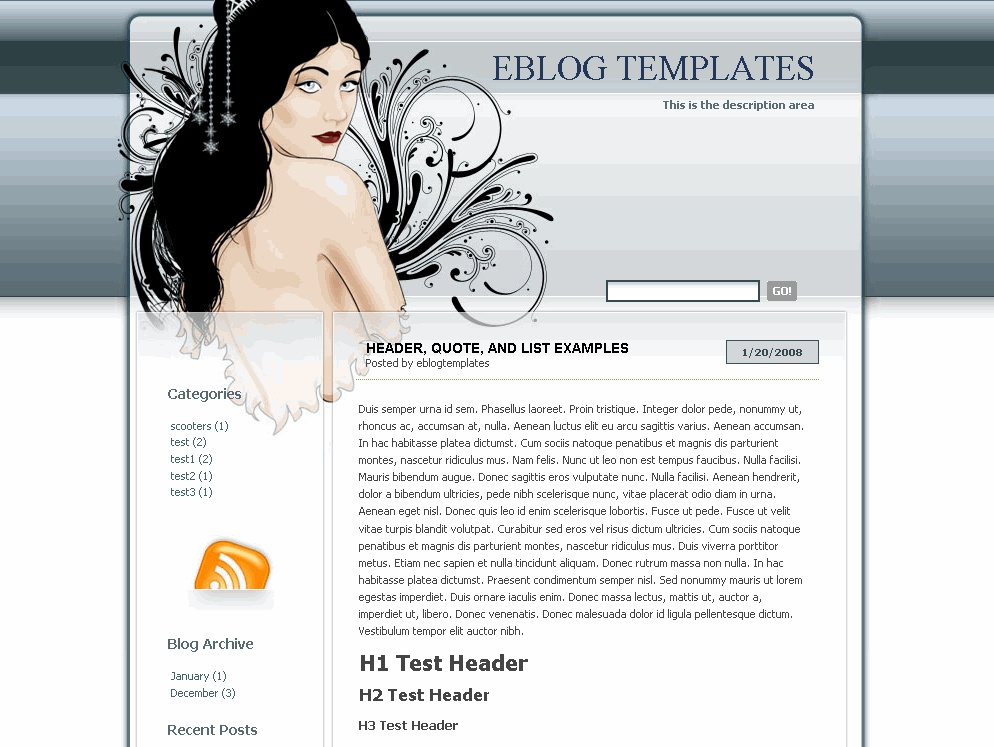
This cool modern web 2.0 template features a stunning girl in the header. It’s a 2 column theme with soothing gray colors and rounded corners to suit the web 2.0 standards. There’s also a custom made RSS icon especially for this theme which is already wired up for your feed.
In order to get the template running properly on your blog you’ll need to make a couple modifications. The “Timestamp Format” under “Settings” => “Formatting” should be set to this format “1/20/2008”. Then the date will show up correctly on your blog posts.
This template also includes cool widgets like “Recent Posts” and “Recent Comments”. You’ll need to edit them before they will show up in the sidebar though. Your feed urls will look like this. Make sure you replace the “YOURBLOG” with the name of your blog.
https://YOURBLOG.blogspot.com/feeds/posts/default
https://YOURBLOG.blogspot.com/feeds/comments/default
There’s also an Ad widget which you can replace or completely remove. The default ad is for Text Link Ads which will disappear once you put your own ad there instead.
This template was originally designed by Lorelei who has some amazing designs. They are all WordPress themes so eBlog Templates had to convert this beauty into xml in order for it to work with Blogger. It’s been tested in Firefox 2.0 and IE 7. There might be some alignment issues in IE 6 or earlier versions because it’s a picky browser version.
Ready to super charge your blog? Check out our professional premium blogger templates or make money by joining our blog affiliate program!
Want to make your blog stand out from the crowd? I recommend giving your newly downloaded Blogger template a unique and personalized look. Read our Free Blogger Header Images article and find yourself a great custom header image!
If you like this post then please consider subscribing to our eBlog Templates RSS feed. You can also subscribe by email and have new templates and articles sent directly to your inbox.
Trackbacks
- ==tulip speaks== » Blog Archive » BLOGGER templates for Girls on October 2, 2008
12 Responses to “Divalicious”
Blogger Sponsors
- Improve Your Blog in 31 Days – Guaranteed
- Build a Better Online Business with WordPress
- Become a Blogger Just Reopened – 5 Days Only!
- Roadmap to Become a Better Blogger
- Free Image Hosting – Photobucket
- How to Install Google Analytics on Blogger
- Improve Your Google Rankings in One Easy Step
- 50 Excellent Blog Footers
- Free Instant Blog Logos
- Create Cool Images With a Wet Floor Effect Maker
 ads by google commented on
  huh commented on
  huh commented on
Hi, I love this template, however, I have one little problem 🙁 Despite setting the date format as you suggested, it still doesn’t show up.
@Carrie White, make sure you select the correct date drop down under the formatting section. There are three and most people choose the wrong one. 😉
Lol! I’ve tried all of them with no success. It’s now set to the correct format and it still doesn’t show 🙁
❓ Hi I really like the look and feel of the DIVAlicious template, the one and only thing I am having a problem with is I want my labels [tags] to appear at the top by my name and the date instead of the bottom but I am having a problem locating the specific code in the HTML editor, any suggestions?
Hi I really like this template…
thx….
^^
i am not able to upload this template , it gives following error
“Please correct the error below, and submit your template again.
The new widget id “rss1” is invalid for type: HTML “
i can’t unzip the download. any suggestion would be appreciated. thanks!
I had the same problem as masked. In order to get the template to work (actually save it after upload) I had to remove a number of widgets.
I removed the RSS widget, Recent Posts, Recent Comments and Ads widget. Here is the code that I deleted from the template in order to get it to save properly.
Removed Code:
/////////////////////////////////////////
////////////////////////////////////////
Recent Posts
-
-
/////////////////////////////////////////////
Recent Comments
-
-
///////////////////////////////////////////////
Nice Template,A Nice Template help to make a meaningful sites,see also http://fileshous.blogspot.com
Help… I have the same problem as masked I need help because I’m so not computer savy.. can someone hold my hand ?
masked on Mar 24, 2009, 8:21 am
i am not able to upload this template , it gives following error
“Please correct the error below, and submit your template again.
The new widget id “rss1″ is invalid for type: HTML “
i had to delete many widgets to make this theme work at first. however, those deleted widgets can be added later.