
Isn't this free template worth at least $1? |
|
|---|---|
| Your support allows me to continue to provide free templates. Any donation is appreciated. |
Blogger Template Info
- Author: Blog Mundi
- Views: 9,668
- Downloads: 0
- Added: Apr 10th, 2008
- Rating:


- Live Demo
is_Simple Template
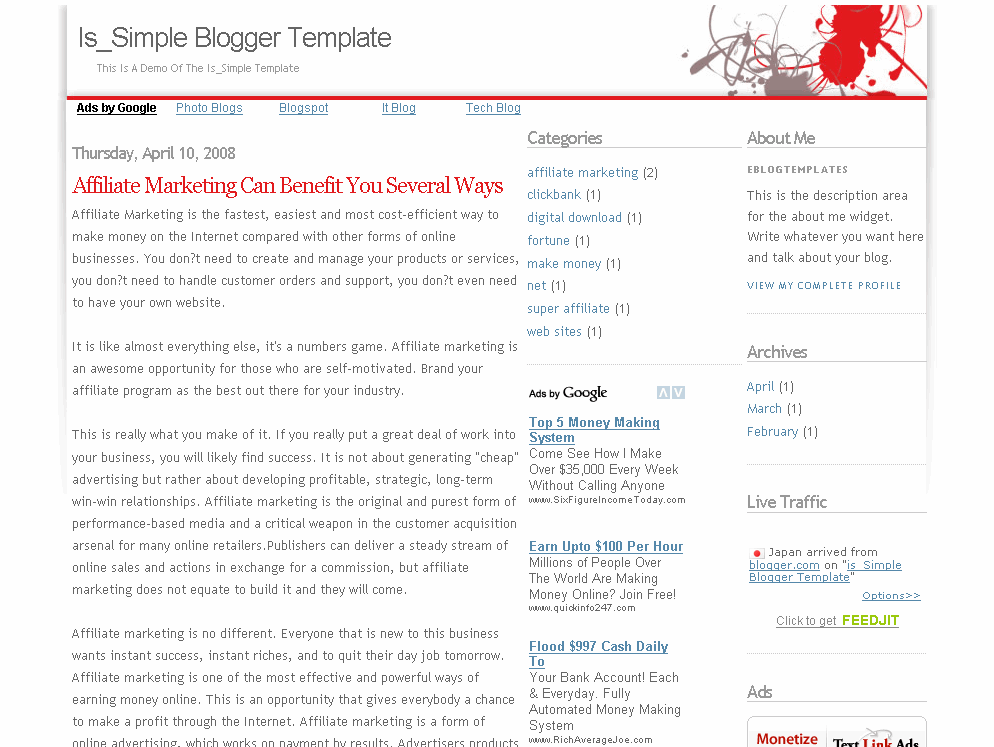
This new addition is a three column red and white Blogger template for those looking for a very simple look. It’s like getting an empty canvas and now it’s your chance to paint it however you want.
The right sidebars come with your standard widgets as well as some additional custom ones. eBlog Templates has added the cool real time FeedIt traffic widget, a Text Link Ad ad placeholder, and an Google AdSense placeholder which just needs your publisher id entered.
If you don’t already have an AdSense account, you should sign up for one now for free so you can start making money on your blog.
There’s also a hardcoded Google AdSense link unit put into the top area above your first post. This is a great spot to get clicks so you should update it with your own publisher id. It’s not a widget so you’ll have to edit the template code and look for the following tag “<!-- start top google ad block -->” and “<!-- end top google ad block -->“. That’s the section you can change.
You’ll notice that the code looks a little strange. That’s because it needs to be converted in order for Blogger to recognize it. Once you create your new AdSense code you can convert it using our free Ad Code Converter and then paste it into your template.
Thanks to Blog Mundi for creating this cool three column template!
Ready to super charge your blog? Check out our professional premium blogger templates or make money by joining our blog affiliate program!
Want to make your blog stand out from the crowd? I recommend giving your newly downloaded Blogger template a unique and personalized look. Read our Free Blogger Header Images article and find yourself a great custom header image!
If you like this post then please consider subscribing to our eBlog Templates RSS feed. You can also subscribe by email and have new templates and articles sent directly to your inbox.
Trackbacks
- Ten Proven Methods To Turn Your Blog Into A Profitable Cash Cow on October 4, 2010
- 55 Hermosas plantillas para blogger gratis de gran calidad | ParadaBlog on November 5, 2012
- ブログを資産化するためのカンタンメソッドトップ6 | スクリプトマーケティング on October 22, 2013
- メソッド6:訪問者の満足によって | おばちんの稼ぎ方講座 on July 27, 2015
61 Responses to “is_Simple”
Blogger Sponsors
- Improve Your Blog in 31 Days – Guaranteed
- Build a Better Online Business with WordPress
- Become a Blogger Just Reopened – 5 Days Only!
- Roadmap to Become a Better Blogger
- Free Image Hosting – Photobucket
- How to Install Google Analytics on Blogger
- Improve Your Google Rankings in One Easy Step
- 50 Excellent Blog Footers
- Free Instant Blog Logos
- Create Cool Images With a Wet Floor Effect Maker
 ads by google commented on
  huh commented on
  huh commented on
I need help with this please!
I can’t save the template.
I need help with this please!
I can�t save the template.
I’m trying to take my blog template and convert it to html not xml. How do I do this?
I like this theme. It support ads for google.
minimalis template thanks for admin, i will be download this template
Nice theme, thanks 🙂
Simple, but looks powerful.