
Isn't this free template worth at least $1? |
|
|---|---|
| Your support allows me to continue to provide free templates. Any donation is appreciated. |


Minyx Template
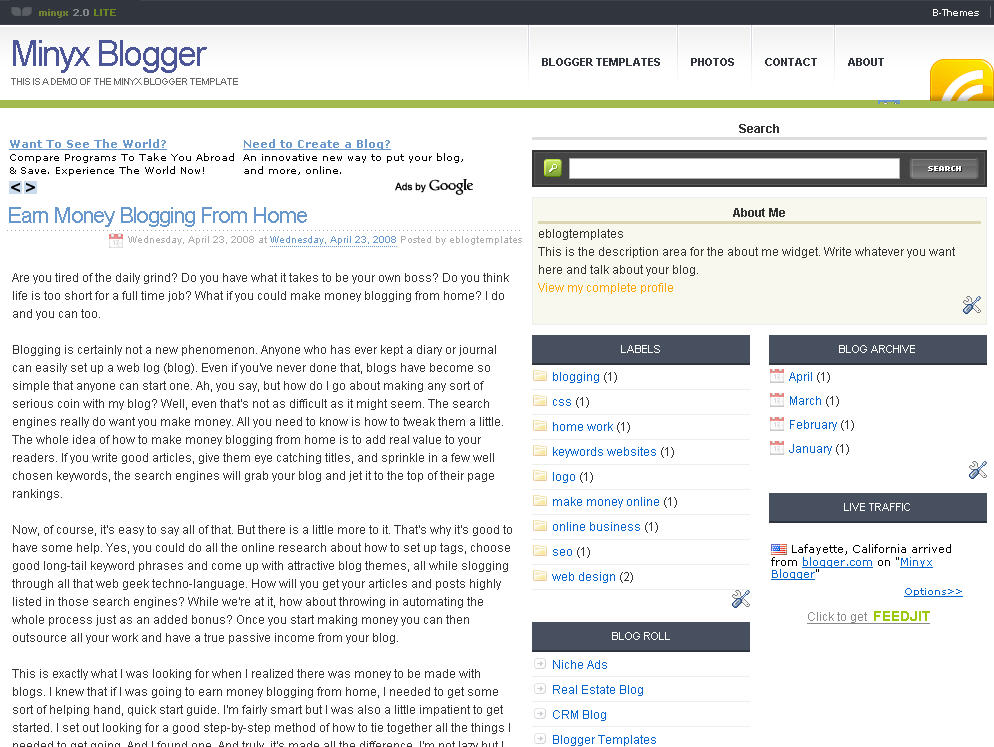
Minyx is a web 2.0 feature-rich Blogger template with a search box, rss feed icon and much more. It’s a great template (but requires some customization from you to work properly) for those looking for a web 2.0 style Blogger template.
Update 1/29/08 – All images for this template are now hosted on our Photobucket Pro account which means unlimited bandwidth. For you this means the images will always work unlike most free templates you download from the internet. Most people don’t understand this until their images aren’t showing up anymore (usually at the end of the month since the bandwidth limit is monthly) and they wonder what happened!
If you downloaded this template before 1/29/08, you should download it again. Just click on the download link and you’ll get the latest version.
This template was converted by Akbach from a WordPress theme originally created by Mauricio Caballero.
Update 4/23/08 – A new demo site has been setup and the cool Feedjit live traffic widget has been added.
Ready to super charge your blog? Check out our professional premium blogger templates or make money by joining our blog affiliate program!
Want to make your blog stand out from the crowd? I recommend giving your newly downloaded Blogger template a unique and personalized look. Read our Free Blogger Header Images article and find yourself a great custom header image!
If you like this post then please consider subscribing to our eBlog Templates RSS feed. You can also subscribe by email and have new templates and articles sent directly to your inbox.
Trackbacks
- +100 Fresh Blogger Templates Ready For Download - Technolik Blog on June 14, 2009
- Top 15: Belíssimos Temas Gratuitos para Blogger-Blogspot | Curiosando on June 17, 2009
- Top 10 Free Blogger Template Sources | OpenABlog on July 7, 2009
- Minyx – Blogger Template – eBlog Templates | Template Boss | Gallery of the the Best Templates on July 25, 2009
- Ten Of The Best Free Blogger Templates on April 2, 2011
76 Responses to “Minyx”
Blogger Sponsors
- Improve Your Blog in 31 Days – Guaranteed
- Build a Better Online Business with WordPress
- Become a Blogger Just Reopened – 5 Days Only!
- Roadmap to Become a Better Blogger
- Free Image Hosting – Photobucket
- How to Install Google Analytics on Blogger
- Improve Your Google Rankings in One Easy Step
- 50 Excellent Blog Footers
- Free Instant Blog Logos
- Create Cool Images With a Wet Floor Effect Maker
 ads by google commented on
  huh commented on
  huh commented on
I have to search template, it good
Hey, I cant change the ref name of the links at navbar. For example “for Home it shows home”
very exclusive Templates
see this link to get more exclusive Template
i hve to search temlate,it good
hi….i just try to download
nice thanks
Good template, i like it. I must download it…
good………….
mmm, good template
Implemented this Blog here
http://directdld.blogspot.com
Hello sir how to add (Addthis) button in this blog.
Plz help
Nice template, It must I collect 🙂 thanks for this template 🙂
Ohhow, cute template bro, I like it
how to remove ads by google in top plz help me ?
i uploaded this theme,
but now every where in it is written
minyx blog account is inactive for 90 days
what is this
if anybody know
plz tell me
new widget id “Ads” is invalid for type: HTML
i am unable to upload it again, whwn i removed it,
how can i upload it
plz help me
I’ve used the template in my blog:
http://takyat.blogspot.com
for invalid widget names i just followed the pattern
HTML23, HTML24 and so on.. well, there were only 2 invalid widget names i encountered.. 🙂
one question though, there’t his make money section with thumbnail ads.. i noticed that the url has referrer – is it for someone else? someone who’ll earn the money when the ads were clicked?
very nice template , thanks
Good template… i’d like to try it..
v.nice theeme i m using it here
http://www.musicxite.com
We were unable to save your template
Please correct the error below, and submit your template again.
The new widget id “Ads” is invalid for type: HTML