
(Don't have an account yet?
Register for free!)
Blogger Template Info
- Author: eBlog Templates
- Views: 26,519
- Downloads: 0
- Added: May 5th, 2008
- Rating:


- Live Demo
PassionDuo Blue Template
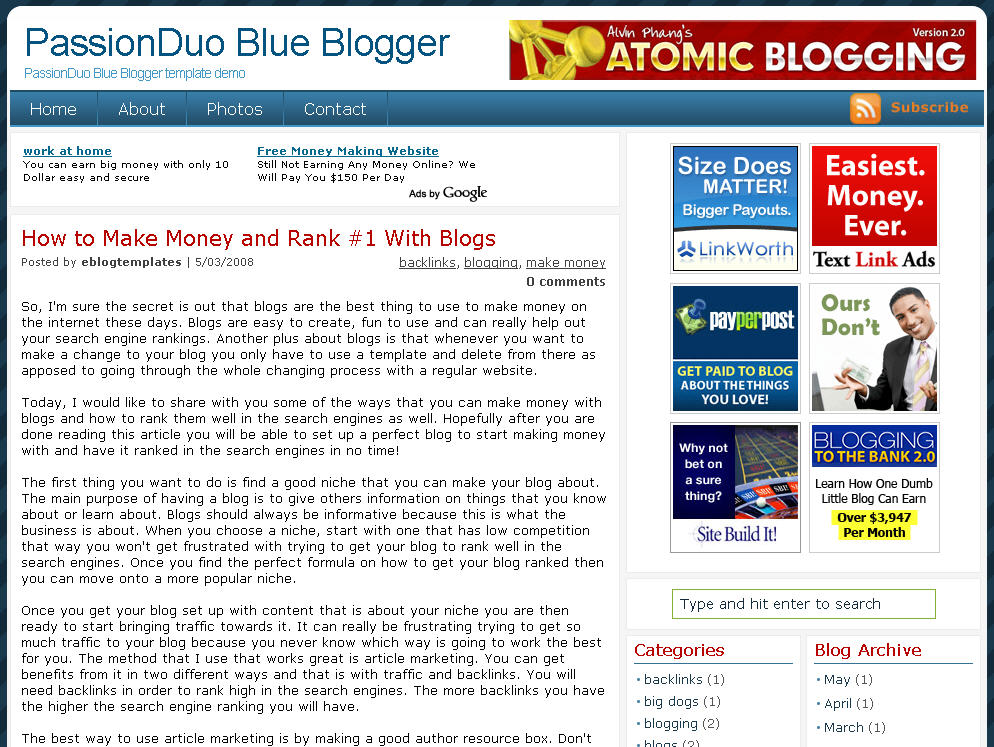
Here is the blue version of our latest make money blogger template first converted here at eBlog Templates. This amazing PassionDuo template for Blogger comes in three colors: red, blue, and green. The green version will eventually become available so if red or blue isn’t your thing, you might want to wait.
This template includes several popular ad formats for your blog. You get a 468 x 60 banner spot in the header, six 125 x 125 banner spots in the right sidebar, and plenty of other sidebar spots for skyscraper banners.
We’ve also included our popular sidebar widgets such as Recent Posts, Recent Comments, and the cool Feedjit (real time visitor widget). Just paste in your blog rss feed urls into the Recent Posts & Comments widgets and they’ll start working.
Unlike most other custom make money blogger templates, we’ve taken the extra step and setup the “Fonts & Colors” functionality. That means you can change all the colors and font styles easily by just using the built in Blogger section. We’ve also customized the comments section so it looks very professional as well.
PassionDuo also includes top tabs which can be added via your Blogger page element screen. The rss feed icon will automatically appear once you add your first tab so don’t be alarmed after you first install it.
Configuring the rest of this template is actually quite easy. You can swap out the ads and replace them with your own or feel free to keep the existing ones if you don’t have any to use. Make sure you check the “Expand Widget Templates” checkbox on the “Edit HTML” page within Blogger before trying to make any edits. Also make sure to backup your old template just in case you make a mistake.
Let’s start with the 468 x 60 header banner. Search for “<!-- Delete or replace with your ad -->” in the template code and the first one you come across is where you replace the ad.
The second instance of “<!-- Delete or replace with your ad -->” is for the Google AdSense code which you can either keep, replace, or just remove completely.
For the six 125 x 125 banner ads you’ll need to find “<!-- Replace with your ads -->” and update those one by one. Make sure not to delete the <li> and </li> before and after each ad otherwise it will look funny. If you don’t already have ads to use, I recommend clicking through each banner and become an affiliate. Then you can replace the affiliate codes with your own and start making money!
The theme was created for Daily Blog Tips by DesignSaurus as a WordPress theme. eBlog Templates converted this theme into Blogger which you can download for free once you register.
Ready to super charge your blog? Check out our professional premium blogger templates or make money by joining our blog affiliate program!
Want to make your blog stand out from the crowd? I recommend giving your newly downloaded Blogger template a unique and personalized look. Read our Free Blogger Header Images article and find yourself a great custom header image!
If you like this post then please consider subscribing to our eBlog Templates RSS feed. You can also subscribe by email and have new templates and articles sent directly to your inbox.
Trackbacks
- Nomorerack is definately not a scam. | Adventures in Online Money | nomorerackscum on August 16, 2012
312 Responses to “PassionDuo Blue”
Blogger Sponsors
- Improve Your Blog in 31 Days – Guaranteed
- Build a Better Online Business with WordPress
- Become a Blogger Just Reopened – 5 Days Only!
- Roadmap to Become a Better Blogger
- Free Image Hosting – Photobucket
- How to Install Google Analytics on Blogger
- Improve Your Google Rankings in One Easy Step
- 50 Excellent Blog Footers
- Free Instant Blog Logos
- Create Cool Images With a Wet Floor Effect Maker
 ads by google commented on
  huh commented on
  huh commented on
Am going to try it out right away.
The wedsite uses PassionDuo Blue Blogger Template
I realised that the http://saveyourassetsfirst.blogspot.sg/ seems to be hacked by hacker.
Link to every News are inserted by another wedsite link before the actual link.
Eg – http://e01018e3.linkbucks.com/url/http://www.gotgoldreport.com/2012/08/we-are-now-seeing-huge-
To access to the real link, point the mouse to “Read more ….” right
click “Properties” – copy the 2nd link under “Address (URL)”
eg http://www.gotgoldreport.com/2012/08/we-are-now-seeing-huge-
For your attention, pls.
Thanks 4 the template 🙂 like this!
INFOIKI
very nice thanks for sharing
very nice
Arigato Gozaimasu
tenks for templet bog good
70-410|
70-488|
70-461|
MB5-705|
200-120|
70-486|
70-451 test |
70-452 test |
70-453 test |
70-454 test |
70-412|
MB2-704|
70-483|
70-480|
300-101|
70-417|
CCD-410|
C4040-251|
1Z0-060|
070-410|
70-347|
70-410 |
70-488 |
70-461 |
MB5-705 |
200-120 |
70-486 |
70-411 |
70-480 |
70-346 |
70-462 |
70-347 |
70-412 |
70-483 |
70-417 |
70-412 |
070-410 |
300-101 |
9L0-422 |
1Z0-060 |
70-411 |
CISSP |
300-115 |
70-347 |
070-486 |
70-462 |
CCD-410 |
70-532 |
400-101 |
EX200 |
HP2-B115 |
70-467 |
70-534 |
070-461 |
220-802 |
SY0-401 |
220-801 |
MB2-708 |
070-488 |
C4040-252 |
70-410 |
200-120 |
C4040-250 |
70-486 |
70-461 |
MB5-705 |
70-488 |
70-410 |
70-488 |
70-461 |
MB5-705 |
200-120 |
70-486 |
70-411 |
70-480 |
70-346 |
70-462 |
70-347 |
70-412 |
70-483 |
70-417 |
MB2-703 |
300-
101 |
70-417
|
CCD-
410 |
C4040-
251 |
1Z0-
060 |
070-
410 |
70-347
|
300-
115 |
HP2-
B115 |
70-411
|
070-
486 |
70-410
|
200-
120 |
70-486
|
70-461
|
70-480
|
70-417
|
C4040-
252 |
C4040-252
|
9L0-422 |
C4040-252 |
MB5-705 |
70-410 |
C4040-250 |
70-461 |
200-120 |
70-486 |
810-401 |
70-483 |
70-417 |
640-554 |
70-488 |
CCA-500 |
N10-005 |
C4040-252 |
MB5-705 |
70-410 |
C4040-250 |
70-461 |
200-120 |
70-486 |
810-401 |
70-483 |
70-417 |
640-554 |
70-488 |
MB2-704 |
70-480 |
70-346 |
1Z0-061 |
AWS-SysOps |
C4040-251 |
HP0-S41 |
C4040-252 |
MB5-705 |
70-410 |
C4040-250 |
70-461 |
200-120 |
70-486 |
810-401 |
70-483 |
70-417 |
640-554 |
70-488 |
MB2-703 |
70-331 |
220-802 |
C4040-252 |
1Z0-061 |
70-487 |
400-101 |
CCD-410 |
100-101 |
MB2-700 |
1Z0-060 |
70-463 |
EX200 |
C4040-250 |
300-115 |
640-554 |
70-533 |
70-532 |
VCP550 |
1Z0-803 |
CISSP |
SY0-401 |
MB2-704 |
70-483 |
70-480 |
300-101 |
70-417 |
CCD-410 |
C4040-251 |
1Z0-060 |
Have you this template in the past and great results with the banner ads being close to the top of the page.
thanks you good template.
1.BATA MERAH SUPER TOP MURAH BERKUALITAS DARI PABRIK UNTUK BANGUNAN”KOKOH DAN KUAT(cliksini)
2.BATA MERAH SUPER TOP HARGA MIRING DARI PABRIK UNTUK WILAYAH JABODETABEK(clik disini)
JUAL PASIR DAN BATU CAKUP BERKUALITAS PELENGKAP PEMASANGAN BATA MERAH PERBANDINGAN BATA PRESS CILEGON VS BATA PRESS CIKARANG (clik disini)
Bata merah jumbo murah ditangerang dan kawasan sekitarnya bisa anda dapatkan melalui website https://batamerahsupertop.blogspot.co.id penjualan online bata merah jumbo murah dari produsen bata merah ukuran jumbo dengan kualitas super PD RIZARA SUKSES .Anda bisa mendapatkan material bata merah untuk bangunan lebih kuat dan kokoh Hub….Kami..Segera…..081316550704 – 087871762867
PERBANDINGAN BANGUNAN DIANTARA BATA MERAH SUPER BERKUALITAS JUMBO DAN BATA RINGAN (HEABLE) DAN KEUNGGULANNYA PUNYA KELEBIHAN MASING-MASING,dibawah ini spesifikasinya.
Bata merah sebagai bata konvensional dengan bahan dasar tanah liat ( lempung ).Proses pembuatan dilakukan secara manual ( tradisional ) atau mekanis ( pabrik ) karena itu ukuran maupun tekstur beraneka ragam dan dibakar sehingga kuat dan tidak mudah hancur bila direndam air ( NI-10 ).
inilah ke unggulan bata merah super top berkualitas murah langsung pabrik yang kami tawarkan pada anda lebih besar ukurannya dari pada bata yang anda sering liat ditoko matrial sekitar anda yang ada dijabodetabek
Panjang = 19 – 20 cm.
Lebar = 9 – 10 cm.
Tebal = 4 – 4,2 cm.
Kuat tekan = 2,5 – 25 N/mm2 ( SII-0021,1978 ).
Tebal spesi = 2 – 3 cm.
Ketahanan terhadap api = 3 jam. ( tidak akan hancur )
Jumlah per luasan ( 1 m2 ) = 65 – 70 buah dengan contruction waste.
per1000 bata dapat hasil pekerjaan >jadi yang ukuran 10x20x4 jadi hasil pekerjaan 15,3 meter persegi tembok/dinding.
per1000 bata dapat hasil pekejaan >jadi yang ukuran 19x9x4 >jadi hasil pekerjaan 14,3 meter persegi tembok/dinding
KELEBIHAN :
>Bahan tahan panas dan tahan api/kebakaran dan tidak memerlukan keahlian khusus dalam pemasangan.
>Ukuran kecil memudahkan pengangkutan dan pembentukan bangunan yang mudah.
>tahan gempa bumi akibat pergeseran alam.
>Kedap air tidak ada rembesan.
>tahan api dan mempunyai kedap suara yang baik.
>Kuat tekanan yang tinggi.
>Pemasangan sangat mudah plesteran sangat singkat tidak kerjaan 2x kali waktu.
>Kualitas beragam kekuatan pada bata merah,banyak konsumen yang memilih bangunan yang pake bata merah,baik ruko apartemen,kontrakan,rumah tinggal,ataupun orang yang tinggal menginap dihotel karna kami sudah membuktikan sendiri mana yang lebih nyaman dalam ruangan kena sinar matahari pastinya tidak panas meskipun tidak ada AC apa lagi pake ac lebih nyaman lg tanpa berbau sinar mata hari,karna bata merah tidak menyimpan bekas sinar matahari.
KEKURANGAN :
>Dapat menyerap panas musim panas dan dingin pada musim dingin sehingga tidak stabil pada suhu ruangan.( panasnya dinding cepat reda itu keunggulan bata merah super top berkualitas jumbo ).
>Waktu pemasangan lebih lama dibanding bahan lain,( ada kepuasan tersendiri biaya tidak jadi ukuran karna pemakaian lebih lama,kuat kokoh tidak takut Retak-Retak pada dinding bangunan anda.
>karna dinding yang pake bata merah semua suhu masuk, dingin ok panas ok ( panas 30 drajat calcius pun,tapi itu setelah matahari bergeser atas bangunan bergeser ke barat 30 derajat panas pada dinding bisa langsung reda ( tidak panas lagi ).
>Tekonologi terus dikembangkan untuk mencapai kebutuhan masyarakat akan kenyamanan.
>Begitu pula dengan bahan yang dipergunakan untuk pekerjaan dinding,efektifitas dan efisiensi pelaksanaan pekerjaan mencapai kenyamanan.
>Kenyamanan sebagai tujuan akhir berbanding lurus dengan efektifitas dan efisiensi pelaksanaan pekerjaan. sudah biaya efisiens bangunan lebih kokoh dan kuat lagi tuan.
MANA YANG LEBIH RAPIH BATA MERAH JARANG PAKE TIANG BESI TAPI KOKOH,DAN BATA RINGAN BANYAK TIANG BESI TAPI KOKOH,ANDALAH YANG MEMILIH KAMI HANYA MEMBERIKAN SOLUSI YANG TERBAIK,MANA YANG LEBIH BOROS BIAYA BATA MERAH APA BATA RINGAN ( HEABLE ) ANDA’LAH YANG MENENTUKAN.
Bata ringan adalah material yang menyerupai beton dan memiliki sifat kuat,tahan api,awet yang dibikin dipabrik menggunakan mesin.
Beton ringan yang terbuat dari semen, pasir silika dan kapur.
Memiliki tingkat kerataan yang baik ringan halus dan diciptakan untuk memperingan beban struktur dari sebuah bangunan,mempercepat pelaksanaan serta meminimalisasi sisa material yang terjadi pada proses pemasangan.
Panjang = 60 cm.
Tinggi = 20 cm
Tebal = 7,5 – 10 cm.
Kuat tekan = > 4,0 N/mm2.
Tebal spesi = 3 mm – 1 cm.
Ketahanan terhadap api = 1 jam lebih menjalur api lebih cepat yang sering anda liat di ibu kota
Jumlah per luasan ( 1 m2 ) = 10 – 12 buah tanpa contruction waste.
perkubikasi ukuran tebal 7,5 cm dapat 111 buah/pcs/biji >jadi ukuran pekerjaan hanya dapat 11 meter persegi tembok/dinding
perkubikasi ukuran tebal 10 cm dapat 83 buah/pcs/biji > jadi ukuran pekerjaan hanya dapat 8,3 meter persegi tembok/dinding
KELEBIHAN :
-Pemasangan lebih cepat dan rapi,tapi memerlukan tukang yang handal, sehingga harus hati hati dalam pemasangan resiko pekerja karna anda yang tanggung.
-Ringan dibadan bangunan tapi riskan terhadap pergeseran alam,tentunya anda sering liat diibu kota.
-Tidak diperlukan spesi yang tebal.karna dalam pelesteran membutukan 2 kali kerjaan
1.tahap mengkamprot rata dinding 2.tahap menjadikan pelesteran dinding tentu pastinya rapih
KEKURANGAN :
-Harga lebih mahal dari bata merah.
-Diperlukan tukang yang lebih handal dalam pemasangan.
-Hanya terdapat di toko material yang besar dan pembelian dalam volume besar kubik ( m3 ).
DARI GAMBAR SUDAH RAPIH TIDAK PERLU TUKANG YANG AHLI APA LAGI ANDA DAPAT TUKANG YANG LEBIH AHLI DAN PROVESIONAL HASILNYA SANGAT MEMUASKAN.
Mengenal Bata Merah Yang Berkualitas Dambaan Setiap Konsumen(clik disini)
bata merah superTop merupakan salah satu material pokok dalam pembangunan yang telah digunakan sejak lama.Kualitasnya sudah teruji membuat bata merah superTop sebagai material pokok, ini masih menjadi favorit untuk digunakan dalam membuat berbagai jenis bangunan hingga kalangan bawah ( lemah ) maupun kalangan atas ( kaya ) semuanya memakai BataMerahSuperTopJumbo..segera pesan hub kami….:>081316550704 – 087871762867
Mengenal Bata Merah Yang Berkualitas Rapih kuat kokoh(clik disini)
Jual bata ukuran jumbo dikawasan jakarta(clik disini)
Supplier bata merah super top ukuran jumbo salah satunya adalah Batamas Group.Kami merupakan supplier bata merah super top dalam kapasitas besar untuk perusahaan kontraktor yang berada di wilayah jabodetabek dengan produk bata merah kualitas pilihan dan tentunya berukuran jumbo yang lebih mengehemat budget pembangunan anda dengan hasil yang memuaskan.Bagi anda pelaku bisnis kontruksi bangunan baik perorangan maupun perusahaan kontraktor yang tentunya membutuhkan supplier material bata merah super dengan kualitas produk terbaik dan tentunya dengan harga yang kompetitif kami mengajak bekerjasama untuk memenuhi kebutuhan tersebut.