
(Don't have an account yet?
Register for free!)
Blogger Template Info
- Author: eBlog Templates
- Views: 12,837
- Downloads: 0
- Added: May 3rd, 2008
- Rating:


- Live Demo
PassionDuo Red Template
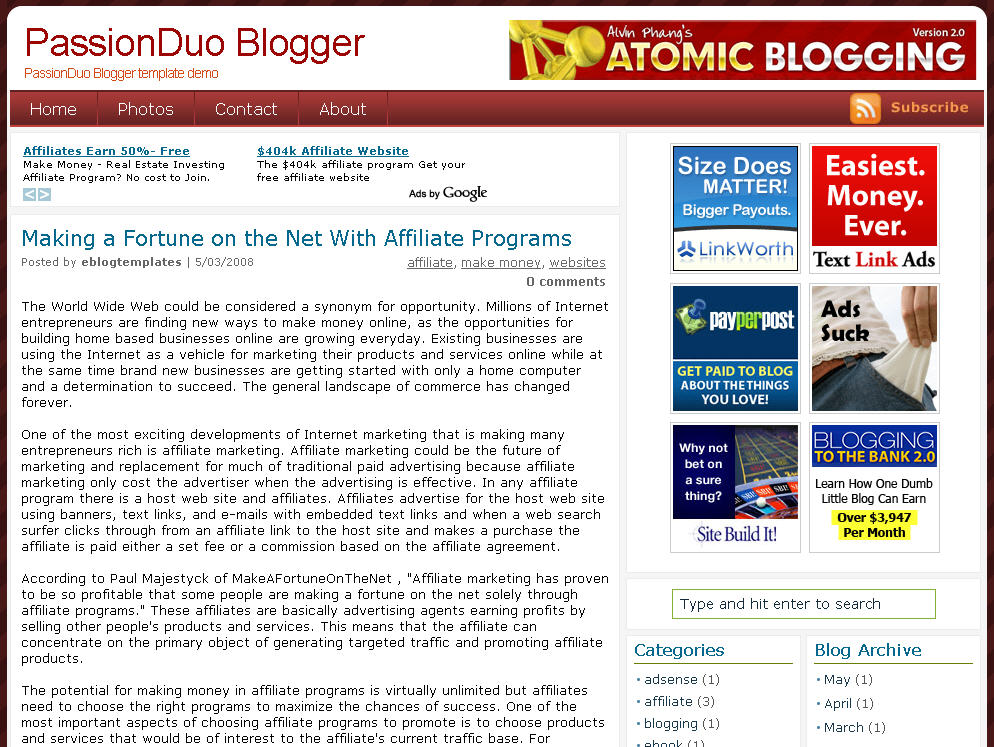
Here’s our latest make money blogger template first converted here at eBlog Templates. This amazing PassionDuo template for Blogger comes in three colors: red, blue, and green with red being the first released. The blue and green versions will eventually become available so if red isn’t your thing, you might want to wait.
This template includes several popular ad formats for your blog. You get a 468 x 60 banner spot in the header, six 125 x 125 banner spots in the right sidebar, and plenty of other sidebar spots for skyscraper banners.
We’ve also included our popular sidebar widgets such as Recent Posts, Recent Comments, and the cool Feedjit (real time visitor widget). Just paste in your blog rss feed urls into the Recent Posts & Comments widgets and they’ll start working.
Unlike most other custom make money blogger templates, we’ve taken the extra step and setup the “Fonts & Colors” functionality. That means you can change all the colors and font styles easily by just using the built in Blogger section. We’ve also customized the comments section so it looks very professional as well.
PassionDuo also includes top tabs which can be added via your Blogger page element screen. The rss feed icon will automatically appear once you add your first tab so don’t be alarmed after you first install it.
Configuring the rest of this template is actually quite easy. You can swap out the ads and replace them with your own or feel free to keep the existing ones if you don’t have any to use. Make sure you check the “Expand Widget Templates” checkbox on the “Edit HTML” page within Blogger before trying to make any edits. Also make sure to backup your old template just in case you make a mistake.
Let’s start with the 468 x 60 header banner. Search for “<!-- Delete or replace with your ad -->” in the template code and the first one you come across is where you replace the ad.
The second instance of “<!-- Delete or replace with your ad -->” is for the Google AdSense code which you can either keep, replace, or just remove completely.
For the six 125 x 125 banner ads you’ll need to find “<!-- Replace with your ads -->” and update those one by one. Make sure not to delete the <li> and </li> before and after each ad otherwise it will look funny. If you don’t already have ads to use, I recommend clicking through each banner and become an affiliate. Then you can replace the affiliate codes with your own and start making money!
The theme was created for Daily Blog Tips by DesignSaurus as a WordPress theme. eBlog Templates converted this theme into Blogger which you can download for free once you register.
Ready to super charge your blog? Check out our professional premium blogger templates or make money by joining our blog affiliate program!
Want to make your blog stand out from the crowd? I recommend giving your newly downloaded Blogger template a unique and personalized look. Read our Free Blogger Header Images article and find yourself a great custom header image!
If you like this post then please consider subscribing to our eBlog Templates RSS feed. You can also subscribe by email and have new templates and articles sent directly to your inbox.
Trackbacks
115 Responses to “PassionDuo Red”
Blogger Sponsors
- Improve Your Blog in 31 Days – Guaranteed
- Build a Better Online Business with WordPress
- Become a Blogger Just Reopened – 5 Days Only!
- Roadmap to Become a Better Blogger
- Free Image Hosting – Photobucket
- How to Install Google Analytics on Blogger
- Improve Your Google Rankings in One Easy Step
- 50 Excellent Blog Footers
- Free Instant Blog Logos
- Create Cool Images With a Wet Floor Effect Maker
 ads by google commented on
  huh commented on
  huh commented on
ice template. DO we have similar wordpress template.
With left side ads as in this blog.
It looks professional, i think it�s very good for money oriented blog
nice template thankyou for share friend
I hope with this theme can enhance the visitor of my blog so that my income will also increase, thanks to admin
Thanks for share great collection template.
very grate theme
my comment section below post not working what can i do
nice..!!!
This game is so awesome!!!!! So happy it’s gone free!!!!! I’m telling everyone I know!!!!! 5 Stars all the way!!!!!!
Thanks for the wonderful theme,let me know which is your favorite 🙂
I like prefer this one to the blue one. Maybe it’s because I love red ^^ Thank you for sharing!!
I was excited to find this site. I wanted to thank you for your time for this wonderful read!! I definitely savored every little bit of it and I have you book marked to check out new things in your web site.
I like prefer this one to the blue one. Maybe it’s because I love red ^^ Thank you for sharing!
Thanks for the wonderful theme.I like prefer this one to the blue one.Thanks for taking time for sharing this
Explore the world of escort girls in Delhi and have a full of pleasure life with them as they have amazing body figures.