Welcome, visitor! [ Login | Sign Up ]

Premium Template Info

Revolution Church Blogger Template

Click to enlarge

Ready to get your hands on the coolest premium Blogger template in the blogosphere? Introducing the Revolution Church premium template for Blogger!

After getting dozens of emails from people offering to pay us to convert this amazing theme into Blogger, we decided it was time to make it available to purchase for everyone. Well, not only has eBlog Templates ported this over to Blogger, we’ve added some great features to really turbo-charge and make this the best premium Blogger template yet!

This is the first and only premium Blogger template that is virtually plug and play. No images to host or have to worry about the links breaking after a few months. No mucking with the template code to change colors, add tabs, modify AdSense code, etc. We’ve designed this template with the ease of usability in mind so Bloggers of all levels can utilize the full power of this premium template. Not only do you get this amazing template but you also get the full installation video series which walks you through configuring every gadget step-by-step.

Don’t be fooled by those free Church Revolution templates that are poorly converted to blogger. They might look nice from their demo but those templates usually require you to make all the changes within the code and stop working properly after a few months. They also don’t include a step-by-step video series.

You don’t have to take our word for it though. Here’s what a few of our many satisfied buyers had to say after purchasing and using this template:

“Purchased today and I LOVE IT! Fantastic job!”Christopher
“Thank you for the great template!”Martin
“I have greatly increased my earnings from AdSense” — Dennis
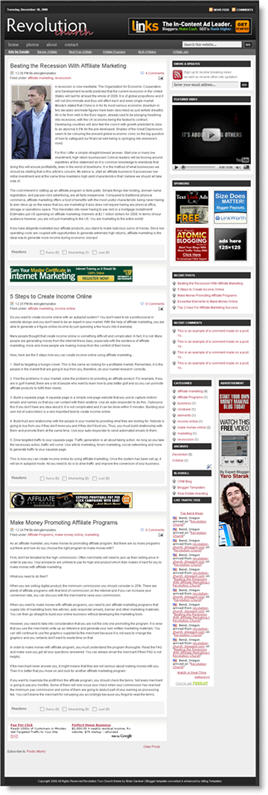
revolution church blogger full size
This Blogger template comes with a ton of advanced features including:

  • Hosted images on Photobucket. Free use forever!
  • Favicon support so you can add your own url icon
  • Compressed CSS to speed up your page load times
  • SEO-friendly page titles to help you rank higher in Google
  • Multiple AdSense gadgets already included in prime locations
  • Automatically highlight author comments
  • Embedded JavaScript date code showing current day
  • Fonts and colors support so you can change on the fly
  • YouTube video gadget to show off your favorite video
  • Link list gadget to easily setup your header tabs
  • Recent comments and posts gadgets
  • Integrated Blogger reactions support (new!)
  • Built-in Feedburner RSS feed and email gadget
  • FeedJit live traffic feed gadget
  • Bonus – FREE 125 x 125 ad gadget!
  • Bonus – FREE Step-by-step installation video series

I promise that you’ve never seen such a complete and professional Blogger template like this one. With the amount of time and effort we’ve put into this, it’s easily worth more than the cost. Ready to turn your blog into a masterpiece? Check out the live demo or buy this premium Blogger template now!

Important – Please Read Before Purchasing

This template does NOT work with the older Blogger Classic layout. Please make sure you are NOT using Classic layout before purchasing this template. Most bloggers are now using the newer layout so you most likely don’t need to worry. Also, eBlog Templates is not the original designer of this template. It was originally designed by WordPress theme mastermind, Brian Gardner. We have spoken directly with Brian and with his approval, have converted it to Blogger and made it available for sale. If you are a WordPress user, you can download his theme for free without any support (only works on WordPress not Blogger).

So why do I have to pay for this template then?

The cost of this template covers the many days of labor and effort put into converting this amazing design into a premium Blogger template as well as building the step-by-step video series. Your purchase does include the complete instructional “how to install and configure” the Revolution Church Blogger template video series. If you think about it, it’s actually a small price to pay for such a functional, advanced, and professional Blogger template. Buy this premium Blogger template now!

Refund Policies

Since this is a digital product there are no refunds after payment has been made. Please make 100% sure you want this template before making the purchase. You also need to be willing to spend 30-60 minutes configuring the template before it looks like the live demo. Our free video installation series will make it easy. We want you to be successful!

Since we can’t test every single Blogger gadget (including 3rd party gadgets) we can’t promise they will all work with this template. Every blog is different and some of your existing gadgets might not be compatible which means either the gadget will need to be removed or modified accordingly. We do provide community-level support which means posting your questions as comments. The installation videos that accompany this template are designed for skills of all levels.

Affiliate Program

Want to put some extra money in your pocket? Why not join our affiliate program and become part of the eBlog Templates sales team! You will earn 30% for each sale you make (i.e. $20 template = $6 for you!) We use E-junkie which is the industry standard for handling affiliate sales. Join now and start making money selling this premium template today!

Buy this premium Blogger template now!

If you like this post then please consider subscribing to our eBlog Templates RSS feed. You can also subscribe by email and have new templates and articles sent directly to your inbox.


,,,,,,


Trackbacks

  1. Revolution Now Becomes Blogger Pro Templates | Top Free Premium Themes & Templates on January 9, 2009
  2. Revolution Now Becomes Blogger Pro Templates | Viet Blog Viet dot Com on January 19, 2009
  3. ucretli-ucretsiz-kaliteli-blogger-temalari | Filmin Tek Büyük Adresi on February 3, 2009
  4. Celebrating My Birthday & The Newly-Launched KidTechGuru Site : TechXav on February 7, 2009
  5. Template Wordpress and Blogspot Free to Download « MurahShop on April 16, 2009
  6. Revolution Church Blogger Template | PAPAJOJO on June 26, 2009
  7. Revolution Lifestyle Blogger at BLOG GRAPHIC DESIGN on July 3, 2009
  8. Revolution Church Free Blogger Template on September 25, 2009
  9. Revolution Lifestyle Blogger | Son Of Byte - Web Design & Development on February 28, 2010

250 Responses to “Revolution Church Blogger”


ed on May 11, 2009, 6:45 am  

sir,
how can i add 1 more sidebar to the left of my blog template where in i can put my google adsense, i want it to be the same as http://theme.vietad.co.cc, i tried adding 1 sidebar but i cant make it.. i also an affiliate of your site promoting this revolution template..

thanks in advanz..


Nicole on May 11, 2009, 10:58 pm  

Very cool template, I will install it on my Spice you to refresh


ed on May 11, 2009, 11:20 pm  

http://makemoney4lyf.blogspot.com – this is my blog using revolution church template..


Dwi on May 14, 2009, 3:50 pm  

nice template, thanks for share


Sunga on May 19, 2009, 11:27 pm  

David,

I am still having problems loading the template. I did ask some time back if you could send me the updated one but I have had no response up to now.

Please help otherwise I fear I may have spent my money in vain.


CNC OTOMAT on May 24, 2009, 2:34 am  

oldukca guzel ama bunun premium u yok mu


jmbatista on May 25, 2009, 9:59 am  

I am having problems activating the “Recent Posts” and “Recent Comments” widgets. When I click on them the “Configure Feed” window opens but it does not have any fields inside so nothing can be inputed.

I am wondering if this has anything to do with a change in the feed id structure. In “Revolution Church Blogger Installation – Part #2″ video the feed id mentioned is something like “1503904″. Now it seems to be more like “kfpsmmck1odq2ka973ma983lgs” : the following is the actual URL: http://feedburner.google.com/fb/a/publicize?id=kfpsmmck1odq2ka973ma983lgs

Thanks in advance for your help.

Best regards
José Manuel


    Nick Fountain on Jun 23, 2009, 5:54 pm  

    I’m having the same problem as José Manuel and his comment on May 25, 2009, regarding problems with the ‘Recent Post’ and ‘Recent Comments’ widgets.
    When you try to edit them the window opens but there is no content within the window to update the Feed.
    Really impressed with the Blog so it would be great to be able to solve this problem and get it fully up and running.
    Regards
    Nick Fountain


Scott on May 28, 2009, 6:48 pm  

I am having problems signing in to the website it keeps giving me an error – confirmation pending check email. I have done that and it verifies that I have been verified.

Additionally I have purchased and downloaded this template but my Mac will not open the xml file. I have office 2004 and the open converter. I also have Neooffice.

I need some help please


    David on Jun 9, 2009, 9:58 pm  

    @Scott, you don’t need to open the file. Just import it into Blogger when it asks for a template.


Jesus Sanchez on Jun 2, 2009, 4:46 pm  

Hello. I’m interested in buying the Church template for blogger but would love to change the background color to white. I know you said that’s not possible but I noticed that another person who commented (se below) was able to get a blue background on his version. How was that possible?

ed on May 11, 2009, 11:20 pm

http://makemoney4lyf.blogspot.com – this is my blog using revolution church template


Orijinal Delikanli on Jun 7, 2009, 7:10 am  

Bu şablonu ne zaman cretsiz yapacaklar yahu..


David on Jun 9, 2009, 9:59 pm  

For some reason Photobucket is having problems serving up images for all templates on this site. I’ve contacted them directly and it should be resolved soon.

Short-term solution – If you move all the images to your own image hosting site (photobucket is free) then you won’t have to rely on our images (which have never been a problem up until today.

Thanks,

David


Frankie on Jun 11, 2009, 6:58 am  

How do you change the favicon?


Daniel_Chocolatoz on Jun 12, 2009, 12:13 pm  

Hi David, I’ve purchased this template a few months ago waiting the right time to make the big changes for my blog. Now that I have applied the changes, the older post and newer post which are supposed to be at the bottom of the page have gone! How can I fix this? Thanks in advance


Daniel_Chocolatoz on Jun 12, 2009, 1:06 pm  

Oh I figured it out already. Nice template!


sandydpa on Jun 14, 2009, 10:02 am  

Hi David,

I am having an issue with email subscriptions. My feed is working and the email subscrition active and everytime you enter an emial address feedburner returns the message

X The feed does not have subscription by email enabled.

I have found people that had this problem but their solution did not work.

Also, in Safari next to the date on a post – where # of comments appear – my the email icon, and pencil icon are placed over top of the # of comments –

Please help – other wise nice template. thanks


    rpawly on Aug 8, 2009, 1:18 pm  

    I am having the same problem with the email subscriptions been staring at it for hours. Its all correct. I think :(

    Publicize service is active

    and have the correct ids in there in both places.

    Help :(


Victoria Westcott on Jun 16, 2009, 9:46 am  

Hi David, Thanks for this. I am considering purchasing the template but just want to check a couple of things first.

A couple of companies have approached me about placing ads on my current blog. My blog is for teachers doing research into teaching in London, England, so these companies fit with our general theme. I really don’t want my blog to be filled with random adsense type ads, so I’m looking for a new template that will allow me to place ads from the companies.

It looks like this template will work. Am I right? Will I then be able to say to the companies, “Please make your ad X by Z in width/height and I’ll put it up”? I am so not an expert on HTML and really, should just hire someone to do this for me (anyone out there want to do this?).

Also, they have asked if they can do “pay per click” – will this template support that? I have no idea what I’m doing in this regard, but someone out there must. Hopefully it’s you! :-)

I’ve been a blogger/blogspot user for years, so I’m comfortable with their format and like the look of this template. I also would change the colours to fit my green apple theme, but judging by the other bloggers on here it looks like that will be possible.

Any guidance you can offer will be great!
Thanks!
Victoria


Sunga on Jul 1, 2009, 9:30 am  

Months later, I am still having this problem bellow with the template. Pleeeeeaaase help David.

“We were unable to save your template
Please correct the error below, and submit your template again.
The new widget id “NavLinks” is invalid for type: LinkList “


sinema on Jul 7, 2009, 9:52 pm  

Oh I figured it out already. Nice template..
Thanks. (:


promise yohanna on Jul 13, 2009, 3:52 am  

please how can i get our church web site hosted with your site.thanks.


Rick on Jul 13, 2009, 7:42 pm  

Is there anyway to change the navbar? I want to put an image of the words “Home” and “About” along with a navbarhover picture that is more inline with the font of the header. Anyway to do this?


ErAy on Jul 14, 2009, 1:05 pm  

Good wordpress template.

I use to it,

look: elektrikdersi.com


kickers0725 on Jul 16, 2009, 2:37 am  

this is a free wordpress template, isn’t it? is this for free for blogger blogs?


mr-g on Jul 18, 2009, 2:00 pm  

scheiss template


bedava film izle on Jul 26, 2009, 2:31 am  

please help thanks admin delete my post


Rev. Donald Fountain on Jul 26, 2009, 6:36 pm  

Seem to be having the same problem as jmbatista was having back in May. When I go to alter the feeds in the Recent Posts and Recent Comments, when the popup window opens, there is nothing there to actually fill out. Do we have a fix for this yet or know what is going on?
The blog address is http://www.DonFountain.com

Thanks a lot!


mercimek on Jul 27, 2009, 3:51 pm  

thank for sharing.


Christopher on Aug 3, 2009, 7:39 am  

Very nice template


David on Aug 12, 2009, 7:34 am  

Hello,
could you tell me how to change the font size for the posts textc in this template?
David


Chelseadaft on Sep 3, 2009, 10:44 am  

Hi David,

Great template conversion and loving it on my site. I am trying to add clickable links next to the news feed and comments feed rss’s at the very top right hand corner of the blog and can’t figure out how to do it.

Help!


DLindberg49 on Sep 3, 2009, 3:02 pm  

I love this template and it has been stable for quite a while. I just tried to add a blogger gadget and didn’t like it so I removed it. All of a sudden my Sponsor ads were all out of alignment. I then removed the Sponsor gadget that comes with the template and no ads show. Then I uploaded my most recent template backup which was only a couple of days old and even though the Sponsor gadget is back..the ads don’t show. There is a period in the Sponsor widget when I open it and if I remove it, I can’t save the widget. So I have lost my ads. Can anyone help with this?


DLindberg49 on Sep 3, 2009, 7:41 pm  

Additional – it seems as though I can’t get rid of the period (.) in the Sponsors gadget because it won’t save if the field is empty. I guess that period is what is making my ads, which are still in the HTML code of the template, not show up at all.


Tami on Sep 9, 2009, 8:38 am  

Hi David,
Are you having a problem with your photobucket account? The right side of my template is not loading.


    David on Sep 10, 2009, 9:51 am  

    No, everything should be working. Is it fine today?


Tami on Sep 10, 2009, 10:34 pm  

Yes, thank you David, it is loading fine today. I know you had a problem once on the past with Photobucket, so I thought perhaps it was a similar problem. Strange, unexplained glitch.


Sunganani on Sep 14, 2009, 5:23 am  

How do I resolve this message when I want to install the template?

We were unable to save your template
Please correct the error below, and submit your template again.
The new widget id “NavLinks” is invalid for type: LinkList


Fendy on Sep 15, 2009, 2:47 am  

Good template


David on Sep 18, 2009, 10:12 am  

Hello,

again my question: Which line/parameters in the code do i have to alter for changes regarding the font size (post text)?


Catalin on Sep 24, 2009, 1:39 am  

nice…i like it…but some scientific templates ?


Anup on Sep 28, 2009, 10:28 pm  

hey!! where is older and newer posts link??


Dinesh on Oct 7, 2009, 10:37 pm  

I have bought this template few days back, but some this is missing there in the template. The old post and new post option is invisible and not showing them. I have tried a lot in making them to visible but no use in it. I recommend not to buy this template until the problem is resolved.

Note for this template developer: Fix them!

With Regards


Bob Solis on Oct 8, 2009, 12:59 pm  

Hello David, I purchased the revolution church template earlier this year. Got a little creative and tried to do my own html blog. Screwed it all up…Now I want my Revolution back , but keep getting this message
(The new widget id “NavLinks” is invalid for type: LinkList)and it won’t save. HELP PLEASE????
Thanks.
I think the email you have for my purchase was how2career@gmail.com


    David on Oct 15, 2009, 3:37 pm  

    @Bob, I’ve just resent you the download link. Make sure to make a backup copy of the template before you get too creative this time. ;-)


Alex Diaz on Oct 11, 2009, 2:46 am  

my feedburner email subscription is now working!!
below is what it says:

The feed does not have subscriptions by email enabled

Please Help!


    David on Oct 15, 2009, 3:34 pm  

    @Alex, you need to check that box within Feedburner to enable email subscriptions. It’s mentioned in the video.


Alex Diaz on Oct 11, 2009, 3:18 am  

I am having an issue with email subscriptions.
Myfeeburner.com email subscription is enabled but everytime you enter an emial address feedburner returns the message:

X The feed does not have subscription by email enabled.

What is the Problem??


Christopher on Oct 11, 2009, 6:23 am  

Hi David–
I purchased this template from you–love it!–and I’m wondering if you have plans to release Revolution Church 2 for Blogger? Could you let us know?

Thanks!
Chris


    David on Oct 15, 2009, 3:01 pm  

    No plans at this time but that could change. ;-)


Prabu on Oct 13, 2009, 7:19 am  

me too facing problem with feedburner as alex dias told


beatitudesoul on Oct 17, 2009, 11:27 am  

Hi David!

I’m very excited to start using the Revolution template that I just downloaded. I’ve also really enjoyed the video tutorials–well done!

I have two questions: I’ve purchased a URL from Go Daddy that I have forwarded to my Blogger account. In one of your videos, I think, you mentioned how I can remove the word blogspot in my Blogger URL. Please direct me where I can find that information?

My second question is how can I upload my pic, so that it will show up next to my comment?

Thank you!

Antonio
http://thefatlesstraveled.blogspot.com


beatitudesoul on Oct 17, 2009, 6:22 pm  

How do you remove the header banner ad?

Thanks!


Smith on Oct 27, 2009, 7:19 am  

Hello,
Can the width of the template be made wider?


Smith on Oct 29, 2009, 7:57 am  

Hello,

half the stuff in the template that i paid for doesn’t work.. could you please send a fix or my money back..

I not i will place a complaint wtih PayPal.


Sunga on Oct 29, 2009, 7:12 pm  

Smith,

I suggest you contact David through the support email you got when you purchased the template or comb the forum.

I found him helpful…unless there is something else we don’t know about your situation. You might just end up embarrassing yourself. Really.


Smith on Oct 30, 2009, 5:54 am  

Hey Sunga,

I decided to move on with another template. I didnt like the service from this site and the template doesn’t work. If i wanted to play around with debugging bugs i would have wrote the template myself. decided to take the loss and wrote of the money i spent on this template. template is nice to look but if it doesn’t work on a fresh install (basically an upload) im wasting my time.

was pissed yesterday but not anymore..


    David on Nov 24, 2009, 9:40 pm  

    Smith, did you take another shot at getting the template to work? You can re-download it via your e-junkie link and it will be much easier to configure.


Sunga on Oct 30, 2009, 6:17 am  

All the best in your hunt. Sad to see you go. It’s also great you are not mad any longer


str on Nov 2, 2009, 3:12 am  

Ohh thaks friend, i am looking for this.

Thaks for sharing.. cheers ;)


jules on Nov 9, 2009, 8:05 am  

Hi,

I just bought today your template & watched all your videos. Now I have several problems. Some of them have been asked in the forum but I don’t see the answers.

1) it is related to the id feed. It seems that no longer the id feed appears at the place where it used to. Now I don’t know where it is and cannot find it. Thus I had to leave that part blank in the source code.

2) As a consequence of 1), I guess, I cannot activate the “Recent Posts” and “Recent Comments” widgets.

3) How do you remove the header banner ad? (the one that says: Links, get started…)

4) I have removed the vertical add. As a consequence, now I have there a white space I don’t how to fill. The problem is when I click at layout it doesn’t look like the layout in the page but it is all one line below the other.

Thanks,


Daily New Tips on Nov 10, 2009, 5:51 pm  

Hai


Daily New Tips on Nov 14, 2009, 12:49 am  

Please anyone can help which the good template for my blog, i use blogger.


Sunganani on Nov 16, 2009, 7:51 am  

If you take a look at my blog, it has that adsense in the first post. How do I remove it?


ananda2456 on Nov 20, 2009, 11:26 am  

Hi I cannot get the recent posts and Comment gadgets to work – they simply come up blank. Regarding the header… what is the correct size for the header on the left side? is it 460 X 100? I can’t get both the header image and advertisement on together. Presently I have an image covering the entire area end to end.
BTW, I love this template.
Ananda


David on Nov 22, 2009, 11:54 pm  

Everyone, Blogger has recently made some changes which affects how this template works. When I originally built this the recent comments and recent posts gadgets worked fine. Unfortunately Google has made changes and won’t allow these to work right out of the box.

The good news is there’s an easy fix. All you need to do is delete both gadgets that come up blank and then create two brand new “feed” gadgets. Then paste in the rss feed urls for your comments and posts (like the video explains) and that should do it.

Let me know if you have any other issues.


David on Nov 23, 2009, 12:20 am  

Another issues that has been brought to my attention. Setting up your feedburner subscribe via email is not working. Instead you get a “The feed does not have subscriptions by email enabled” message even after you have enabled it in your Feedburner account.

Google acquired Feedburner and had changed the form action email subscription url. Here’s how you can fix it. (Make sure when you are in Edit HTML mode you have checked the “Expand Widget Templates” box.)

Search for the following:
http://www.feedburner.com/fb/a/emailverify
and replace with:
http://feedburner.google.com/fb/a/mailverify

Then search for:
<input type='hidden' value='http://feeds.feedburner.com/~e?ffid=YOUR-FEED-ID-HERE' name='url'/>
and replace with:
<input name='uri' type='hidden' value='Testing2'/>

So your final code should look something like this:
<form action='http://feedburner.google.com/fb/a/mailverify' id='subscribe' method='post' onsubmit='window.open(&apos;http://feedburner.google.com/fb/a/mailverify?uri=Testing2&apos;, &apos;popupwindow&apos;, &apos;scrollbars=yes,width=550,height=520&apos;);return true' target='popupwindow'>
<input type='text' value='Enter your email address...' id='subbox' onfocus="if (this.value == 'Enter your email address...') {this.value = '';}" onblur="if (this.value == '') {this.value = 'Enter your email address...';}" name='email'/>
<input name='uri' type='hidden' value='Testing2'/>
<input name='title' type='hidden' value='Testing Blog'/>
<input id='subbutton' type='submit' value='GO'/>
</form>

I will be releasing a patched version of this soon so if you purchased this template prior to 11/22/09, you will need to make this change in order for the email subscription feature to work. Once the patch has been released, you should be able to just re-download it again using your original e-junkie download link.

Sorry for the inconvenience but Google/Blogger is a moving target and they don’t announce when they make changes to their code engine.


David on Nov 23, 2009, 12:45 am  

The patched version has been released (v1.7) which fixes the above issues. You can use your original e-junkie download link to get this version.

Anyone who purchases this template after 11/22 will have the fixed and latest version.

If there are any additional problems, feel free to contact me directly. My email is in the README.txt file included in the download.


Dave on Nov 23, 2009, 7:03 am  

Hallo David,
thanks so much for this extended update. Anyway I still need to know – how to change the font size for the (posts) text?


David on Nov 24, 2009, 9:42 pm  

Dave,

You’ll need to change the body css property from font-size:12px; to 14px or something larger.


Mark on Dec 10, 2009, 5:21 pm  

Downloaded today and within hrs have it working and have made some changes all works fine accept all of my old posts are only showing time not date, though this format is selected to show date and time in the editor? Also I tried to replace the icon that is up in the browser from a picture on Flickr and it now shows the Blogger logo?
Any help would be great thanks!


Mark on Dec 11, 2009, 8:31 am  

I figured out the Favicon icon but now I am having trouble getting a banner in the header. My code in the header banner box is:


Mark on Dec 12, 2009, 2:33 pm  

Hi Dave I have found two more problems with my template. When I go to configure the recent posts and recent comments I cannot copy my feeds into the editor. There is a single line in these editors but it does not allow me to put the link into it. Not clickable.

So header ad trying to put a flicker photo that is 468 by 60 in the header and also the recent comments and recent posts.
Thanks


    David on Dec 12, 2009, 7:22 pm  

    @Mark, did you try removing the recent posts & comments gadgets and adding new ones? That usually does the trick.


Mark on Dec 13, 2009, 8:11 am  

In the Editor there is nothing that I can delete the recent posts and comments gadgets with. I will try to send you a picture of it. The add in the Header does that have to be ad sense or can I customize a banner for that area? It does not seem to let me add an image and a link?


    David on Dec 14, 2009, 12:44 pm  

    Strange. You can go into the code then and manually remove the recent posts & comments gadgets. Just make sure you check the expand all gadgets checkbox otherwise you won’t find the code. No, the ad in the header can be anything you like.


Justjwblog on Dec 14, 2009, 11:24 am  

I have such a dumb question. I am thinking about downloading this theme but I wanted to know how I would know if I have the Blogger Classic Layout? It’s such a dumb question I know.


    David on Dec 14, 2009, 12:45 pm  

    You probably don’t. Nobody really uses the classic layout anymore. Try changing templates on your blog to another google provided one. If you can change to another non-classic layout then you are using the correct type.


Bdinamo on Dec 14, 2009, 4:01 pm  

very nice template site.


Mark on Dec 14, 2009, 7:06 pm  

David thank you I removed the recent posts and replaced them and it works perfect.

I tried the same with the header ad and am not having any luck. I need help getting a header ad to show up at the top. Now I don’t have one up in the editor. Tried to ad a widget up there and it wants to replace the toolbar widget. Getting there….


donatputx on Dec 15, 2009, 1:01 pm  

Hello, David. Thanks for your templates. Just one question before buying. Does the option “read more” works in Blogger post editor when using this template? I really need to use the “read more”. Since the template Passion Duo the “read more” does not work, I set buy Revolution Church. Thanks for everything, and forgive my poor English


gallerycars on Dec 18, 2009, 8:48 am  

I would love to sample this theme, but I can not afford to buy it ….


Mark on Dec 18, 2009, 1:12 pm  

Dave How can I get the ad in the header again. I deleted it and now when I try to ad a widget there it wants to replace the link bar?
Thanks all else is perfect very well done and easy even for me to use!


bedava film izle on Dec 24, 2009, 8:17 am  

Hello Thank Süpper.


farmville oyunu on Dec 24, 2009, 8:18 am  

would love to sample this theme, but I can not afford to buy it �.


Shelley on Dec 31, 2009, 7:17 pm  

Hi Dave,

This is a great template, couple quick questions,

How would I change the image sizes that are on the very top of the blog to fit in the whole space?

How would I add post dividers..

Lot’s of great info on your site..

Thank you


Olan Deen on Jan 9, 2010, 10:09 pm  

I love eblogtemplates.com

Thanks to David


Kris on Jan 13, 2010, 9:28 pm  

I’m still having trouble getting the post date to show. Everything on the Blogger end is set up correctly, but instead all I show is time of post (not date). Very frustrating.


Robin Statzer on Jan 14, 2010, 9:29 am  

The blog entries do not display a date? I don’t know where to check this other than the layout in blogspot. Can you help me figure out how to get the date to display?

Thanks!


ukuwu on Feb 17, 2010, 5:27 am  

good template


dannyjay on Feb 28, 2010, 10:19 am  

Hi David,

The “older posts” link at the bottom of the page moved to the center of the main body behind the posts….I didn’t change anything in the code and it happened to both of my blogs.

Any idea on how to correct this?

Danny-


    David on Feb 28, 2010, 3:44 pm  

    Danny- I’ve just applied the fix so if you want to download it again using your original e-junkie then you’ll have it. Otherwise you can apply the fix yourself.

    Search for
    <div class='blog-pager' id='blog-pager'>
    and right above it paste this
    <div class='clear'></div>


Smith on Mar 1, 2010, 5:54 am  

Hello All,

My read more seem to have moved t the middle of the screen for some reason.

Out of the 5 or so post, in the last post the “read more” moved to the middle of the post..

anyone come across this and if so whats the fix.

cheers


Rob MacKay on Mar 4, 2010, 8:41 am  

In my blog posts the date and time used to show up (as expected) but after uploading the template the date and time no longer show even though they still remain ticked in the control panel.


Anup on Mar 4, 2010, 8:56 am  

@Rob, I visited your blog and I can see you have problem that pager links i.e Older post, Newer post and Home links are not in right place or it’s not visible. I have exactly solved this problem:

http://hacktutors.blogspot.com/2010/02/older-post-newer-post-home-links-are.html

Thanks!


Anup on Mar 4, 2010, 9:00 am  

@Rob, I observe your blog and I can see you have problem that pager links are not in right place or it’s not visible. I have exactly solved this problem:

http://hacktutors.blogspot.com/2010/02/older-post-newer-post-home-links-are.html

Thanks! Regards

Anup kayastha


Kris on Mar 5, 2010, 6:39 am  

any updates on getting the date and time to show? This causes many problems and I’m hoping it can be addressed before having to search for another template.

Please update as to whether we think a fix will be coming or not.

Otherwise – great template!


Leave a Comment

You can use these tags: <a href="" title=""> <abbr title=""> <acronym title=""> <b> <blockquote cite=""> <cite> <code> <del datetime=""> <em> <i> <q cite=""> <strike> <strong>

Putting spammy or irrelevant links in your comments will result in deletion and potental banning.