
How to Setup Your Recent Posts and Recent Comments Blogger Page Elements
In order to enable the Recent Posts and Recent Comments page elements in your recently downloaded Blogger template, you need to follow a couple simple steps.
These lists aren’t going to show up when you first install the template so we’re going to bring them to life now. They are actually both RSS Feed widgets so we’ll need to paste in your feed and comment rss feeds to make them work.
Let’s start with the Recent Posts page element so click to edit it. Then paste in your RSS feed url which will most likely be in this format https://YOURSITE.blogspot.com/feeds/posts/default . Make sure to replace “YOURSITE” with your actual blog url.
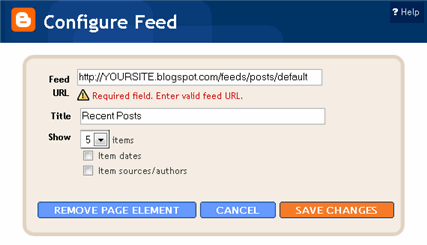
There’s no need to change the title (unless you want to call it something else) so then hit “Save Changes”. Then save your blogger layout and go over to your other browser window, refresh and see the Recent Posts appear in your blog’s sidebar.
Now you’re going to do the exact same thing with the “Recent Comments” page element but you’ll instead use this feed format https://YOURSITE.blogspot.com/feeds/comments/default . Again, make sure to replace “YOURSITE” with your actual blog url. Save and make sure it’s working properly. If it doesn’t appear on your blog, chances are you don’t have the correct feed url or you might not have any comments yet.
If you really want to fine tune your Recent Posts and Comments settings like increasing the max number displayed to 10 you can. Go read our advanced recent posts settings article and take your widgets to another level.
Ready to super charge your blog? Check out our professional premium blogger templates or make money by joining our blog affiliate program!
If you like this post then please consider subscribing to our eBlog Templates RSS feed. You can also subscribe by email and have new templates and articles sent directly to your inbox.
Trackbacks
175 Responses to “How to Setup Your Recent Posts and Recent Comments Blogger Page Elements”
Blogger Sponsors
- Improve Your Blog in 31 Days – Guaranteed
- Build a Better Online Business with WordPress
- Become a Blogger Just Reopened – 5 Days Only!
- Roadmap to Become a Better Blogger
- Free Image Hosting – Photobucket
- How to Install Google Analytics on Blogger
- Improve Your Google Rankings in One Easy Step
- 50 Excellent Blog Footers
- Free Instant Blog Logos
- Create Cool Images With a Wet Floor Effect Maker
 ads by google commented on
  huh commented on
  huh commented on
jayko, sorry I was not able to answer you at once. Enjot your blogging…
the fields to enter feeds address. Anyone know what
This really is a great widget i was looking for it for a long time and ultimately i found it at your blog..thanks a lot for sharing it..
nice idea indeed, please keep it up
Hi
I want to replace my adbrite 468*60 ads with the default adsense ads at the top of the first post.
What should I do?
Thanks in advance
sorry, I wanted to comment under the “Ads Theme”.
Using this method you can`t optimize very well the widget. Try out this one: http://www.codingmix.com/2010/07/recent-comments-widget-for-blogger.html
This is a very good widget, it`s fully customizable
Please visit my site,
gallery67
It is excellent idea, Thanks for the information.
I have also created a new recent comments listing gadget for Blogger blogs. My gadget is called Last Comments and is capable of showing the author’s name, comment preview, title of post the comment was left on, time of comment, and date of comment, and it allows you to link any of those to 1) the author’s website or blogger profile, 2) the actual comment, or 3) the post itself. Last Comments also can be put in horizontal spaces as well as vertical spaces. You can find a demonstration, instructions for configuration and the link to add it to your blog at: <a href="last-comments.blogspot.com.
It works gr8 in blogger , any idea for wp ? Without plugin and css tweaks ?
Thanks for this wonderful tip. I was going to do it manually using Link Gadget. Thanks anyway.
Great information. I’m really glad that its useful to me. Thanks
Nice…working for my site…
very thanks!
this is what exactly i’m looking for!!
It works GR8 in blogger , any idea for wp ? Without plugin and css tweaks ?
Good job. Thanks a lot for helping me.
KANG KALO PASANG POSKAN KOMENTAR KAYA YANG AKANG GIMANA NI ?
Thanks a lot for helping me
Thanks for this wonderful tip.
Nice…working for my site…
Hi, I am PrijsCompare
This is the excellent idea and it provides best template, technique for me….
The use of templates as a metaprogramming technique requires two distinct operations, a template must be defined, and a defined template must be instantiated. The template definition describes the generic form of the generated source code, and the instantiation causes a specific set of source code to be generated from the generic form in the template. Thanks.
i heard that such widget also helps in reducing the bounce rate so i think that recent post widget should be more attractive so that it can engage the user and we can get more pageviews.and i think your widget will do this job for me.thanks for sharing.ringtones
Mobile app development company in udaipur
Top Mobile Apps Development Company
Are you looking for top mobile apps development company in Udaipur? In Rajasthan? In India? AppSenor is offering the best apps development services to its customers since 2012. AppSenor Team is specialised in apps development services in Udaipur and have more than 6 years of exposure in a highly competitive market.
http://appsenor.com