
Isn't this free template worth at least $1? |
|
|---|---|
| Your support allows me to continue to provide free templates. Any donation is appreciated. |


sIMPRESS Template
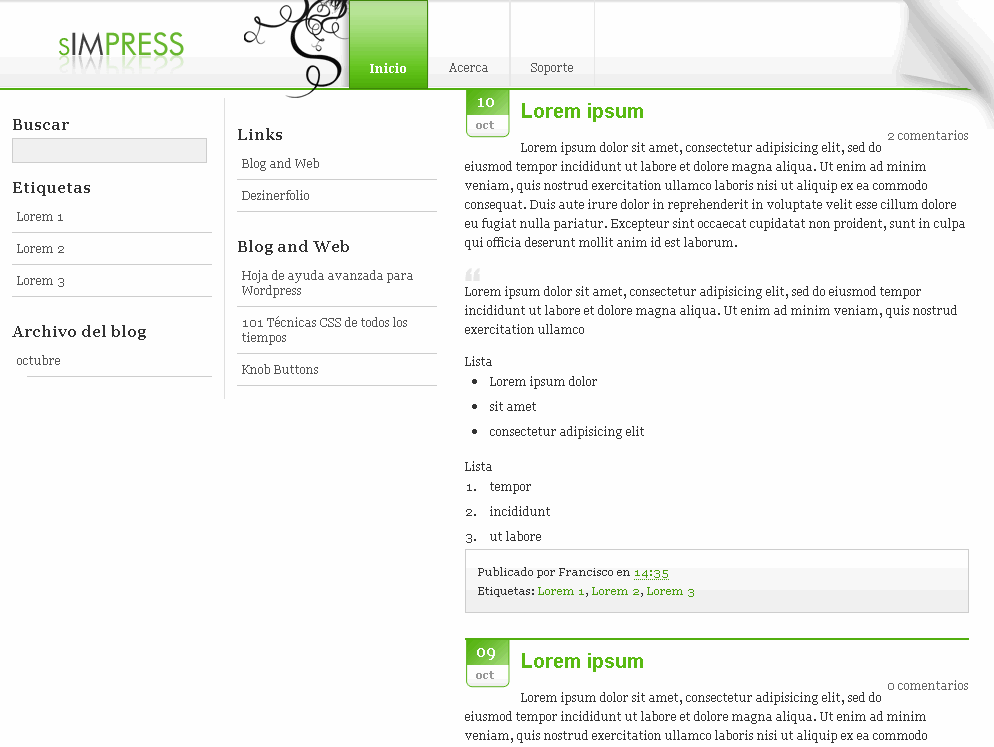
I’m excited to announce that sIMPRESS 2.0 for Blogger is now available. This is a nice web 2.0 Blogger template with several cool features. First off, it’s got tabs across the top so you can customize and add new ones as you please. Next, it’s a fluid width template which means it stretches when you expand your browser. It also has a cool date function that shows the day and month for each post. It’s using a javascript formatting function to handle this which you don’t need to worry about. There is also a search box built in but you’ll have to wire it up for it to work properly.
Installation
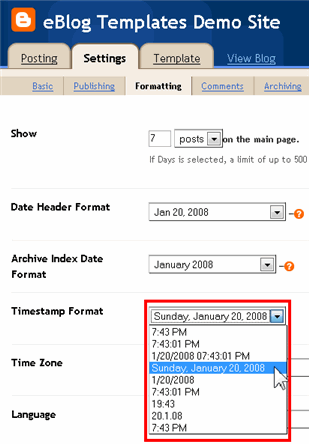
There’s a couple of simple configuration settings you need to make in order for this template to work properly. In order to get the date to display correctly, you need to go into your “Settings” => “Formatting” area and change the timestamp format to this format “Sunday, January 20, 2008”. See the image for details.
Next, to setup your tabs across the top, you need to edit the template code. Look for this block of code and change the links and names of each tab as you like.
<div class='topnavi'>

<ul>

<li class='current_page_item'><a href='/'>HOME</a></li>

<li class='page_item page-item-2'><a href='https://eblogtemplates.com'>Templates</a></li>

<li class='page_item page-item-2'><a href='#'>About Me</a></li>

<li class='page_item page-item-2'><a href='#'>Contact</a></li>

</ul>

</div>
All images are pre-hosted and the javascript is built into the template so the date on each post feature works very well! We distribute template unlike other sites which break after a few months because the owner moved the images or javascript file. We host the images on an unlimited bandwidth server so you don’t have to worry about broken images!
Thanks to Dezinerfolio for designing the template and Blog and Web for converting it into an xml Blogger template.
Ready to super charge your blog? Check out our professional premium blogger templates or make money by joining our blog affiliate program!
Want to make your blog stand out from the crowd? I recommend giving your newly downloaded Blogger template a unique and personalized look. Read our Free Blogger Header Images article and find yourself a great custom header image!
If you like this post then please consider subscribing to our eBlog Templates RSS feed. You can also subscribe by email and have new templates and articles sent directly to your inbox.
Trackbacks
- 100+ Excellent Blogger Templates | Montiroxa Press© 2010 on May 4, 2010
- 99+ Excellent Professional Blogger Templates Free | TelaBela.com-leading information hub... on May 27, 2011
- 100+ Excellent Blogger Templates on August 12, 2012
- 120 Best Free Blogger Templates Around | DenzoMag on December 23, 2012
58 Responses to “sIMPRESS”
Blogger Sponsors
- Improve Your Blog in 31 Days – Guaranteed
- Build a Better Online Business with WordPress
- Become a Blogger Just Reopened – 5 Days Only!
- Roadmap to Become a Better Blogger
- Free Image Hosting – Photobucket
- How to Install Google Analytics on Blogger
- Improve Your Google Rankings in One Easy Step
- 50 Excellent Blog Footers
- Free Instant Blog Logos
- Create Cool Images With a Wet Floor Effect Maker
 ads by google commented on
  huh commented on
  huh commented on
its work, thank you ==> http://pikirankristus.blogspot.com
I’ve been use this template years ago… and I modified parts of it…visit NeoKhilafah
cool template i already tried it.
Thanks a lot of Mr. Admin. This is exactly what i was looking for.