
Spy on Your Competitor – Find Out What WordPress Plugins They’re Using
With most installations of WordPress there comes a small security flaw that potentially could be exploited but in most cases it’s harmless. This is not a new trick and it’s nothing illegal to do but usually you can find out exactly what plugins other WordPress blogs are using. This simple way of sniffing out one’s plugins is basically done by browsing directly to their plugin folder.
Here’s how you’d do it.
- Find a site that runs WordPress (it’s usually easy to spot them) and figure out where their WordPress installation is located. If you view the source, just look for /style.css and you’ll find their /wp-content/themes/ directory.
- Copy that path and instead of /themes, put in /plugins. The final url that you’ll construct will be something like https://www.competitor.com/wp-content/plugins
- Paste that url in your browser and you’ll quickly find out if they’ve taken any steps to hide their plugins. If not, you’ll see something that looks like this:
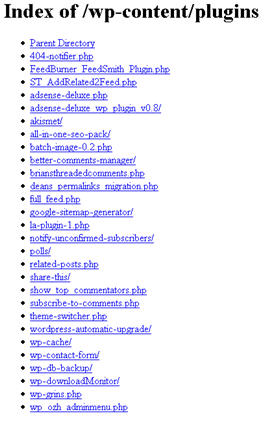
Now you can see exactly what plugins they’re using. There’s really no harm in knowing this but there’s a chance someone could exploit their blog. Say for example, one of the plugins like “wp-grins” has a security hole. Now you know this site runs it and you can launch an attack. There’s never been any cases that I’m aware of and that’s probably why the WordPress developers haven’t done anything about it.
It’s also a good way to figure out what certain plugin a site is using so you can get it for your own site. I’ve done this a few times in the past when I stumble upon a site with some cool features. How I’ve done this is by usually just viewing the source, looking for their .js or .css files and then searching Google by that name.
Is Your WordPress Blog Secure?
Now that you’ve had fun browsing someone else’s plugins folder, it’s time to try your own. If you’re able to see your plugins via a browser, then I’d recommend tightining up your security. The easiest way is to create a blank index.html or index.php file and put it directly in your plugins directory. This will make it so a blank page will load instead of the directory itself.
Another way to block people is by turning off directory browsing which is a web server configuration. It’s more involved and technical vs the quick and easy blank index.html file.
I hope you’ve had fun and in the process and tightened up your own blog’s security. You can never be too safe!
Ready to super charge your blog? Check out our partners professional premium WordPress themes!
If you like this post then please consider subscribing to our eBlog Templates RSS feed. You can also subscribe by email and have new templates and articles sent directly to your inbox.
Trackbacks
- A Wordpress Vulnerability, and How to Close It on March 3, 2008
- atomic blonde lektor pl on July 21, 2017
- traiteur rabat on August 29, 2017
- traiteur rabat maroc on August 30, 2017
- ingénieurs marocains on September 5, 2017
16 Responses to “Spy on Your Competitor – Find Out What WordPress Plugins They’re Using”
WordPress Sponsors
- Improve Your Blog in 31 Days – Guaranteed
- Build a Better Online Business with WordPress
- 50 Excellent Blog Footers
- Free Instant Blog Logos
- The Definitive Guide to WordPress SEO
- Create Cool Images With a Wet Floor Effect Maker
- Get Paid to Write Reviews on Your Blog
- Why Most Bloggers Are Stuck – Reporters vs Experts
- Yaro Starak’s 10 Great Blog Traffic Tips
- Google Friend Connect – New Social Network
 ads by google commented on
  huh commented on
  huh commented on
Hi, I was just wondering how did you add this What’s Next under the post. I noticed Problogger has that too. Is it a plugin or what is it?
Thanks
@Fatos, it’s actually not a plugin but that’s a good idea to create one. The What’s Next links are individually coded to dynamically work on each post. An easier way to get similar functionality is to download and install something like ShareThis or AddThis which both work great on WordPress. You might want to give those a try.
Thanks for your reply. And yes I know about these other plugins but I just happen to like that one and maybe it’s just that I want that too and that’s why I asked. And go ahead man a create a plugin like that, I would be the first one to use it. Good 💡
@Fatos, maybe I’ll write a new article about how to create it. It’s easier to explain than to create a plugin. 😉
Alright Fatos, I’ve just written up an article on how to implement this feature. Check it out –> How to create a “what’s next” post footer section. Thanks for the suggestion!
wow came across your blog and it’s really tight and alot of great info,signed up for the feed>I’ll be back thanks
Nice trick! I’m going to patch my wp blog .htaccess file to prevent that =) Thanks.
Unfortunately, this trick doesn’t seem to work anymore.
can’t just place an index.html page to hide that?
Ohh, never thought about that,
Sure going to some blog updates
thanks
Gagnez, vous voulez gagner ! Vous en avez marre de subir des échecs les uns après les autres, vous avez droit vous aussi à devenir quelqu’un de bien, bien dans sa peau, bien dans sa vie, et tout cela est un état d’esprit, mais qui doit être très profond, ancrer au plus profond de vous-même. Et pour gagnez vous devez changer votre esprit, la façon de voir les choses qui vous entourent et qui vous arrivent, changer votre manière de penser, éviter de vous auto-saborder. Sachez que vous aussi, vous avez droit à voir et à saisir toutes ces opportunités qui se présentent devant vous et à GAGNEZ pour de bon et pour longtemps. Il existe une méthode pour vous aider à Gagnez regardez ici: http://gagnez.123axion.com/ Et après vous ne serez plus jamais comme avant, vous rejoindrez le clan des gagneurs, le clan de l’élites où tout leur réussis et vous marcherez sour les plus hautes marches des podiums et vous surferez sur la vague du succès et de la réussite.