
Isn't this free template worth at least $1? |
|
|---|---|
| Your support allows me to continue to provide free templates. Any donation is appreciated. |


Styleicious Template
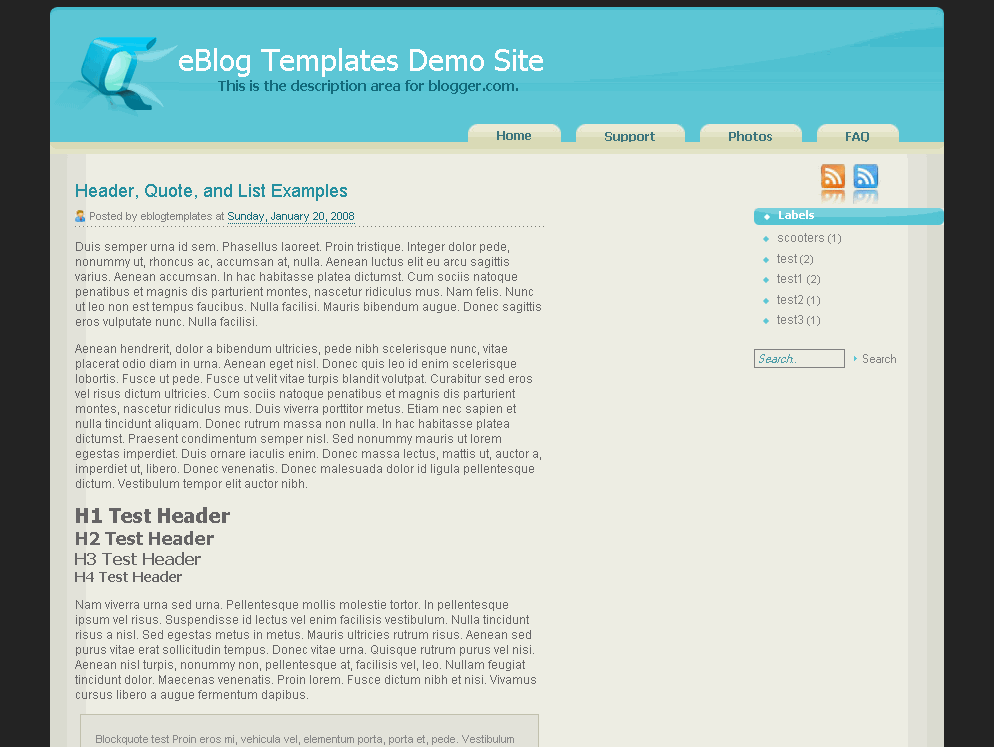
Styleicious is a cool web 2.0 style Blogger template with tabs across the top right. The header is a soft aqua blue and the body contains 2 or 3 column, a nice footer where you can put your post archives, and a search box to boot.
To change the tab urls and names you need to edit the template code. Open the .xml file in a text editor and then search for this:
<div id='main_menu'>

<ul>

<li><a href='#'>FAQ</a></li>

<li><a href='#'>Photos</a></li>

<li><a href='https://blogandweb.com' title='Plantillas Blogger'>Support</a></li>

<li><a href='#'>Home</a></li>

</ul>

</div>
Now you can change the hrefs and tab names to whatever you like.
All images are pre-hosted on our photobucket.com pro account which has unlimited bandwidth. That means you don’t need to worry about the images not showing up which can happen to other Blogger xml templates.
This theme was originally designed by Tom over at thaslayer.com and converted into this Blogger template by Francisco from Blog and Web.
Ready to super charge your blog? Check out our professional premium blogger templates or make money by joining our blog affiliate program!
Want to make your blog stand out from the crowd? I recommend giving your newly downloaded Blogger template a unique and personalized look. Read our Free Blogger Header Images article and find yourself a great custom header image!
If you like this post then please consider subscribing to our eBlog Templates RSS feed. You can also subscribe by email and have new templates and articles sent directly to your inbox.
Trackbacks
3 Responses to “Styleicious”
Blogger Sponsors
- Improve Your Blog in 31 Days – Guaranteed
- Build a Better Online Business with WordPress
- Become a Blogger Just Reopened – 5 Days Only!
- Roadmap to Become a Better Blogger
- Free Image Hosting – Photobucket
- How to Install Google Analytics on Blogger
- Improve Your Google Rankings in One Easy Step
- 50 Excellent Blog Footers
- Free Instant Blog Logos
- Create Cool Images With a Wet Floor Effect Maker
 ads by google commented on
  huh commented on
  huh commented on
great site. thanks so much for the free template
hi… please repair Blogy Styleicious template . his image is delete please repair it and tell me when you repair this template. thank you . from hitesh hiteshbairathi@gmail.com
I have a problem with this template. In some post is a huge space between the title and image of the post.