
Super Charge Your Blogger Comments With Intense Debate
One of the shortcomings of Google’s Blogger is the lack of a quality commenting system. Out of the box, it comes with a very generic non-interactive inline comment reply system that works fine but is to basic for most people. Luckily there’s a new website called Intense Debate that provides an amazing free commenting package which will impress your readers and really super charge your blog.
 Intense Debate allows you to replace your standard blog commenting system with what they call “A completely new tool for conversation”. It’s very easy to setup using their wizard even for a custom Blogger template. You’ll also need to import your old comments which isn’t too difficult either and add the new widgets to really spice up your blog.
Features Include:
- Easy to setup code – Wizard system automatically updates your existing template with the required code
- New comment email notifications – Don’t waste time checking back on a blog to see if anyone responded to your comment
- Reputation and comment voting – Move the best comments to the top based on their reputation
- Sidebar widgets – Add widgets like recent comments and a top commenter widget
- Social traffic drive – Link to several major social sites you are a part of to give fellow readers an idea of who you are
- Track people, blogs, and more – Allow your readers to track comments and the people who make them across different blogs
- User profiles – Have readers setup their own profiles which they can use on any blog using Intense Debate
- Threaded comments – Discussions are organized into threads so they’re easier to follow
- Keep your existing comments – Import your existing comments so you don’t lose them
Getting Started
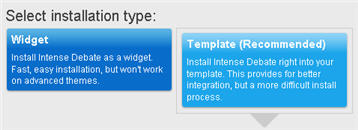
Ok, you’re sold on using Intense Debate as your new commenting system and want to get started. First you’ll need to enter your Blogger url, then sign up for an account, and then you’ll be presented with two options. You can either install Intense Debate as a widget or have Intense Debate automatically insert the required code directly into your blog template. The latter is their recommended choice and what I did.
You’ll then be presented with the “Advanced install guide” which includes five steps. The last step has you upload your template into their system so it will automatically insert the required comments code. It’s important to note the “Replace comments on” section because if you select the “All posts” option, you’ll need to import your existing Blogger comments into Intense Debate in another step later. This is the option I recommend you choose so all your comments are unified.
Some people select this option and then are surprised when they look at their blog because it looks like all their comments were deleted. The comments are still there but sitting on the Blogger server. Remember when you start using Intense Debate, you are saving all comments into their system.
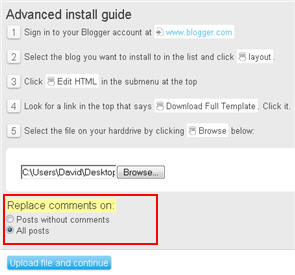
Before you click the “Upload file and continue” button, make sure you’ve made a backup of your template just in case something goes wrong. When I first tried using Intense Debate’s, it altered some of my custom template code which screwed things up. It wasn’t a big deal because I could just go back into the code and make the changes myself, but for those who are less inclined to make changes, it’s better to just have a backup. Hopefully you won’t have any problems but chances are you’ll need to tinker with the code a bit after Intense Debate inserts it’s sections.
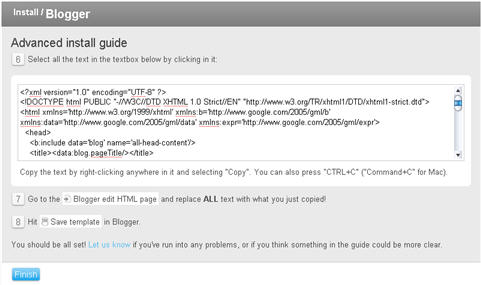
Here’s the last step which basically spits back your original template with the additional Intense Debate sections added. Copy this and paste it back into your Blogger html editor. Save it and go look at your blog. Click into one of the posts and you should now see a cool blog comments section built right into the post footer which will look something like this:

Ok, now that you’ve got the code setup correctly, it’s time to import your old Blogger comments into the Intense Debate system. Go back into Intense Debate and click on your blog name tab => tools => import comments. The screen you should be at will look something like this.

Enter your Blogger username and password and then it will ask you which blog you want to import the comments from. Now it will automatically import your old comments into your Intense Debate account. Go over to your blog and make sure the comments made it over ok.
Add Widgets
If you really want to take advantage of the extra features provided by Intense Debate, you’ll want to add at least one of the free widgets. I like the recent comments and top commenter widgets which will add some cool flare to your blog. If you already have a recent comments widget that uses your rss feed, it most likely won’t work anymore because all your comments are being sent to Intense Debate. You have two choices, either update your existing recent comments rss feed url with the new Intense Debate one, or remove that widget and replace it with the Intense Debate one. The choice is up to you and how it fits into your blog’s layout.
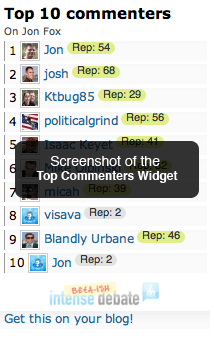
Here’s an example of what the top commenter widget looks like:
Other Options
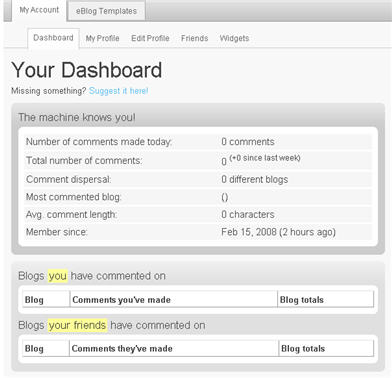
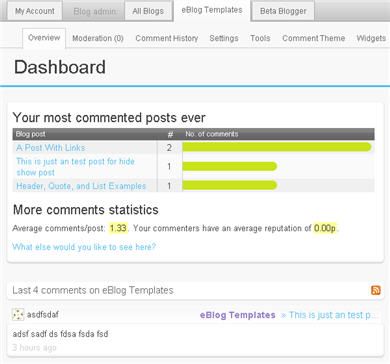
I urge you to spend some time getting familiar with the dashboard in Intense Debate since there are many options you can setup. It will give you 100x more power than the default Blogger commenting system and really give you a handle on your blog comments. Here’s a couple of screenshots of my dashboards:
Summary
This commenting system is really a great addition to any blog especially Blogger because of it’s lack of features. It’s easy to setup (it took me 15 mins) and comes with a ton of great features. There are a couple other things to point out before you decide to make the switch. In order to moderate or view anything related to your comments, you’ll now need to login to this system separately. Also, although it’s not required, it’s beneficial for anyone posting a comment on your blog to have an Intense Debate account. They don’t need one to post comments, but if they want to add a custom picture next to their post, vote on comments, etc they’ll need to login.
Lastly, if you’re using a Blogger template with custom comment sections (like comment count on the post), you might need to tweak the template code after Intense Debate adds it’s required sections. For me, I had to modify it a little bit before it was displayed properly in my template. Not a big deal, but worth noting.
Overall, I highly recommend using this commenting system because it gives you much more power over the boring bland Blogspot commenting system and it also makes your blog look and act much more professional and it’s fun to post/rate comments. Give Intense Debate a try and let me know what you think.
Ready to super charge your blog? Check out our professional premium blogger templates or make money by joining our blog affiliate program!
If you like this post then please consider subscribing to our eBlog Templates RSS feed. You can also subscribe by email and have new templates and articles sent directly to your inbox.
Trackbacks
41 Responses to “Super Charge Your Blogger Comments With Intense Debate”
Blogger Sponsors
- Improve Your Blog in 31 Days – Guaranteed
- Build a Better Online Business with WordPress
- Become a Blogger Just Reopened – 5 Days Only!
- Roadmap to Become a Better Blogger
- Free Image Hosting – Photobucket
- How to Install Google Analytics on Blogger
- Improve Your Google Rankings in One Easy Step
- 50 Excellent Blog Footers
- Free Instant Blog Logos
- Create Cool Images With a Wet Floor Effect Maker
 ads by google commented on
  huh commented on
  huh commented on
This sure looks great, but is there some way to get rid of the “Intense Debate” banners from the bottom?
@Ashutosh – I believe you can edit your template code and search for their banner code. Then just remove it. I haven’t actually tried it yet so let me know if that works.
David,
I am an HTML n00b 🙁
Anyway, I think Intense Debate will be kind of a takeover of Blogger, so I am not trying it; hope the guys at Blogger do something about the horrible commenting system…
@Ashutosh, my guess is Google will buy a company like Intense Debate and integrate them into their commenting system. They have so much cash it would make more sense to buy instead of developing a new one.
hi david, I’m currently using haloscan with my blogger blog. how will intense debate affect my commenting system? can it be integrated? can I import my old comments from haloscan? thanks.
@monaco, if you’re already using Haloscan then it might not be worth the effort to switch over. I’ve never done a migration so I’m not sure how tough it would be.
Very useful, dude.
Thx
Man, can you tell me where the option to import back the comment. Now I lost all the previous comments!!!!
gofree, you shouldn’t have lost all your other comments. They should all be in the system…you just need to import them. I’m not sure which part you’re having trouble with?
Actually first I didn’t see the import tool there Now it works just fine, dude. Thx.
Anyways, the option there at Intense Debate is just a bit confusing – in their beta stage 😀
Again thanks for a very useful finding, dude.
When I tried installing it on my blog, it told me I had repeat tags in my template. I think this came from all the extra page elements I have installed, but it wouldn’t let me upload it until I got the template fixed.
Anyone else run into this? I like ID, but I can’t seem to run it on the blog I want to. (I did get it to run fine on a regular template with no extras.)
I didn’t have any issue until the end portion – the import. The server kept ‘timing out’ on it!
I’m not sure if is because it has alot of area to cover, or if I just need to try it later!
I installed ID and am learning about it… but the styling of the comments now don’t match my blog very well. And I don’t like, or want, to learn CSS!
Hi David,
Why I failed 😕 to install Instant Debate on Pro Blogger Template. I have followed step by step, but I could not find any changes on the screen below the post.
Any other source to install Cool Commentary Box?
Thanks
@cmn_thea1106, not sure what the problem could be. You might want to try the support section on the Intense Debate site.
okay… thanks Bro!
hi can u help me with the code?I use installation type and Blogging Pro template but it give me error. 😕
@cyberfly, I’m not sure what the problem could be. You might want to see if the Intense Debate site has a help section.
it is hekimboard..
Hi David
I am using the WP Premium Red theme from your site. But my number of comment displaying in the front page is messed up. It is showing “Comment #” in case of just the number. Can you tell me how to fix it?
Also while trying to displaying the navigation bar of the template, it is showing very large capital fonts at the right alignment.
Please tell me how to fix those. Thnx for the great work with the blog.
http://gainingideas.blogspot.com
http://mythemetestblog.blogspot.com
thanks fibercement dış cephe kaplaması.
😥
I have had nothing but trouble with intense debate. Commenters hate it and now it wont uninstall. Intense Debate intensely blows.
what about SEO that is what matters to me ❓
damn, I so noob, it not working, or it was my template different then usually 😕
Interactive Learning Systems For more information on the Interactive Learning Systems and to chat live visit us at: -http://www.powercomars.com/.
❗
I am thinking of adding IntenseDebate on my blog http://gangetic.blogspot.com. Thanks for the information.
As of November 2008, IntenseDebate removed their tool for importing blogger comments. According to an employee there, the tool was buggy and often lost a lot of users’ original blogger comments (please update). They are tinkering with that tool currently, hoping to relaunch when all the bugs are fixed. One major drawback with the comment system in IntenseDebate is how it’s Javascript-based. In other words, whatever comments are made DO NOT show up in searches and page rankings–which is a real downer if those comments add a great deal of new or pertinent information to the original article.
This is great, it let me finally be able to prove that I can make a message board site out of blogger.
Gentlemanlychatter.co.nr
Proof.
Wow, thanks lots David… I’ve been looking for something exactly like this for a while now. Your resourcefulness & generosity to share is really awesome.
Great post, might incorporate with my blogging gaming site.
playpacmaonline.net
i don’t know wht’s the problem with intense debate…Even when i followed step by step to do template installation……it shows no changes on my blog…
If intense debate is so awesome, why is this site not using it?
will try for sure!
I also thought IntenseDebate would be great on my blog, but it not only slowed down my blog but also disabled my comments section once I have uninstalled it. Now my blog have no comment section.
Its really a fuckin system coz instead of giving code to insert in the template it asks us to download full template and then copy paste etc., without specifying whether Expand widget Templates has to be checked or not. Its bit confusing and also its slows down blogger blogs. That is why not many blogs/sites use it , so as the case with eblogtemplates as well.
I sincere suggestion to eblogtemplates is don’t review someone as very good unless you try it yourself.
If you have tried, y intenseDebate is not uploaded here??
Anyways whatsoever happened is happened, now I want someone here to help me restore my comments section or else I would love to put a comment section as of yours on my blog. Please provide the code and instructions to my email mentioned.
Anyways now I want you to suggest me a
when trying to uninstall IntenseDebate, here is the error Iam getting
Your template could not be parsed as it is not well-formed. Please make sure all XML elements are closed properly.
XML error message: Element type “input” must be followed by either attribute specifications, “>” or “/>”.
What should I do now??
Y are you not replying?? Don’t you bear responsibility for the products your refer
also all my previous comments are hidden as there is no option “Import Comments” in blog tools.
Please answer me soon. I have been posting comments here and no one is answering.
Its better if you stop running this site if you can’t answer to the comments or else just remove the comments section…
@ramaraobobby, I like to recommend products and sites that I think are beneficial to others but I don’t support them. You’ll have to see if they have a forum where you can post your issue. Good luck!
I found your blog on google and read a few of your other posts. I just added you to my Google News Reader. Keep up the good work. Look forward to reading more from you in the future.
thanks alot for sharing this wonderfull post with us, i am also using instant debate comment system afte reading this post, eblogtemplates you are rocks…
Hey there! Just wanted to say that this is one well written article! Thanks for posting this. I was looking for a site that has this kind of info and I’m glad I stumbled upon this one. 😀 Keep up the great articles.
Thanks for the info! I was struggling with Intense Debate after giving my blog a facelift…with your help, I was able to get it all back on track by re-installing it. 🙂
Thanks again!