
Isn't this free template worth at least $1? |
|
|---|---|
| Your support allows me to continue to provide free templates. Any donation is appreciated. |


Underground Template
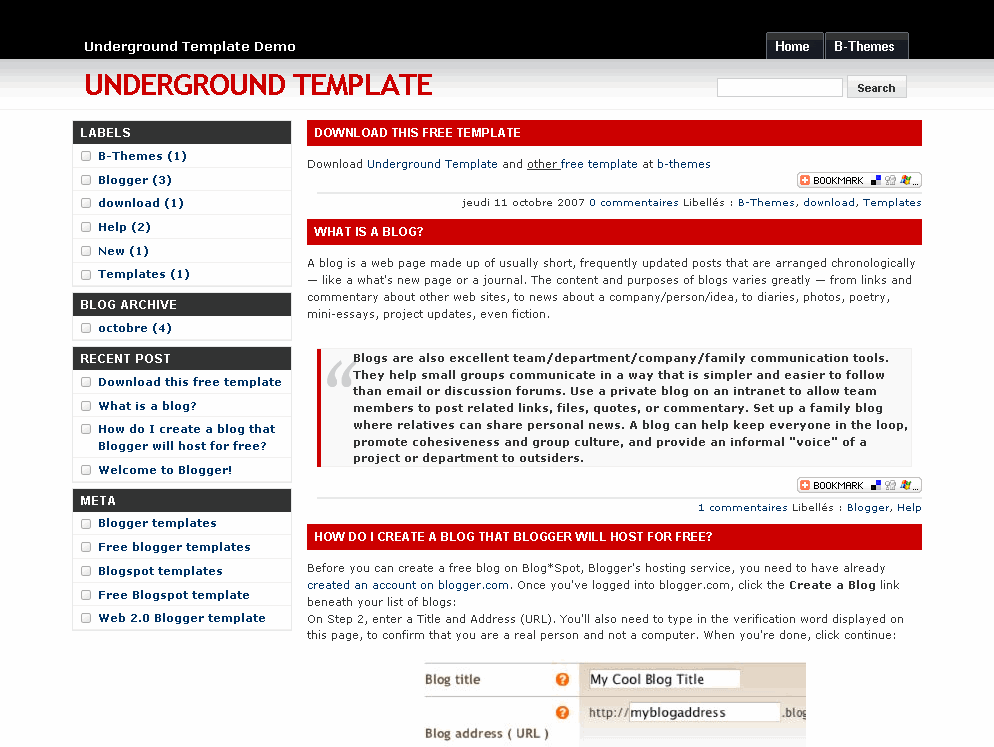
This is a lightweight, fixed width, 2 column Blogger template with a black and red color scheme which is very easy to customize and fast-loading. It also comes with some cool built in features like the “Add This” social bookmarking sharing widget for each post, and dynamic tab creation with a link list widget.
In order to add new tabs, you’ll need to go into Blogger edit mode and edit the tabs widget. There you can add all the new tabs you want which will automatically appear at the top of your blogger template. No messing with the .xml code with this one!
This template was ported over to a Blogger template by Akbach from the original design by styleshout.
Ready to super charge your blog? Check out our professional premium blogger templates or make money by joining our blog affiliate program!
Want to make your blog stand out from the crowd? I recommend giving your newly downloaded Blogger template a unique and personalized look. Read our Free Blogger Header Images article and find yourself a great custom header image!
If you like this post then please consider subscribing to our eBlog Templates RSS feed. You can also subscribe by email and have new templates and articles sent directly to your inbox.
Blogger Sponsors
- Improve Your Blog in 31 Days – Guaranteed
- Build a Better Online Business with WordPress
- Become a Blogger Just Reopened – 5 Days Only!
- Roadmap to Become a Better Blogger
- Free Image Hosting – Photobucket
- How to Install Google Analytics on Blogger
- Improve Your Google Rankings in One Easy Step
- 50 Excellent Blog Footers
- Free Instant Blog Logos
- Create Cool Images With a Wet Floor Effect Maker
 ads by google commented on
  huh commented on
  huh commented on
hey love this template its simple and looks great i do have one problem though and its whit changing fonts and colors it cannot b done why is this? is it code stopping it? i have uploaded a picture to imageshack to show what im on about if you look at the pic you will see nothing is there anymore, any help with this small problem will be appreciated thanks
the pictures here > http://imageshack.us/?x=my6&myref=http://imageshack.us/
I have used this theme on my blog and I would like only first few lines of each post to appear and then it should be written as read more. You can check out http://hakironce.blogspot.com/ and tell me how to get that. please help me.
really cool template…. got the pro touch !
I love it. 🙂
tell me how i can add tabs above the header image in the template.thanks
I like to use this for my blog but I prefer to have the sidebar on the right side. Can this be done?
@Frenchy, yes but you’ll have to play around with the css code within the template to get it done. If you are familiar with css and blogger template code, it won’t be too difficult.
Ok, i’ll be trying to experiment on this first before applying the theme for my blog. Thanks David.
I have a set of sites, all using your template. For some reason, the black bar has disappeared across the top of the page. I’ve tried re-entering the code, but no success. Do you have any idea what could be causing this?
For some reason Photobucket is having problems serving up images for all templates on this site. I’ve contacted them directly and it should be resolved soon.
Short-term solution – If you move all the images to your own image hosting site (photobucket is free) then you won’t have to rely on our images (which have never been a problem up until today.
Thanks,
David
I just upload the template for my blog, but something weird comes up.. there is no comment form below the post column.. my blog visitor can’t post any comment if it goes like this.. i need your solution immediately, thnx
I’m having troubles uploading the template to my blog. The error code says something about closing loops, etc. ???
What I am missing?
Congrats for the creator of the template. The design is really nice.
I intend to use it for my blog, but I have an important requirement: I want the articles to be seen only partially ( for example the first 500 symbols). I mean when you load a page to see the firs part of the article and to have the option ” See more” which will bring you to the full text of the article.
Is this possible for this template, are there any adjustments that I can make to fix that promblem?
Thank you in advance and kind regards,
Villy
David,
Is it possible / how hard would it be to divide the sidebar in order to make a thrid column?
Jasonj
I’m having trouble posting comments on this template as well, any idea what the problem could be?
Very good.
This blog template looks so great