
Isn't this free template worth at least $1? |
|
|---|---|
| Your support allows me to continue to provide free templates. Any donation is appreciated. |


Blog Oh Blog V2.0 Template
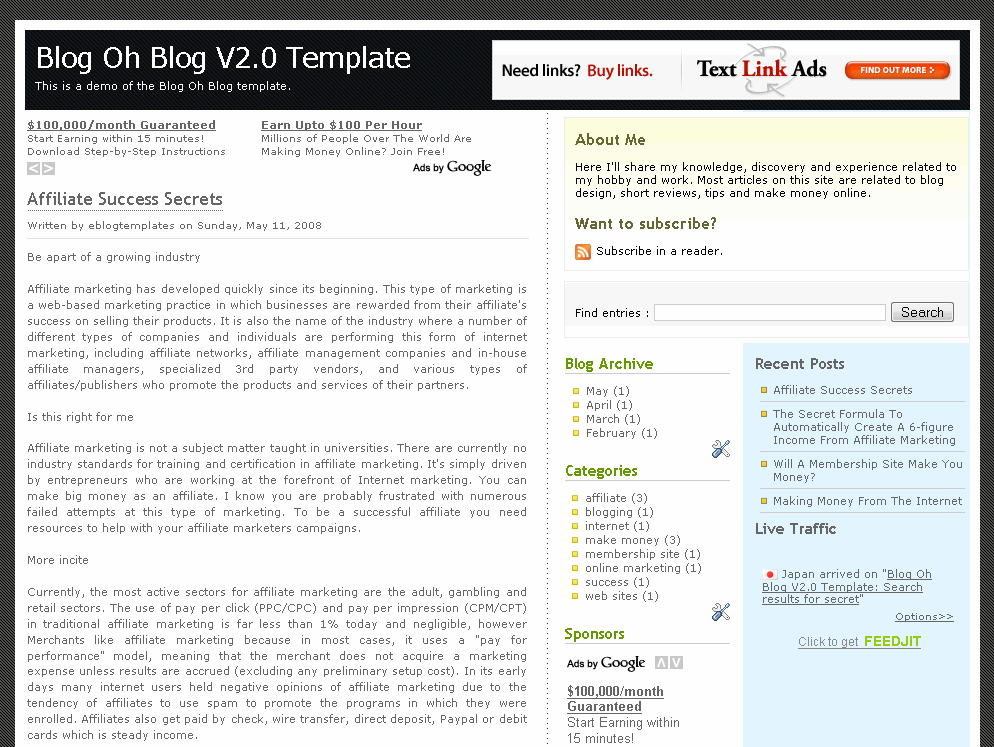
Blog Oh Blog v2.0 is a very clean and useful new Blogger template. It’s been enhanced by eBlog Templates so it’s more functional and easier for you to setup! It comes with 3 columns and the following widgets. Recent Posts, Recent Comments, Search, RSS Feed, Link List, and tabbed navigation.
It’s easy to update the tabs once you install the template. Actually you won’t see any tabs when you first set it up. You’ll need to go into template edit mode and edit the “Top Tabs” page element. There you can create all the tabs you want. The “Home” tab gets automatically created after you setup your first tab.
There’s also a header Ad html box which you can either remove or update with your own banner ad. It’s a perfect spot for a 468×60 banner such as Google adsense, etc. Once you edit the page element, the default Text Link Ads banner ad will go away.
The about box in the top right area is easy to edit as well. Just enter whatever text you want in the widget box.
Also, you’ll need to setup the Recent Posts and Comments widgets. Read this post for instructions on how to configure them.
Thanks to Blog Oh Blog for designing this template (originally for WordPress) and to Jacky Supid for converting it to the new xml Blogger template.
Revision History
Update 5/11/08 – Added Feedjit sidebar widget & fixed layout editor page so widgets align properly. Also added live demo site.
Ready to super charge your blog? Check out our professional premium blogger templates or make money by joining our blog affiliate program!
Want to make your blog stand out from the crowd? I recommend giving your newly downloaded Blogger template a unique and personalized look. Read our Free Blogger Header Images article and find yourself a great custom header image!
If you like this post then please consider subscribing to our eBlog Templates RSS feed. You can also subscribe by email and have new templates and articles sent directly to your inbox.
Trackbacks
- Blog Oh Blog V2.0 – Blogger Template – eBlog Templates | Template Boss | Gallery of the the Best Templates on July 25, 2009
- Ten Of The Best Free Blogger Templates on April 2, 2011
57 Responses to “Blog Oh Blog V2.0”
Blogger Sponsors
- Improve Your Blog in 31 Days – Guaranteed
- Build a Better Online Business with WordPress
- Become a Blogger Just Reopened – 5 Days Only!
- Roadmap to Become a Better Blogger
- Free Image Hosting – Photobucket
- How to Install Google Analytics on Blogger
- Improve Your Google Rankings in One Easy Step
- 50 Excellent Blog Footers
- Free Instant Blog Logos
- Create Cool Images With a Wet Floor Effect Maker
 ads by google commented on
  huh commented on
  huh commented on
While trying to upload the template, the following error came:
We were unable to save your template
Please correct the error below, and submit your template again.
The new widget id “Recent-Posts-Widget1” is invalid for type: Feed
My question is, how to solve/install this template?
@ Suman
Change “Recent-Posts-Widget1” to Feed5
And Later On when the Error Come ..
Change them all to the Exact type.
If Feed, then Feed25 (any no. which u’ve not used)
If HTML, then HTML6 etc..
Hope dat you got d Idea!
TricksTerminal.Blogspot.com
Seems like this theme is broken now. Or just my coding
I placed google adsense ads below post title using this blog.
those ads shows up in chrome, firefox but not showing up in IE.
Care to check?
here is my blog:
http://www.boracayhotelsph.blogspot.com/
is giving that error
Por favor, corrige el siguiente error y envía la plantilla de nuevo.
El código ID del nuevo widget “Recent-Posts-Widget1” no es válido para este tipo: Feed
How to add header image? wWill not work when I do changes in the edit header.