
Isn't this free template worth at least $1? |
|
|---|---|
| Your support allows me to continue to provide free templates. Any donation is appreciated. |
Blogger Template Info
- Author: eBlog Templates
- Views: 6,036
- Downloads: 0
- Added: Jan 30th, 2008
- Rating:


- No Demo
Cats Template
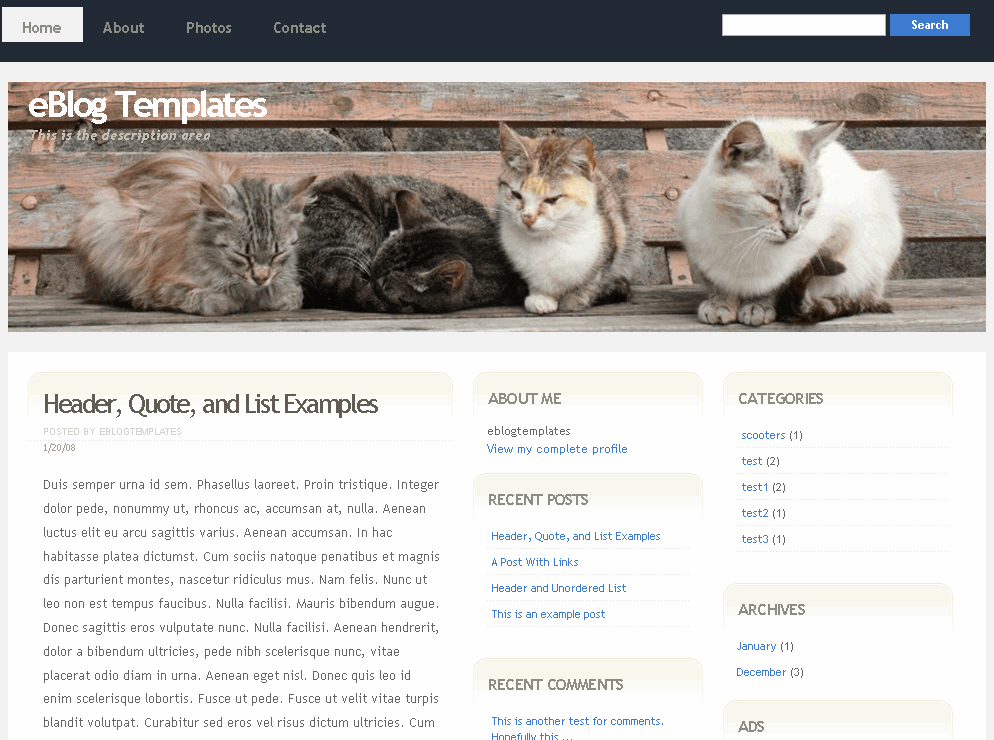
Are you an animal lover especially for cats or kittens? If so, then this is the ideal Blogger template for you. This cute and fuzzy blog skin comes with four furballs of love that sleep all day and occasionally watch over your blog posts. Not only is this a cute template but it’s quite functional as well. It’s based off the “Tastelessly” Blogger template and includes the following cool widgets:
- Header tabs
- Search box
- Recent posts page element
- Recent comments page element
- Ads page element
When you first load up this new template, the recent posts and recent comments page elements won’t show up. You need to go to the page elements section and follow the directions on this post “How to Setup Your Recent Posts and Recent Comments Blogger Page Elements“.
Also, you’ll want to configure the tabs across the top. By default, it only comes with a “Home” tab but it’s easy to add in new ones. The widget page element is a link list so in your Blogger “Template” => “Page Elements” section, just go edit the “Top Tabs” widget and add new links and your additional tabs will magically appear! You don’t even need to mess with the template code like most other templates you download.
The ads page element defaults to a Text Link Ads 180 x 60 button which will disappear once you plug in your own. The page element is HTML so just paste in the code you want to use or delete the ad page element altogether.
All the images are hosted using our Pro Photobucket account (unlimited bandwidth) so your images will work all the time unlike other sites that offer this same template!
There’s not many Blogger templates out there with cats or kittens so this one is special!
This template was designed by Free CSS Templates and converted and enhanced into a Blogger template by eBlog Templates.
Ready to super charge your blog? Check out our professional premium blogger templates or make money by joining our blog affiliate program!
Want to make your blog stand out from the crowd? I recommend giving your newly downloaded Blogger template a unique and personalized look. Read our Free Blogger Header Images article and find yourself a great custom header image!
If you like this post then please consider subscribing to our eBlog Templates RSS feed. You can also subscribe by email and have new templates and articles sent directly to your inbox.
Trackbacks
30 Responses to “Cats”
Blogger Sponsors
- Improve Your Blog in 31 Days – Guaranteed
- Build a Better Online Business with WordPress
- Become a Blogger Just Reopened – 5 Days Only!
- Roadmap to Become a Better Blogger
- Free Image Hosting – Photobucket
- How to Install Google Analytics on Blogger
- Improve Your Google Rankings in One Easy Step
- 50 Excellent Blog Footers
- Free Instant Blog Logos
- Create Cool Images With a Wet Floor Effect Maker
 ads by google commented on
  huh commented on
  huh commented on
I upgraded to this theme with a few modifications. My question will be, if I create a post with a photo upload, font size below the photo becomes a bit smaller. I couldn’t fix this problem and don’t know why occurs.
Here is the example page. See the font size below the picture? It automatically decreases!
http://irazca.blogspot.com/2008/03/arthur-c-clarke-kanz-tanyor.html
Thanks for the help.
Thank you for making this template, I really love it! One problem, I have my comments turned on yet I can not find on my blog where people can leave a comment. Did I mess something up when I made changes to the template or are there no comments on this one?
Thanks,
Cynthia
PS. Ignore the comment above, I JUST figured it out (at last). Thanks again for the great template!
Hoe can I edit the categories box?
This template dont have a footer tab. How can I add one??? Plz Help. Thanks.
Thank you for the fine template!
I LUUUUV it! You rock! 🙂
nice templates 🙂
i love cat ^_^
Thanx for making beautiful templates, I appriciate ur proudful efforts and artful web designing.
Yahya
Dea Great Admin!!!!
Thanx for availing this best info option for bloggers.
Please guide me that how can i post all pages on same homepage and also all posts without dates.
http://www.kiss4love.blogspot.com
Hi,
The top portion of this template is not showing up — the search box and the tabs do not appear. Please help.
http://asiansexyangel.blogspot.com
i like funny Cat

Meeeeeeeeeooooowwwwwwware cat pics…
hmm that didnt work did it lol 🙂
very cute
Very nice templates
thanks 🙂
Hi,
I cannot change my template to this template, getting the following error:
Please correct the error below, and submit your template again.
The new widget id “Recent-Posts-Widget1” is invalid for type: Feed
Any idea how I solve that?
Thanks!
Nice Template,A Nice Template help to make a meaningful sites,see also http://fileshous.blogspot.com
Hi Admin
Thanx for cute template gifts.
thank you eblogtemplates
veyr good templates
hi there!
i hv a same problem with JC. when i change my template. getting same error message too..
” Please correct the error below, and submit your template again.
The new widget id “Recent-Posts-Widget1″ is invalid for type: Feed”
can u help soon?
thx.
if u hv a problem lik this ” Please correct the error below, and submit your template again.
The new widget id “Recent-Posts-Widget1″ is invalid for type: Feed ” just change that with like this..hope it will help u. ^_^
id=’Ads’ change to id=’HTML17′
id=’Recent-Posts-Widget1′ change to id=’Feed17′
id=’Recent-Comments-Widget’ change to id=’Feed18′
id=’BuildaNiche’ change to id=’HTML18′
id=’TLA-Ad’ change to id=’HTML19′
id=’Feedjit’ change to id=’HTML10′
id=’LinkListFooter’ change to id=’LinkList17′
I have this template in one of my blogs, and love it, but when I tried to install it in a new one, found the problem above…The new widget id “Recent-Posts-Widget1″ is invalid for type: Feed”
I’ve tried what the next comment said but I couldnt find any of the info. Can you please help!
templates
Wish I could use this but getting
Please correct the error below, and submit your template again.
The new widget id �Recent-Posts-Widget1� is invalid for type: Feed
Any idea how I solve that?
Thanks!
Since I installed this beautiful blog theme my friends cannot leave any comment. If you try to leave a comment you will not find any box to write in your comment. PLEASE HELP ME. This blog theme is so nice, I will not delate it.
PS: I didn’t change anything like posting options, all i did was installing the cat theme.
Nice template, I’m going to try it soon!
How do I put this template on my blog? there aren’t any instructions on here how to
How do i put this template on my blog?
this is a test.
beautiful template,,
http://sepektrum.blogspot.co.id