Isn't this free template worth at least $1? |
|
|---|---|
| Your support allows me to continue to provide free templates. Any donation is appreciated. |
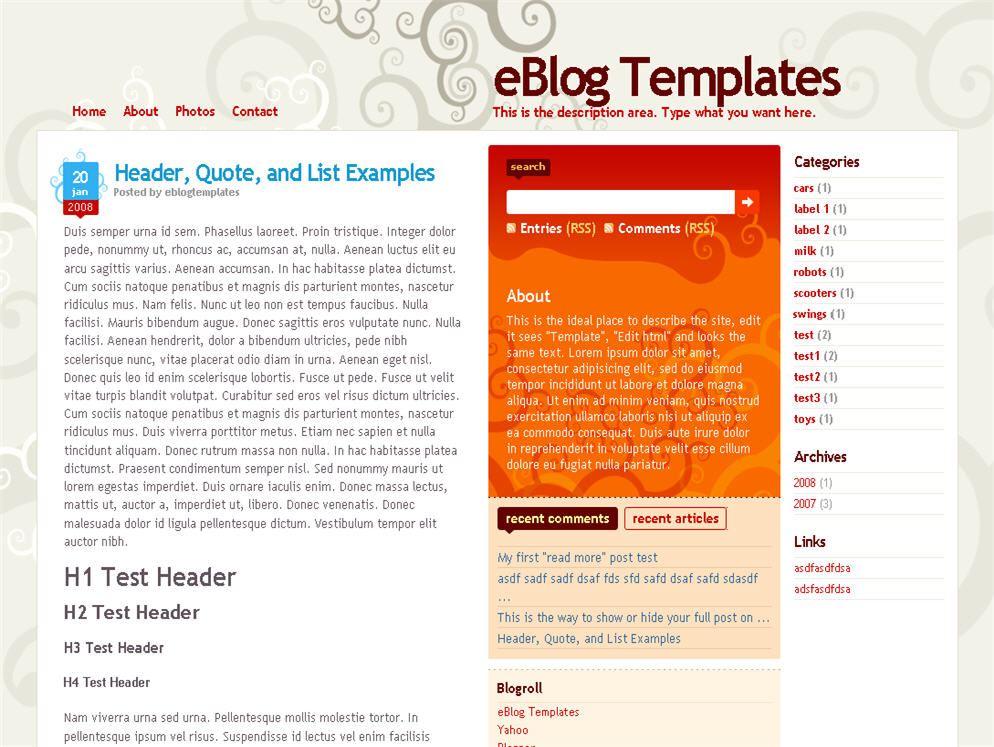
Here’s a nice three column modern artistic Blogger template with some nice bells and whistles. It has a cool search box and “About You” section with a red/orange background along with a custom date/time stamp for each post. This template is only the second one ever to include javascript tabs within the sidebar. That means instead of the page reloading each time you click on a tab, it dynamically clicks over! Check out the live demo to see it in action.
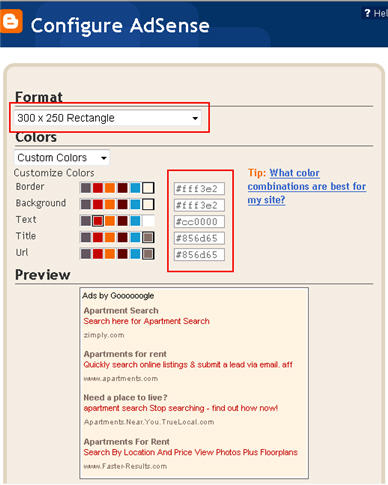
This free Blogger template is also setup for you to easily add Google AdSense and make money from your blog. If you don’t already have Google AdSense, you should read more about how to make money from Blogger and sign-up. The ad format and colors you should use to best match this template are illustrated below. The 300 x 250 rectangle with #fff3e2 for the border and background, #cc0000 for the text, and #856d65 for the title and url. This will make your ad block blend in nicely with the light pink second column.
You’ll also need to setup the header tabs before they appear. Just edit the “top tabs” widget and create the tabs you want. The “Home” tab automatically appears once you create your first tab.
To setup the recent posts and comments cool dynamic tab section you’ll need to paste in your rss feeds. Read this article on setting up your Blogger recent comments and posts section.
The rest of the configuration is pretty straight forward. If your individual blog post date stamp doesn’t show up, you’ll need to make one more change. Go into your Blogger’s “Settings” tab and then click on “Formatting”. Next, change the “Timestamp Format” (it’s the 4th one down) to this format => “Wednesday, February, 2008″. Make sure you change the “Timestamp Format” and NOT the “Date Header Format”. Many people in the past have told me it didn’t work only to find out they were changing the wrong field.
This template was originally designed by Design Disease for WordPress and was converted into Blogger by Blog and Web. eBlog Templates decided to take it one step further and enhance it to include the dynamic header tabs and javascript recent posts and comments tab section.
Want to make your blog stand out from the crowd? I recommend giving your newly downloaded Blogger template a unique and personalized look. Read our Free Blogger Header Images article and find yourself a great custom header image!
If you like this post then please consider subscribing to our eBlog Templates RSS feed. You can also subscribe by email and have new templates and articles sent directly to your inbox.
2 Right sidebars,3 columns,bloggin secret,Dilectio,Dilectio Blogger,Fixed width,free blogger templates,grey,Orange,Pink,Red,tabs
115 Responses to “Dilectio”
3:38 pm on March 2nd, 2008 (subscribed to comments)
I think this template is gorgeous! Thanks for the extra tips at the end!
10:00 pm on March 4th, 2008 (subscribed to comments)
OK, I’m kind of dumb. How do I make one of my top tabs a “mailto:” tab?? Every time I try it adds the http, and it’s really frustrating.
8:20 pm on March 5th, 2008 (subscribed to comments)
Amanda, since the top tabs are a link list, you’ll just want to do something like this:
http://mailto:youremail@yahoo.com
1:04 am on March 7th, 2008 (subscribed to comments)
Thank you! Thank you! I’ve tried to load this exact template through some other template sites, but without much success and with alot of complication. You have definitely made it so much easier and so straight forward. And to think I found your site completely by accident via google search for blog widgets…
4:51 am on March 7th, 2008 (subscribed to comments)
Glad you like it Angela. We actually make sure the templates are tested and work before hosting them on our site!
7:46 am on March 8th, 2008 (subscribed to comments)
I’m using this template, can someone tell me how to make my blog achieves become hierarchy mode? Because i try put in hierarchy in the page element edit section, but it appears only the year of my blog achieve.
7:32 pm on March 10th, 2008 (subscribed to comments)
hi david. i uploaded this template in my blog http://www.elmot-lumot.blogspot.com and its really beautiful. however, i have some probs.
1. there are no buttons for new page elements in my layout page for me to create new page elements in the right side of my blog.
2. when i uploaded the template, i cant also see the links/commands (customize, new post, sign out) on the navbar of my blog.
hope to have some clarifications and assistance to this one. thanks david!
7:26 pm on March 11th, 2008 (subscribed to comments)
Hi brix, I’m able to see everything nicely in my blogger layout window using firefox. Are you using IE?
3:25 pm on March 14th, 2008 (subscribed to comments)
the text in my posts wraps around the photos. How do i get it to center underneath the photos?
8:23 am on March 15th, 2008 (subscribed to comments)
this is the Site: http://cit-iedept.blogspot.com/
Thankz in advance!!
8:25 am on March 15th, 2008 (subscribed to comments)
also I forgot, the Copyright area thing seems to be on top?! just below the top tabs…
10:49 am on March 15th, 2008 (subscribed to comments)
iggy, please read the instructions on this post on how to properly set the date. I’m not sure why the copyright area shows up on top of your blog. You must have moved some code around by accident.
10:19 am on March 16th, 2008 (subscribed to comments)
Exactly the thing I was looking for!!!
now which other template has dynamic tabs??
please let me know and hey great job!
8:55 am on March 22nd, 2008 (subscribed to comments)
OMG! I love this template. It’s so clean and neat and nice! Thanks soooo much! However, I tried to set up my recent posts and comments. When I put in the code for the Recent Posts, I get this error message: Please correct the errors on this form. Why is this happening? When I put in the code for the recent comments, it’s ok and saved. However, when I view my blog, the recent comments doesn’t show up.
I hope I can have this rectified. Other than that, I’m loving it!!! Awesome template! LOVE IT!
11:59 am on March 22nd, 2008 (subscribed to comments)
Bunny, make sure you’re putting in the correct feed url for both the recent comments and posts. They are two separate urls. Did you read the post on how to install the feeds? It should work just fine.
8:00 pm on March 22nd, 2008 (subscribed to comments)
Thanks David, I tried it on a different laptop and got it working

Love this template!!
7:40 am on March 23rd, 2008 (subscribed to comments)
hi…i tried uploading this theme, but it won’t save
when i click save, it keeps saying widgets are about to be deleted and when i confirm and save, it brings me to an error page. It’s been a long time since i used blogger. did i miss to set up anything here???
help please. would really love to use this template. thanks
7:15 am on March 24th, 2008 (subscribed to comments)
sunshine, those Blogger error messages are tricky and the error codes are useless. I would try and select a default Blogger template first and get the basics working. Then try to add this template.
3:22 am on March 25th, 2008 (subscribed to comments)
Only one word David… You Rock! Thanks a ton!
9:06 am on April 1st, 2008 (subscribed to comments)
Hi David,
LOVE this template!
I’m having problems getting the Top Tab widget to work. I tried adding the names of the tabs, but they’re not showing up! Can you paste the exact code that I need to edit?
I even tried to copy and paste the Top Tab code you used in the sample blog. Still not working.
Thanks!
8:08 pm on April 11th, 2008 (subscribed to comments)
Hi eblogtemplates people!
Thanks for this template! I started tweaking it a week ago, and I finally got it to look the way I wanted to. It’s a really beautiful template… tweaking it was just fun!
2:18 am on April 14th, 2008 (subscribed to comments)
Hi David,
For some reason my photos in my latest post is all over the place. When I edit the post it shows where the photos will be placed which should be center, however its not sitting right at the moment. I would appreciate greatly your reply
Thank you
3:21 am on April 14th, 2008 (subscribed to comments)
Hi David,
A few more questions
:
how can I center page elements in the centre side column?
how can I change the centre column width?
how can I centre footer elements?
Many thanks
7:11 am on April 18th, 2008 (subscribed to comments)
really nice template, and one more thing i should add here is the nice description given with this template, that i haven`t found any description with most of the templates on the web.nice work, keep it up.
http://artizle.blogspot.com
5:10 pm on April 20th, 2008 (subscribed to comments)
How to set date and time?
10:22 pm on April 21st, 2008 (subscribed to comments)
@mr haris, go into your blogger settings tab and change the datetime format to “August 20, 2008″. That should get your date working.
12:30 am on April 26th, 2008 (subscribed to comments)
Can this 100% width? I can see the scroll bar at the bottom of the browser.
Thx
7:07 am on April 26th, 2008 (subscribed to comments)
@gofree, it should already be 100%. It might depend on the browser and your screen settings though.
6:16 am on May 2nd, 2008 (subscribed to comments)
The screen is 1024×768 browsed by FireFox 2.0.0.14, but there is still a horizontal scroll. Any way to fix this by making 100% width to let flow across the screen?
thx
2:02 am on May 7th, 2008 (subscribed to comments)
ah..it’s us again!we forgot to tell you that we are in a bit of hurry!please contact us very soon!
2:07 am on May 7th, 2008 (subscribed to comments)
(error with the comments)this comment should existed before comment no.30! we have a problem with the archive!we have changed it to hierarcy mode but it doesn’t appear on the blog!why
please reply us as soon as possible because as I said before we are in a bit of a hurry!
thank you in advance!
4:31 am on May 7th, 2008 (subscribed to comments)
hey,
Could you please me out…..I want to put Google’s custom search box instead of the default search, could you help me out with that, how can I do it….would be much appreciated!
Regards
Bhavika
4:32 am on May 7th, 2008 (subscribed to comments)
Hey,
Wud u know how to replace the search box on this template with a google custom search box?
Would really appreciate your response
Thanks
Bhavika
4:38 am on May 8th, 2008 (subscribed to comments)
NO reply…..am really awaiting to hear from you!!!
Bhavika
6:45 am on May 8th, 2008 (subscribed to comments)
please check out and my problem!i am really in a hurry!
8:34 am on May 8th, 2008 (subscribed to comments)
@Bhavika, I’m not sure…never done it before. You should search Google for a solution.
@delasalle-news, try removing the archive widget, save, and then add it back again. Make sure to backup your template before making this change.
9:22 am on May 8th, 2008 (subscribed to comments)
that really help!thanks!when i open my blog with internet explorer 7 the article’s images are sometimes shown smaller and the middle orange collumn is sometimes separated!when i open it whit firefox2 everything is great!http://delasalle-news.blogspot.com thank you in advance!
2:27 am on May 10th, 2008 (subscribed to comments)
please reply me david
1:38 am on May 12th, 2008 (subscribed to comments)
please answer me david we are really in a hurry!when i open my blog with internet explorer 7 the article’s images are sometimes shown smaller and the middle orange collumn is sometimes separated!when i open it whit firefox2 everything is great!http://delasalle-news.blogspot.com thank you in advance!
7:03 am on May 14th, 2008 (subscribed to comments)
david?there have been so much days! pleaseeee answer me!
8:19 am on May 14th, 2008 (subscribed to comments)
@delasalle-news, I’m not sure what it could be. It might just be a bug within Blogger. Did you try using another template? Does it have the same problem with IE 7?
9:59 pm on May 14th, 2008 (subscribed to comments)
we’ve already set our blog and this template fits perfect!we don’t want to change it!this problem didn’t exist with other templates!could you please check it out?did you see our blog?
http://delasalle-news/blogspot.com thank you in advance!
6:33 am on May 18th, 2008 (subscribed to comments)
@delasalle-news, yes I did look at your blog but I couldn’t figure it out. It’s a very unique problem and I can usually figure these things out but not this time. It’s strange how the images sometimes work and show up in their normal size and sometimes they don’t. Did you try setting up a test Blogger blog and installing the template again there? Play around with some images and see if you get the same problem with the default template installation.
2:34 pm on May 30th, 2008 (subscribed to comments)
HELP! The dates aren’t showing up on my blog
4:47 am on June 1st, 2008 (subscribed to comments)
How to configure the Email and RSS?
9:48 pm on June 2nd, 2008 (subscribed to comments)
Hi love this template though have same problem as someone else. The copyright is top left - loaded here - not sure about which codes etc you mentioned previous. Don’t want to screw with HTML please help
3:01 am on June 3rd, 2008 (subscribed to comments)
Same person as previous post - take about my image from banner and copyright drops to bottom of page where it should be. I can’t insert anything there without copyright coming back up. Ideas?????
10:46 am on June 9th, 2008 (subscribed to comments)
i’ve inserted some google adsense but it seems not to appear? why is it so?
i insert it under the adverlets (check my blog for better view)
thanks
2:42 am on June 21st, 2008 (subscribed to comments)
You did an amazing work. Thanks guys. And thanks for the tips at the end.
However, are you going to release this theme for the free Wordpress blogs?
I switched from blogger to Wordpress and I would love to be able to use this theme.
8:50 am on June 25th, 2008 (subscribed to comments)
I’m still tweaking it a bit but just wanted to say THANK YOU! The layout is beautiful and it was easy enough for someone as clueless as myself to set up thanks to your careful instructions. Much appreciated!
2:55 pm on June 26th, 2008 (subscribed to comments)
Gorgeous template, very easy to install, however, I am having the same problem with the copyright popping to the tippy top when I added a header image. Without a header image, the copyright is in the right place at the bottom. I didn’t “mess with any code” at all to put the header image in, just used the page element header widget to upload an image, and still get this problem. Any suggestions for a workaround?
2:21 am on July 3rd, 2008 (subscribed to comments)
Hello there. I have been using this template for the past few months and have really enjoyed it. I recently needed a change and wanted to go back to something simpler so I have reverted to a standard blogger template and now my date won’t show on my postings. I’ve switched the timestamp back to what it was. Any ideas? I also had to delete all the search and rss page elements by hand as they weren’t working. Any help would be much appreciated.
Thank you in advance!
Lindsay
2:38 am on July 3rd, 2008 (subscribed to comments)
Please disregard previous question about date. I reverted my widgets back to normal and then the date was able to be shown. Thanks again for a great template. I’m sure I’ll use it again in the future.
Cheers,
Lindsay
4:54 pm on July 4th, 2008 (subscribed to comments)
thanks to your template i like it
http://kurt-paragas.blogspot.com/
3:59 am on July 9th, 2008 (subscribed to comments)
I really like this template. I use it on my blog with a few modifications.
4:18 am on July 12th, 2008 (subscribed to comments)
Thanks for your template! But I can’t seem to set my picture aligned at the CENTER and have the words start at the bottom of the picture. Although it previews correctly in Blogger’s post-edit, after publishing the post, it always comes up with the text wrapped around the picture. Any workaround for this?
5:50 am on July 14th, 2008 (subscribed to comments)
Thanks for your template, I love it! I’ve done some modification to the width of the main and sidebar. It looks fine on Firefox but not in IE. I’m not sure what’s wrong.
6:24 pm on July 14th, 2008 (subscribed to comments)
The download doesn’t work for me– it just says that the XML page can’t be displayed after I unzip the file. I’m using IE7. What’s the issue?
12:25 pm on July 16th, 2008 (subscribed to comments)
Hey David, thanks for sharing this template. I’ve tested many other templates but none suits me until I found this one.
By the way, how do I change the 435 pixels width post area to 468 pixels and remain the current pixels of white space padding on the left and right side of the post area? I need to insert some banners there and most of them are 468 x 60 which cannot fit into the post area.
Any of you guys have an idea on how to do this?
Will be very much appreciated!
4:16 am on July 17th, 2008 (subscribed to comments)
Kevin, find the ‘main-wrapper’ section and try changing the ‘width’ from 435 to 468. Does it work?
9:47 am on July 17th, 2008 (subscribed to comments)
Hi Kye, thanks for your idea. I’ve tried that before but when I set it to 468px, all my middle bars and sidebars are moved to bottom after the post and comment area. I think because when the post area is set to 468px, it overlaps the sidebars so they are moved. So how do I fix this?
5:45 am on July 23rd, 2008 (subscribed to comments)
Kevin, you’ll have to shrink the ’sidebar-wrapper’ accordingly. i.e. +33px on main-wrapper, -33px on sidebar-wrapper. See if this works?
6:29 am on July 23rd, 2008 (subscribed to comments)
Hi again Kye. Thanks so much for helping. I tried to set the main-wrapper 468px and sidebar-wrapper from 500px reduced to 467px (which is -33px), but now the middle orange bar overlaps the right sidebar, and a few middle bar moved to bottom of the page.
Is there any other solutions? Maybe we should make the white background (the actual body) bigger than 1100px? The problem is, I cannot find the left and right margin of the post area. So I don’t know which tag to edit.
6:32 am on July 23rd, 2008 (subscribed to comments)
The actual body is called outer-wrapper I guess, which is 1010px. I’ll try to increase it by 33px to be 1043px.
7:13 am on July 23rd, 2008 (subscribed to comments)
Great! It’s solved now! I have 468px post-area now heh
Thanks much Kye.
5:24 am on July 24th, 2008 (subscribed to comments)
That’s great! Just curious, why do you want to change the width to 468px? Now, your page is wider than my browser, is that what you want?
Cool site by the way, any tips for my site to increase my ranking?
10:04 am on July 24th, 2008 (subscribed to comments)
Thanks Kye. I changed the width because I need to get one of the most common banner size which is 468×60 to fit into my post area. It looks good now.
By the way, which ranking are you referring to? I’ve posted some articles regarding SEO and how do we get ranked on my blog if you’re interested.
I’ve seen your blog and posted a comment there. Nice Dilectio template you have there. Good job bro.
2:45 pm on July 30th, 2008 (subscribed to comments)
I am having a problem with the time/date stamp. The cool graphic shows up, but no date or time. How do I fix this?
Thank you!
5:16 pm on July 30th, 2008 (subscribed to comments)
Forgive me for my stupidity. I have read the directions and now have it working just fine.
6:46 pm on August 27th, 2008 (subscribed to comments)
very informative regarding how to use template to a blog
1:40 am on August 29th, 2008 (subscribed to comments)
The Orange Box and the recent comments and recent posts style make me to download it
3:38 pm on August 29th, 2008 (subscribed to comments)
I clicked on download now and nothing happened.
9:13 pm on September 5th, 2008 (subscribed to comments)
hi, I LOVE this template, thanks so much for sharing it
but i’ve got one problem… the text in my posts wraps around the photos.
How can i get it to center underneath the photos?
I’ve searched through the comments and noticed you didnt answer this question.
Please, please help… Thank you so much in advance
11:21 am on September 10th, 2008 (subscribed to comments)
i got a problem with Archives doesn’t show like i want
herachy, it show only the year =/
11:13 pm on September 10th, 2008 (subscribed to comments)
how can i add this template to my blogger blog!!
pls help me step by step
i’m jus a starter here
plssssss help
11:15 pm on September 10th, 2008 (subscribed to comments)
http:dailytechnoapps.blogspot.com/
this is my site
12:18 am on September 11th, 2008 (subscribed to comments)
sreehari,
all you need to do is…
#1 - download & save this template & unzip the folder.
#2 - login in to blogger, go to ‘Layout’ page.
#3 - At the Layout page, click on ‘Edit HTML’, and you’ll see this “Backup / Restore Template”.
#4 - Click on ‘Browse’ & search for the file you downloaded onto your hard drive earlier. Upload the file.
#5 - Confirm delete of all Widgets (Click ‘Confirm & Save’)
and… voila! new layout
1:28 am on September 11th, 2008 (subscribed to comments)
We’re sorry, but we were unable to complete your request.
When reporting this error to Blogger Support or on the Blogger Help Group, please:
* Describe what you were doing when you got this error.
* Provide the following error code and additional information.
bX-btcv0r
Additional information
it comes like this what to do?
1:58 am on September 11th, 2008 (subscribed to comments)
yenz!!! help plss
5:45 pm on September 11th, 2008 (subscribed to comments)
heyy… i’m not sure why it didn’t work for u
it worked fine for my other website http://allthebestsites.blogspot.com
sorry…
5:46 pm on September 11th, 2008 (subscribed to comments)
i mean, http://alldebestsites.blogspot.com/ my other blog
12:41 am on September 12th, 2008 (subscribed to comments)
i got it but date doesn’t come on the blue header!!
1:50 am on September 12th, 2008 (subscribed to comments)
you just need to change the settings, as per the instructions… “If your individual blog post date stamp doesn’t show up, you’ll need to make one more change. Go into your Blogger’s “Settings” tab and then click on “Formatting”. Next, change the “Timestamp Format” (it’s the 4th one down) to this format => “Wednesday, February, 2008″. Make sure you change the “Timestamp Format” and NOT the “Date Header Format”. Many people in the past have told me it didn’t work only to find out they were changing the wrong field.”
Hope it helps
3:19 am on September 12th, 2008 (subscribed to comments)
yeah!
it worked for me !! thnx!! and love u!
1:45 pm on September 13th, 2008 (subscribed to comments)
I created a test blog in order to perforn new templates. My blog successfully came as dilectio. But i did not follow this process.
I did the follow:
download and sane template and then i went to blogger , i deleted the previous html and i opened the fresh and just only coried and pasted the new code. Everything was gonna be fine. But it does not show the blogger’s name above from the header of my blog..
2:32 am on September 15th, 2008 (subscribed to comments)
Georgeouuuus, for real man
8:39 am on September 15th, 2008 (subscribed to comments)
Hey!!I downloaded this excellent theme, but the only problem i have is about the HEADER TABS. While i can create the tabs ”about” (and automatically ”Home”), When i click on ”About” it does not show me anything. I see i put a url there but the problem is: How can i edit this ”about” area when i create it??(so as to show me sth)..I do not know a lot about that. Plz help me…
8:48 am on September 15th, 2008 (subscribed to comments)
Also: the copyright area on Internet Explorer 7 is shown below the blog but with firefox (new version) is shown above next to the header image. But it does not matter at all.Just mention it
5:17 am on September 18th, 2008 (subscribed to comments)
hello really nice template, but i have a problem, in my blog i have just put the template, when i check the blog it still shows last template, i click on some post and it changes to delectio, but then if i click in delectio header it comes back to the blog with the older template….=(
any guess of what could it be??
3:42 am on September 22nd, 2008 (subscribed to comments)
Hi,
I’d really like to use your template for my blog, but when I’ve loaded it up, it’s altered the formatting of my pictures and headings.
When I’m posting in Blogger, the Blogger preview shows the formatting I want, but when I look at the site it’s all messed up!
Could you please have a quick look and see if you have any ideas what I can do?
Hope you get to this soon, I don’t want to have my blog live with these formatting errors for long.
Thank you!
2:43 pm on September 22nd, 2008 (subscribed to comments)
Hi, i got it 100% on its nice, now i need to know how to out an image in the top bars, like those pics with your mail on it if someone did it please help me
11:23 am on September 23rd, 2008 (subscribed to comments)
im getting this error!
We were unable to save your template
Please correct the error below, and submit your template again.
Your template could not be parsed as it is not well-formed. Please make sure all XML elements are closed properly.
XML error message: Content is not allowed in prolog.
and not only in this theme, its the same case with watever template ive tried!!!! HELP!!!!!!!!!!!! FAST
12:10 pm on September 27th, 2008 (subscribed to comments)
Love this template! How do I make the posts section the middle column instead of the left? Couldn’t find the section of code to move. Thank you!
5:40 am on September 28th, 2008 (subscribed to comments)
thanks, i did your themes working good and nice…thanks a lot..
8:03 am on September 28th, 2008 (subscribed to comments)
it’s great theme!
i did upload the theme for my website
http://dailytechnoapps.blogspot.com/
to ifra
i think u r using blogger
in that case u should 1))go to blogger edit layout
2)) click edit html
3)) u will see
Backup / Restore Template
Before editing your template, you may want to save a copy of it. Download Full Template
Upload a template from a file on your hard drive:
click upload and browse and upoad the theme
5)) then u will get a msg which says u will hav to delete some html elements
click confirm and illa ur blog’s new theme
10:15 am on October 6th, 2008 (subscribed to comments)
Great work - thanks!
But the text in my posts wraps around the photos. How do i get it to center underneath the photos?
11:36 pm on October 6th, 2008 (subscribed to comments)
i`m using this template at my blog : http://sketchminded.blogspot.com
thanks…
6:41 pm on October 10th, 2008 (subscribed to comments)
walla! i’m the no.100 post this comments!
I really loved this template. thanks David! actually i am a new blogger and i’m not so familiar with it and i really need to study about it
6:45 pm on October 10th, 2008 (subscribed to comments)
eh, not the no.100 laa..huhuhu..
actually my wife helping me a lot! she is also a new blogger! well, i really need to find the template that is suitable with the printing and design (what i am doing in my blog). so thanks again for this wonderful template..

8:31 am on October 12th, 2008 (subscribed to comments)
Could you please have a quick look and see if you have any ideas what I can do?
Hope you get to this soon, I don’t want to have my blog live with these formatting errors for long.
Thank you!
12:00 pm on October 15th, 2008 (subscribed to comments)
Hi! Thanks for this awesome template. I’ve been messing with it a bit and I so far only have two problems. I looked at a few of the comments and I’m sorry if this has been answered already. First, I would like to change where it says “recent articles” to say “recent posts” and even if I change it on the layout page it won’t change on the site. I looked in the html and I can’t find where that is defined. I also didn’t find an image that was defined as that. The second thing is, I don’t want it to have that “Subscribe” part at the bottom. If you know how to get rid of that that would be great. Thanks again for a great template!
8:24 am on October 16th, 2008 (subscribed to comments)
i have read all the comments for this template.
as many here i am too having the same problem of words getting wrapped around images..
the words r neither going down or up..
they r just going here and there……
i mean simply getting wrapped up with the images…
hence most of my posts now have distorted and all words and images have messed up..
David could u plz help with this..
i see that u answered everything except this problem…
plz see to this..
this takes away the perfectness from the template…..
PLZ HELPPPPPPPP…..
8:46 am on October 16th, 2008 (subscribed to comments)
In response to Yogesh Goel’s question. I was having the same problem. If you have a picture smaller than the width of the post area, it’s going to wrap funny. Make sure that your pictures are big enough to fill the space. In fact, make them bigger and the template automatically puts them at the right size. I use this tag for putting pictures in my posts rather than using blogger:
If you use that, when your guests click on the picture they will be sent to the full size copy. I had a picture yesterday that was portrait sized and as long as the first word that is wrapping is longer than the extra space it won’t wrap. I had to put “—” with the word to keep it from wrapping. It’s not a terrible way to deal with it, much better than trying to change the HTML. I hope that helps!
8:47 am on October 16th, 2008 (subscribed to comments)
Ok, that is weird, it didn’t show up…I will try again but if it doesn’t show up this time I’m sorry!
<a href="http://example.com/example.jpg"><img src="http://example.com/example.jpg"></a>4:48 pm on October 17th, 2008 (subscribed to comments)
Great theme, and you did a great job converting it to Blogger platform.
I just want to ask how you add AdSense before Blog Entry? Did you add the code manually?
Thanks,
Sjarief
3:24 am on October 20th, 2008 (subscribed to comments)
Hi, Amazing Templete i use this templete
this is the Site: http://mp3gallary.blogspot.com/
Thankz in advance!!
5:41 am on November 1st, 2008 (subscribed to comments)
Hi David,
the text in my posts wraps around the photos. How do i get it to center underneath the photos?
I have added ” Read More ” feature to my blog that is also coming with images not below images.
images not coming in center ( which is there in post preview )
any guidelines ?
5:59 am on November 1st, 2008 (subscribed to comments)
i have the same problem with photos too. i cannot put them in the center..
@BollyScans is it difficult to add ”Read More ” feature to my blog?? Can you show me as soon as possible??THANK U!!!!!!!!
5:40 pm on November 1st, 2008 (subscribed to comments)
@ JIM
have you tried adding “Read More…” feature , please try again with this
http://www.jackbook.com/blogger-hack-blogspot-hack-blogger-templates-customizing/related-posts-entries-on-blogger-blogspot
7:14 pm on November 7th, 2008 (subscribed to comments)
how do i use it on blogger.com ?
12:06 am on November 10th, 2008 (subscribed to comments)
hi david… i have just applied your template to my blog and I observed that my uploaded pics inside each post doesnt center and in fact, gets positioned at the left and is text wrapped with the next paragraph. where should I edit this inside the html code? thanks in advance.
you can view my blog at http://hoboneil.blogspot.com, and have even posted a url for the dilectio website. thanks again and cheers!
10:11 pm on November 19th, 2008 (subscribed to comments)
Thanks…!

12:47 pm on November 21st, 2008 (subscribed to comments)
What dedin gülüm
Trackbacks
Leave a Comment or Review
So what do you think of this Dilectio Blogger template? Any suggestions on how to improve it? Feedback is a valuable way to communicate directly to our staff and Francisco, the template author.
Note: We receive dozens of comments on a daily basis and can't always respond to each and every one. Please only post relevant comments regarding this Blogger template.
If you have questions regarding general Blogger settings, you should visit the Blogger Help site. The Blogger Help Group is also another good resource for finding an answer to your question.
The eBlog Templates Blog Forum is also a great place to look for help from other members.