
Isn't this free template worth at least $1? |
|
|---|---|
| Your support allows me to continue to provide free templates. Any donation is appreciated. |


Dilectio Template
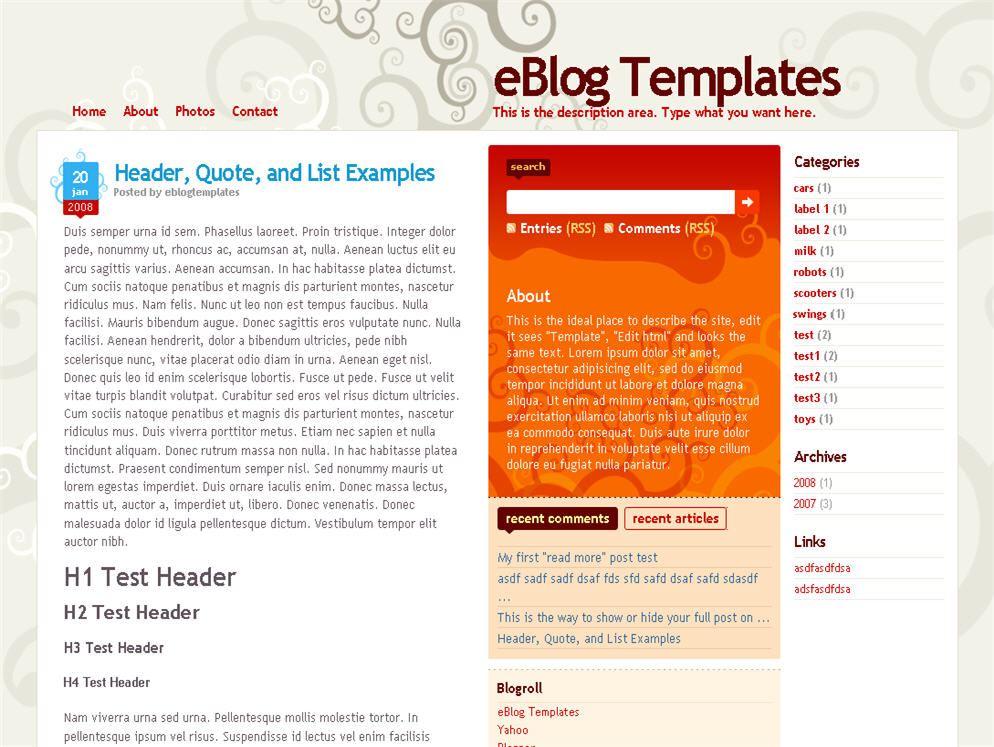
Here’s a nice three column modern artistic Blogger template with some nice bells and whistles. It has a cool search box and “About You” section with a red/orange background along with a custom date/time stamp for each post. This template is only the second one ever to include javascript tabs within the sidebar. That means instead of the page reloading each time you click on a tab, it dynamically clicks over! Check out the live demo to see it in action.
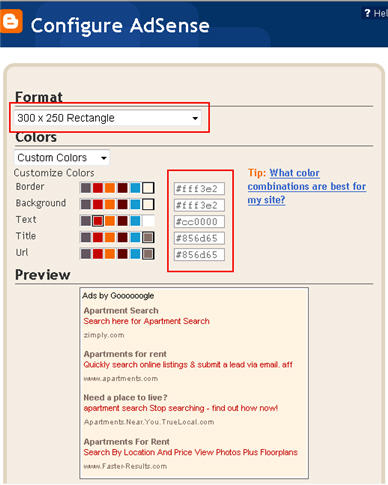
This free Blogger template is also setup for you to easily add Google AdSense and make money from your blog. If you don’t already have Google AdSense, you should read more about how to make money from Blogger and sign-up. The ad format and colors you should use to best match this template are illustrated below. The 300 x 250 rectangle with #fff3e2 for the border and background, #cc0000 for the text, and #856d65 for the title and url. This will make your ad block blend in nicely with the light pink second column.
You’ll also need to setup the header tabs before they appear. Just edit the “top tabs” widget and create the tabs you want. The “Home” tab automatically appears once you create your first tab.
To setup the recent posts and comments cool dynamic tab section you’ll need to paste in your rss feeds. Read this article on setting up your Blogger recent comments and posts section.
The rest of the configuration is pretty straight forward. If your individual blog post date stamp doesn’t show up, you’ll need to make one more change. Go into your Blogger’s “Settings” tab and then click on “Formatting”. Next, change the “Timestamp Format” (it’s the 4th one down) to this format => “Wednesday, February, 2008”. Make sure you change the “Timestamp Format” and NOT the “Date Header Format”. Many people in the past have told me it didn’t work only to find out they were changing the wrong field.
This template was originally designed by Design Disease for WordPress and was converted into Blogger by Blog and Web. eBlog Templates decided to take it one step further and enhance it to include the dynamic header tabs and javascript recent posts and comments tab section.
Revisions
1/6/08 – Fixed the post image alignment issue. If you’ve downloaded the template prior to this date, you can fix this by editing your existing template. Read this post for instructions.
Ready to super charge your blog? Check out our professional premium blogger templates or make money by joining our blog affiliate program!
Want to make your blog stand out from the crowd? I recommend giving your newly downloaded Blogger template a unique and personalized look. Read our Free Blogger Header Images article and find yourself a great custom header image!
If you like this post then please consider subscribing to our eBlog Templates RSS feed. You can also subscribe by email and have new templates and articles sent directly to your inbox.
Trackbacks
394 Responses to “Dilectio”
Blogger Sponsors
- Get Paid to Write Reviews on Your Blog
- Yaro Starak's 10 Great Blog Traffic Tips
- Create Cool Images With a Wet Floor Effect Maker
- Why Most Bloggers Are Stuck - Reporters vs Experts
- Google Friend Connect - New Social Network
- Mashable's "70 Fresh & Modern Blogger Templates" List
- Free Blogger Training Videos
- Improve Your Google Rankings in One Easy Step
- "What Blog Template Should I Make Next?" Contest Results
- Top 5 Free Blog Header Image Websites
- Improve Your Blog in 31 Days – Guaranteed
- Build a Better Online Business with WordPress
- Become a Blogger Just Reopened – 5 Days Only!
- Roadmap to Become a Better Blogger
- Free Image Hosting – Photobucket
- How to Install Google Analytics on Blogger
- Improve Your Google Rankings in One Easy Step
- 50 Excellent Blog Footers
- Free Instant Blog Logos
- Create Cool Images With a Wet Floor Effect Maker
- Lyrics: "It was a useful document. Thank you." Blog Videos (66 comments)
- Birthday: "Hello. It worked great for me, thank you." Blogger Ad Code Converter (846 comments)
- paus88: "situs slot yang sangat gacor yang pernah ada di Asia..." Blogger Ad Code Converter (846 comments)
- paus88: "paus88 is the most exciting slot site that has ever..." Blogger Ad Code Converter (846 comments)
- tokovvip: "situs togel hongkong tokovvip yang terpercaya ini..." Blogger Ad Code Converter (846 comments)
- tokovvip: "situs togel hongkong terpercaya hanya ada di tokovvip..." Blogger Ad Code Converter (846 comments)
- Wadud: "Very very helpful. Thank you." Blogger Ad Code Converter (846 comments)
- Maria: "Very effective it is and It helps a lot for me. Thank you..." Blogger Ad Code Converter (846 comments)
- noob: "We carefully select honey to reach you with the highest..." Blogger Ad Code Converter (846 comments)
- Textile Mentor: "This post is very creative I liked it. keep..." Blogger Ad Code Converter (846 comments)
 Lyrics commented on
  Birthday commented on
  paus88 commented on
  tokovvip commented on
thanx admin
Hi,
Thanks for sharing such a nice template!
Is the template free for use in both personnal and commerical?
thanks for information..
thanx for all this information
even i have my own blog for the Magazines ,movies, games, software, TV Shows, eBooks, Misc
super post, thank you
Hi,thanks for the method to fix Recent Posts/Comments but after I tried it, there were no posts or comments displayed – just the title.
http://sriyany.blogspot.com
Any suggestions on how to overcome this one?
Thanks you very much! I am readed all comment, wonderful ideas!
Thanks a lot for your nice blog post about nice three column modern artistic Blogger template with some nice bells and whistles. Keep it up.
ohh yes nice theme
good… but if we’re add adsense not enough good.. by the way thanks so much
I love this template im using it for my blog thanks i also found out how to add the embed comment form
Hello,
I am use it (tips on read), good post.
Also i am share this page, my social account.
I am following you, since today 🙂
Good luck man !
i love this template too..it’s simple
This is such a beautiful and functional template. I wonder if anyone knows how I could direct the “Home” URL to a link other than the default homepage URL?
thank u for share
Hey there,
I recently downloaded this template but my pages widget doesn’t seem to work. Instead of being horizontal, it is aligned vertically and inside the blog post area. Can you please suggest the solution?
Thanks for all information.
I love this template im using it for my blog thanks i also found out how to add the embed comment form
Thanks you very much! I am readed all comment, wonderful ideas!
Thanks for all information about Dilectio Blogger template, this will be very usefull for all other users.
Dilectio Blogger template is free and has many features, this is great for the users.
a nice three column modern artistic Blogger template,thanks.
I really like what you have received here, certainly like what you are saying and the best way during which you are saying it
Someplace within the paragraphs you actually were able to make me a believer unfortunately just for a while. I nevertheless have a problem with your leaps in logic and you might do well to help fill in all those gaps. In the event that you actually can accomplish that, I will surely end up being amazed.
I nevertheless have a problem with your leaps in logic and you might do well to help fill in all those gaps. In the event that you actually can accomplish that, I will surely end up being amazed.
Hi there! I could have sworn I’ve been to this blog before but after browsing through some of the post I realized it’s new to me. Anyways, I’m definitely glad I found it and I’ll be bookmarking and checking back frequently!
Thanks a lot for your nice blog post about nice three column modern artistic Blogger template with some nice bells and whistles. Keep it up.
Thanks for all great information. I absolutely love this template. I have been using it for a few weeks now, it’s been working great.
Thanks you very much! I am readed all comment, wonderful ideas!
http://www.modamodel.net/?s=elbise
Here’s a nice three column modern artistic Blogger template with some nice bells and whistles. It has a cool search box and “About You” section with a red/orange background along with a custom date/time stamp for each post. This template is only the second one ever to include javascript tabs within the sidebar. That means instead of the page reloading each time you click on a tab, it dynamically clicks over! Check out the live demo to see it in action.
We receive dozens of comments on a daily basis and can’t always respond to each and every one. Please only post relevant comments regarding this Blogger template.
thank you admin.
very nice
thanx admin. very nice template
very nice template. thanks
thank you very much soo
thank you
thank you, good theme
hanks a lot for your nice blog post about nice three column modern artistic
A nice theme, but more needs to be developed.
been a lot of really great theme health thanks to your hands
I use this template. It is very good
Hello;
I think it would be better if the description was great and there were more pictures than visuals
This is really catchy theme above all its free.
http://www.wellmakemoney.com
NICE & VERY GOOD TEMPLATE