Isn't this free template worth at least $1? |
|
|---|---|
| Your support allows me to continue to provide free templates. Any donation is appreciated. |
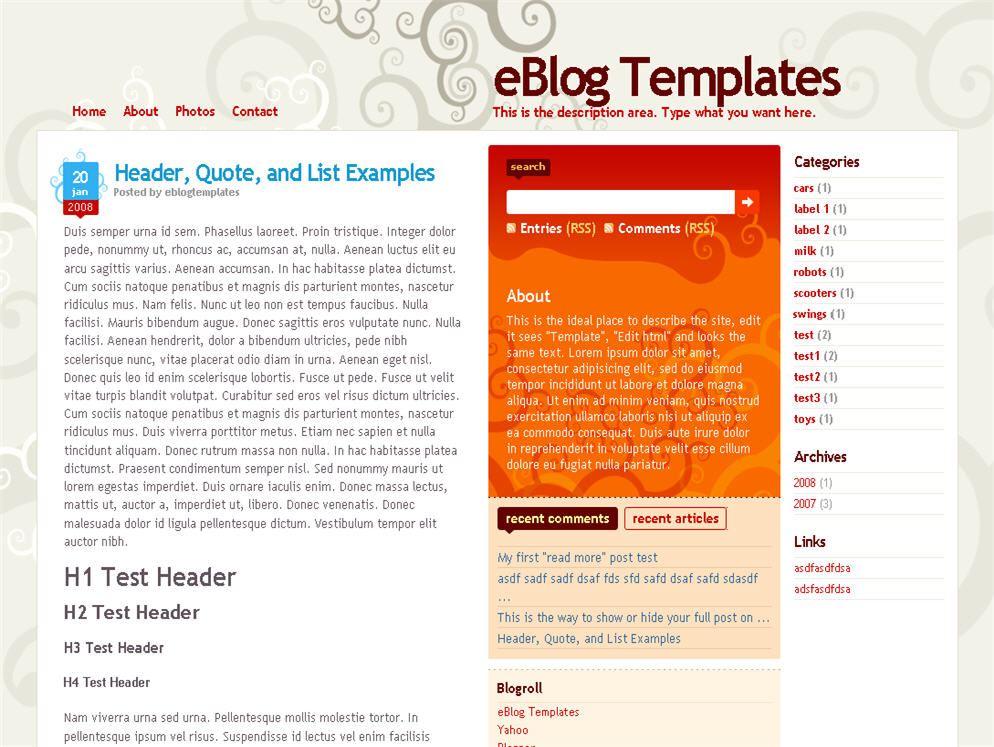
Here’s a nice three column modern artistic Blogger template with some nice bells and whistles. It has a cool search box and “About You” section with a red/orange background along with a custom date/time stamp for each post. This template is only the second one ever to include javascript tabs within the sidebar. That means instead of the page reloading each time you click on a tab, it dynamically clicks over! Check out the live demo to see it in action.
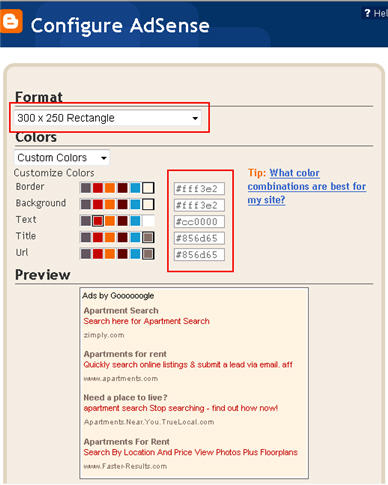
This free Blogger template is also setup for you to easily add Google AdSense and make money from your blog. If you don’t already have Google AdSense, you should read more about how to make money from Blogger and sign-up. The ad format and colors you should use to best match this template are illustrated below. The 300 x 250 rectangle with #fff3e2 for the border and background, #cc0000 for the text, and #856d65 for the title and url. This will make your ad block blend in nicely with the light pink second column.
You’ll also need to setup the header tabs before they appear. Just edit the “top tabs” widget and create the tabs you want. The “Home” tab automatically appears once you create your first tab.
To setup the recent posts and comments cool dynamic tab section you’ll need to paste in your rss feeds. Read this article on setting up your Blogger recent comments and posts section.
The rest of the configuration is pretty straight forward. If your individual blog post date stamp doesn’t show up, you’ll need to make one more change. Go into your Blogger’s “Settings” tab and then click on “Formatting”. Next, change the “Timestamp Format” (it’s the 4th one down) to this format => “Wednesday, February, 2008″. Make sure you change the “Timestamp Format” and NOT the “Date Header Format”. Many people in the past have told me it didn’t work only to find out they were changing the wrong field.
This template was originally designed by Design Disease for WordPress and was converted into Blogger by Blog and Web. eBlog Templates decided to take it one step further and enhance it to include the dynamic header tabs and javascript recent posts and comments tab section.
1/6/08 – Fixed the post image alignment issue. If you’ve downloaded the template prior to this date, you can fix this by editing your existing template. Read this post for instructions.
Ready to super charge your blog? Check out our professional premium blogger templates or make money by joining our blog affiliate program!
Want to make your blog stand out from the crowd? I recommend giving your newly downloaded Blogger template a unique and personalized look. Read our Free Blogger Header Images article and find yourself a great custom header image!
If you like this post then please consider subscribing to our eBlog Templates RSS feed. You can also subscribe by email and have new templates and articles sent directly to your inbox.
2 Right sidebars,3 columns,bloggin secret,Dilectio,Dilectio Blogger,Fixed width,free blogger templates,grey,Orange,Pink,Red,tabs
So what do you think of this Dilectio Blogger template? Any suggestions on how to improve it? Feedback is a valuable way to communicate directly to our staff and Francisco, the template author.
Note: We receive dozens of comments on a daily basis and can't always respond to each and every one. Please only post relevant comments regarding this Blogger template.
If you have questions regarding general Blogger settings, you should visit the Blogger Help site. The Blogger Help Group is also another good resource for finding an answer to your question.
The eBlog Templates Blog Forum is also a great place to look for help from other members.
Can You Have More Sales, Too?Helping over 49,000 businesses like yours raise profits and build customer relationships using AWeber's opt-in email marketing software for over 10 years.
Take a Free Test Drive today!
Hi! Thanks for this awesome template. I’ve been messing with it a bit and I so far only have two problems. I looked at a few of the comments and I’m sorry if this has been answered already. First, I would like to change where it says “recent articles” to say “recent posts” and even if I change it on the layout page it won’t change on the site. I looked in the html and I can’t find where that is defined. I also didn’t find an image that was defined as that. The second thing is, I don’t want it to have that “Subscribe” part at the bottom. If you know how to get rid of that that would be great. Thanks again for a great template!
i have read all the comments for this template.
as many here i am too having the same problem of words getting wrapped around images..
the words r neither going down or up..
they r just going here and there……
i mean simply getting wrapped up with the images…
hence most of my posts now have distorted and all words and images have messed up..
David could u plz help with this..
i see that u answered everything except this problem…
plz see to this..
this takes away the perfectness from the template…..
PLZ HELPPPPPPPP…..
In response to Yogesh Goel’s question. I was having the same problem. If you have a picture smaller than the width of the post area, it’s going to wrap funny. Make sure that your pictures are big enough to fill the space. In fact, make them bigger and the template automatically puts them at the right size. I use this tag for putting pictures in my posts rather than using blogger:
If you use that, when your guests click on the picture they will be sent to the full size copy. I had a picture yesterday that was portrait sized and as long as the first word that is wrapping is longer than the extra space it won’t wrap. I had to put “—” with the word to keep it from wrapping. It’s not a terrible way to deal with it, much better than trying to change the HTML. I hope that helps!
Ok, that is weird, it didn’t show up…I will try again but if it doesn’t show up this time I’m sorry!
<a href="http://example.com/example.jpg"><img src="http://example.com/example.jpg"></a>Great theme, and you did a great job converting it to Blogger platform.
I just want to ask how you add AdSense before Blog Entry? Did you add the code manually?
Thanks,
Sjarief
Hi, Amazing Templete i use this templete
this is the Site: http://mp3gallary.blogspot.com/
Thankz in advance!!
Hi David,
the text in my posts wraps around the photos. How do i get it to center underneath the photos?
I have added ” Read More ” feature to my blog that is also coming with images not below images.
images not coming in center ( which is there in post preview )
any guidelines ?
i have the same problem with photos too. i cannot put them in the center..
@BollyScans is it difficult to add ”Read More ” feature to my blog?? Can you show me as soon as possible??THANK U!!!!!!!!
@ JIM
have you tried adding “Read More…” feature , please try again with this
http://www.jackbook.com/blogger-hack-blogspot-hack-blogger-templates-customizing/related-posts-entries-on-blogger-blogspot
how do i use it on blogger.com ?
hi david… i have just applied your template to my blog and I observed that my uploaded pics inside each post doesnt center and in fact, gets positioned at the left and is text wrapped with the next paragraph. where should I edit this inside the html code? thanks in advance.
you can view my blog at http://hoboneil.blogspot.com, and have even posted a url for the dilectio website. thanks again and cheers!
Thanks…!
What dedin gülüm
Thanx for blogger themes very good and google adsense inside
awsome thanks blogger, themes.
nice visual nice adsense position
thanks.
dinle
dinle
I tried to install Google analytics on this theme and it did not work. Has anyone had success? Can anyone explain how? Great theme and thanks for your help.
hello, how can i delete 2nd and 3rd column? i tried several times but failed since im new(noobies)
Great blogspot themes…
My Web site
goodsağlık, insan vücudu, hastalıklar, tedaviler
karınca yumurtası
Hi, I was wondering if anyone has had any issues regarding the date showing up on their blog posts. So far, I have just the blue ticker without the date showing in the box. Can someone please help me?
Here’s my blog so you can take a look at the issue on the most recent post.
tennismobster.blogspot.com
thx for any help you can give me. Btw, love this template. I wish that the Wordpress theme “The Morning After” was also available for Blogger. Has anyone seen this theme out there for Blogger?
Got the same problem with the date format, how did you get it fix?
Hola all,
Dilectio is a very beautiful template and is use by many of my friends, but there’s a little bit of problem when images were to be used. Problem like Miriam (read above comments #22) and the rest were facing.
To fix that little problem please refer to this post, Solving ‘Dilectio’ BloggerTemplate.
Hopefully it will solve that text-wrap around images problem for those who are using Dilectio.
See you around. Happy New Year. I wish you peace, prosperity and much joy in 2009 and beyond.
Greetings and lots of love from Malaysia.
@ArahMan7, thanks for pointing this out. I finally got a chance to fix this so the latest download now works with image alignment. The post you are also referring to is exactly what the problem was. Thanks!
Hi ArahMan7. Thanks for your aswers! In my test blog (Blogger) the date don’y show up. I just read your post, added the code but no way for me.
BTW when I tried to change the background image I have a piece of sh*** :$
I love this template but really I need the date show up and replace the background image. Do u know where I read more about this issues o can give me any suggestion to solve them?
Thanks in advance and grettings.
Hola David,
Thanks for the head-up David. Really appreciate it very much. And I’m glad you’ve it fixed too.
See you around David.
Greetings and lots of love from Malaysia.
I want to ask “how can I fill up the top tabs element with my post”??
This very good, templates
Great blogspot themes…
Hi,
I choose “Comment Form Placement” type as “Embedded below post”, but it doesn’t work. I don’t see any form below my post???
When I click on “post comment”, it adds “#comments” to the URL, just that!
I appreciate if you can find a solution.
Tnx!
I have used your gorgeous template for my Telugu Babes blog.But ‘Recent Articles Recent Comments’ widget is not working. pls help me.
Telugu Babes!
Iaxmi,
Go to the layout, open the widget and add the feed URLs of your posts and comments:
http://telugubabes.blogspot.com/feeds/posts/default
http://telugubabes.blogspot.com/feeds/comments/default
Regards!
Post a comment not working on this template? i cant post comment. Can anyone help on this please.
Have a great day!!
Hola iclfan,
I can leave a comment on your blog. What make you say the comment link NOT working?
Have a great day to you too.
Greetings and lots of love from Malaysia.
Hey let me correct my words here, it shows the comment but not in the form I want (embed below post). What is the reason it is not showing the comment form?
Hola iclfan,
That’s much better. Next time whenever you wanna ask a question (maybe somewhere else) please be specific. Give as much info as possible. I’m sure your question will be answered the way you want it.
I think you’re asking about inline comment? It’s very easy to do if you’re using Blogger default templates. All you’ve to do is to go to the Blogger in Draft. After signing in with your username and password, you will be taken to your Dashboard. From there go to Settings –> Comments –> Comment Form Placement. Then select Embedded below post. Save and that is it.
For others who are using customized template (like the one you’re using now – Dilectio), first you do like the above. After saving it, go to your blog and see whether the inline comment is in place or not?
If not, this is what I do on my template. Whatever you do, please backup your template.
From your Dashboard, go to Layout –> Edit HTML –> Expand Widget Templates. Search for this string of codes,
<p class='comment-footer'> <a expr:href='data:post.addCommentUrl' expr:onclick='data:post.addCommentOnclick'>Post a Comment</a> </p>Change it to;
<p class='comment-footer'><b:if cond='data:post.embedCommentForm'> <b:include data='post' name='comment-form'/> <b:else/><a expr:href='data:post.addCommentUrl' expr:onclick='data:post.addCommentOnclick'>Post a Comment</a></b:if> </p>That’s it. And save your template.
But please remember, your template may be tweaked differently. Basically, that was the line of code I have to add to make the inline comment form to appear.
If you’re still not clear about it, I shall make a post specially for you.
Greetings and lots of love from Malaysia.
I have the same problem as iclfan.
I choose â��Comment Form Placementâ�� type as â��Embedded below postâ��, but it doesnâ��t work. I donâ��t see any “leave a comment form” below my post???
When I click on �post comment�, it adds �#comments� at the end of the URL.
Now, I have chosen pop-up option.
Any idea?
http://abdullahozcelik.com
Hola Abdullah,
The answer has been given above or you can refer to my post to experience the best blogger support.
Read it carefully and I’m sure you can do it.
Greetings and lots of love from Malaysia.
Hola iclfan,
I did leave a comment for you, but I guess Akismet thought it was a spam and block it.
For now you’ve to wait for the BlogMaster to unblock the comments as a reply to your question.
Anyway, I’m doing a post about Inline Comment on Web Directory.
Greetings and lots of love from Malaysia.
Hi ArahMan7,
Thank you for your solution! Now, I can see my comment window embedded below posts.
I have another rather insignificant visual related question.
0 comments:
——————————–
Post a Comment
—————————–
How can I remove the 2nd line under the “Post a comment” sentence?
Thanks!
Hola Abdullah,
I’m glad you’ve got your inline comment. ArahMan7 aims to please his friend.
To remove the second line. Find for this string of codes;
/*-- (Comments) --*/#comments h4 {
font-size: 16px; letter-spacing: -1px; margin: 0px 0px 5px 0px; padding: 10px 0px; color:#660000; border-bottom: solid 2px #660000;
}
Change it to;
/*-- (Comments) --*/#comments h4 {
font-size: 16px; letter-spacing: -1px; margin: 0px 0px 5px 0px; padding: 10px 0px; color:#660000; border-bottom: none;
}
I hope it will work for you.
Did you know that ‘Add a Gadget’ has been incorporated with iGoogle? You can add as many widgets as you want. Just browse through the categories. I’m sure you’ll find what you want.
Greetings and lots of love from Malaysia.
Does someone know Blogger has an additional feature to add a Star Rating Widget in each of the post-footer? And also “delicious, stumbleupon buttons widget” would be great.
ArahMan7,
Your suggested change removed both lines, not only 2nd line.
I didn’t understand what you mean by “Did you know that ‘Add a Gadget’ has been incorporated with iGoogle?”. I just see 19 Basic gadgets when I click on “add gadget” button on page elements view.
I try to add “Star Rating” feature to my posts: I edit my posts section, click on “Show Star Ratings” but it doesn’t work???
Thanks!
Hola Abdullah,
When you’ve more than 1 comment, all line will be deleted. I suggest you keep the original codes. Sorry, it didn’t work.
When you click ‘Add a Gadget’ there are many widgets to choose. Not only the basic one. That’s why I told you to browse other categories.
Try to click ‘Featured’, ‘Most Popular’ and the rest. We are used to use ‘Basic’, we overlooked the rest.
Greetings and lots of love from Malaysia.
I have applied this template on my blog. Just one problem, the mid section where my blog contents is, is flushed to the left of the webpage. Can someone tell me how to centralise it.
My blog address is http://www.punggolplus.blogspot.com
Thanks.
Hola Jessica,
I don’t see anything wrong with your blog. Can you take a screenshot of your blog and post it here? Or you can just post the image’s url here.
Greetings and lots of love from Malaysia.
Hi Arahman7
Thanks for your prompt response.
The link to the screenshot is here: http://www.flickr.com/photos/10544943@N07/3252781925/
Thanks.
Hola Jessica,
The only thing that is misplaced is the Nuffnang ad at the bottom on your left sidebar. It is way too big. The sidebar width is only 320px whereas your Nuffnang ad width is 336px.
My guess, that’s the cause. Try using smaller ads.
Greetings and lots of love from Malaysia.
Hola Jessica,
You mean the empty space on the right?
I guess you must be using a Laptop with 1280 x 800 pixel resolution. If you’re, then it’s normal. On my LapTop with the same resolution, there’s an empty space on the right.
On my desktop with 1024 x 768 pixel, your blog looked real good. No empty space.
Right now both my desktop and laptop are on. Your blog look ok on my desktop, but on my laptop there’s an empty space.
There’s nothing to worry Jessica. That’s normal.
Greetings and lots of love from Malaysia.
Hi Arahman.
Thanks for your advice about the nuffnang ad. I have adjusted that.
Here’s another screenshot of the bottom of my blog – http://www.flickr.com/photos/10544943@N07/3253697470/
The end credits are outside the perimeter of the main body of the blog. Is that normal? I am thinking that it should be in the center of the screen, together with the main body of the blog.
Jessica
Hola Jessica,
On my Laptop, it is situated at the topmost on the right (at the empty space). See image, Jessica’s Blog.
But on my desktop it is situated correctly, at the bottom on the left. See image, on ArahMan7 GooglePages.
I can’t say for sure whether it’s normal or not coz I can’t explain it in technical term why it happened that way.
Greetings and lots of love from Malaysia.
Hi Arahman
Thanks for the time and effort. I appreciate it.
:]
Hola Jessica,
It’s ok. I aims to please my friends. You’re my friend, aren’t you?
Give me a call (email or whatever) if you needed any help and experience the best Blogger support at your fingertips.
Greetings and lots of love from Malaysia.
Thanks buddy. I will.
Goodnight.
Sleep tight to you too.
Greetings and lots of love from Malaysia.
Hi there,
I absolutely love this template. I have been using it for a few weeks now, it’s been working great.
There is however one thing I would like addressed if possible? It’s regarding the blog archives.
If I choose the Hierarchy format and choose to display the post titles, it is not displaying the titles beneath the dates. Instead it just lists all the posts in entirety in the body area on the left. This makes it extremely difficult for readers to skim through the topics to the post that interests them.
If you could let me know how this can be corrected to display the post titles beneath the date. I would very much appreciate it.
Thanks for the great work!!
Lucia in Canada
Hola Lucia,
Now I understand what do you mean. To list all your posts in Archive, there are 3 ways to do that. Either you choose ‘Hierarchy’, ‘Flat List’ or ‘Dropdown Menu’ the result is still the same. It will display all posts entirely.
As for me, I listed all post titles in ToC (Table of Content) – see it in action on Web Directory to experience the best Blogger support at your fingertips,
If you like it that way, you can implement it by reading Table of Content on Web Directory.
Hope it will be in some sort of help to you.
Greetings and lots of love from Malaysia.
ArahMan7,
Thanks for your reply to my question regarding archiving. The “Heirarchy” setting to display the titles is broke in this template, and that is what I am hoping to get fixed. I took a look at your ToC suggestion, but I don’t think that will work for me. I appreciate the suggestion, though!
Thanks for all your hard work answering posts regarding template. Take care,
Lucia
ArahMan7,
Regarding the inline comments fix, I had the same problem, used your correction code, and it worked like a charm! Thanks so much!
Lucia
Hola Lucia,
I’m glad your inline comment worked out great. Thank you for making me grinning from ear to ear this fine evening (it’s 6.21pm over here).
About your archives, give me some times to work it out. Actually I don’t understand what do you mean. I’m going to do a bit of experiments and tell you the outcomes later.
See you later, my friend.
Greetings and lots of love from Malaysia.
What is wrong with my site? http://gafaswayfarer.blogspot.com
The background in the widgets dont appear??
Thnx !!
Hola Moda Wayfarer,
Can you be more specific? Which widget are you referring to?
Did you know that your Google calendar is way too big for your template? Sorry to say, I don’t see why Google calendar has to be there in the first place?
Greetings and lots of love from Malaysia.
Hello,
I am setting up a new blog, using this template, and the post dates will not display. Any suggestions?
Thanks,
Ray
Hola Ray,
Please read the instruction above (below how to set-up your AdSense). I’m sure if you read it carefully you’ll get to set-up your date correctly.
Greetings and lots of love from Malaysia.
I love this Theme but I dont know how to put inlink adsense in m post.. Please Help
I want to embed in in all my blogspots
julius
http://www.earlyblogger.com/
Hola Julius,
Read my post here, AdSense in Blog’s Post. For your information, this post was published on Wednesday July 18th, 2007.
Hopefully that post will be in some sort of help to you.
Greetings and lots of love from Malaysia.
Great Template.
My friends tryed to put some comments but they aren’t abble to do it…
Hola Toni,
I don’t what’s wrong, but I CAN leave you a comment on your blog as you can see the image here, ArahMan7 on GooglePages for Toni.
Greetings and lots of love from Malaysia.
Hola to all friends of David (the founder of eBlog Templates),
Welcome to Dilectio’s comments section.
To ensure the smooth running of this comments section, please
✔ Search or read before you post!
✔ Include your blog’s URL.
✔ Keep questions on topic.
I’m sure you will find the above tips useful. That’s will be the case if you take it in a positive ways. Whenever you wanna ask a question, please be calmed and give as many information as you can about your problems.
Believe me, it works both ways. Your questions will be answered promptly and to the point, the way you wants it to be answered. Other Bloggers (more knowledgeable than me) who gonna answer your questions will not be wasting their times trying to figure out what you are trying to say actually? In a bad case scenario, your questions might not be getting any answers! Leaving you high and dry wondering why you’re not getting any responds?
That’s all for now, folks. Keep the questions coming!
Greetings and lots of love from Malaysia.
p/s I’m sure David (the founder of eBlog Templates) enforce a zero tolerance policy on spam!
@ArahMan7, thanks for the comment and support. Everyone, please listen to him because most of the time, your questions have already been answered. Don’t be lazy and just read the other comments.
Thanks ArahMan7
When I edit my template,insert xml code of Dilectio Template and make “save template” appears the next information:
“We were unable to save your template
Please correct the error below, and submit your template again.
The new widget id “Recent-Posts-Widget1″ is invalid for type: Feed”
and
“Widgets are about to be deleted
Please confirm that the following widgets should be deleted. All the widgets’ configuration data will be lost.
* Feed1
* BloggerButton1″
What I’m doing wrong? Sorry if you already aswered this question but I couldn’t found it.
Thank you!
Hello, I tried to fix the html code as you indicated before with the comments issue, I still can’t post any comments, neither my friends… I would like to know what to do??? this is the comments code that I have…
I really hope you can help me, I love this theme!
Hi Marysabel,
Regarding your problem with the comments. The instructions to fix this is in ArahMan7’s posting dated “Jan 26, 2009, 9:36 am”. Is this what you did to try to resolve the problem?
I had the same problem and ArahMan7’s instructions fixed it. So it should work.
Lucia
@Venus as a boy: it seems like Blogger has been making some changes recently that don’t sit well with customized templates.
A solution I found for your problem would be to simply change any troublesome widget ID’s to “[type][#]“.
For example, “Recent-Posts-Widget1″ is a Feed, so rename it as “Feed1″.
Go ahead and confirm deletion of widgets; that’s fine. It makes sense – you made new widgets and left out old ones.
(Also, if you end up with a weird bX-something error after doing that fix, a solution is to just increase the numbers of certain widget IDs from 1 to 2, particularly Blog/BlogArchive. Don’t ask; I’m equally confused.)
@ModaWayfarer: it looks like Photobucket, which hosts Dilectio’s image files, has trouble from time to time. I’ve had this happen to me as well. You can just host the images yourself, and change the links within the template accordingly.
Hi Lucia, I tried all he said here, but nothing worked.. I would like to say that I’m using this template with blogger… I tried to change the code and nothing happened, the settings and nothing… So I would like to know what the heck I have to do next, hahaha, this is driving me nuts. =(
Hola Marysabel,
I don’t know why but all template tweaking must be done in Blogger in Draft.
Maybe like Stephanie said, Blogger has been making some changes recently that don’t sit well with customized templates.
Just hang in there.
Greetings and lots of love from Malaysia.
I made it and now the answer is:
The new widget with id “SearchBox” has an invalid type: html
Ok I went back to the Draft Blogger and did everything you indicated again, and now every time that I go to my blog and I try to post a comment, ok it directs me to the post comment page, and all the sudden i see the comment box but it disappears…
Hola Marysabel,
I’ve just ran a test on my test-blog. Everything turned out A-OK.
Looked into your Page Source and I noticed you’ve TWO Post a Comment on your template.
My guess is that you’ve change the codes on the wrong place. Noticed that on Edit HTML mode there are two lines of
<p class='comment-footer'>Please choose the correct syntax.One more thing, did you change to Embedded Comment Form below post in Setting?
Do it slowly, I’m sure you’re able to solve it.
Greetings and lots of love from Malaysia.
Hola Marysabel,
I’ve just ran a test on my test-blog and it turned out A-OK.
On your Page Source, I see that there are two lines of Post a Comment and my guess you’ve changed the codes in the wrong place.
On Edit HTML mode there are TWO string of Post Footer. Read carefully and choose the correct syntax.
Greetings and lots of love from Malaysia.
p/s this is my third comments. two got blocked.
ArahMan7,
I appreciate all the help you are giving all of us. I’m having the same problem that Marysabel had, and I’ve been doing just as you suggested for her. I’m in the draft blogger, I have two feed errors that come up where I change the name to either feed1 or feed2, and then I have two HTML errors that I change to HTML1 or HTML2. After the second change, I get the blogger error: bX-v7bdaz.
I’m trying everything that you have suggested in these helpful posts. I changed to a classic blogger template, I removed any extra widget that I had installed…I still can’t get this to work.
I’m sure it has to be something simple, but this is day 2 of trying… I love the template, and really want to make it work.
Thank you for any suggestion you can offer!
Hola Stepalicious,
For your information, David (founder of eBlog Templates) wrote an awesome post about bX Errors. You can read the post How to Fix them, here.
I’m sorry Stepalicious. I wish I could help you but I couldn’t make myself clearer than the post, About Inline Comment.
Hang in there, I’m sure you can solve it eventually. eMail Me (email address can be found on my blog), maybe we can work something out.
Greetings and lots of love from Malaysia.
p/s Dilectio Template is beautiful and I would like to know your blog URL.
How can I modify my blog post section so that the links open in new window?
It takes too much time to add target=”_blank” for every link in HTML mode while creating a new post!
Tnx!
http://abdullahozcelik.com
Hola Abdullah,
You cannot use CSS to open a new window. CSS is for styling but you can use javascripts.
I Googled “open in new window javascript” and I got about 9,140,000 results for open in new window javascript. (0.15 seconds)
There are so many javascripts you can choose from like on HTML Goodies, or on About[dot]Com.
Greetings and lots of love from Malaysia.
hi, y have the same error “The new widget id “Recent-Posts-Widget1″ is invalid for type: Feed”
pleese a solution?
y realy want this template :s
Hola Jorge,
Don’t worry. You’re not the only one having this problem. There are many other Dilectio Template’s lover who are having the same problem as yours.
I’ve been trying my best helping out Stepalicious (see above) but I eventually ended up with the dreaded bX-bliced error.
It’s not your fault. As Stephanie (see above again) put it, it seems like Blogger has been making some changes recently that don’t sit well with customized templates.
Nobody have these problem before, but somehow rather than making it easier, the Blogger team have made some changes making it difficult to some users.
Help yourself to Blogger Help Group and read all about the dreaded bX-bliced problem.
Until then, chill down and wait for the Blogger Team to rectify their problem.
Greetings and lots of love from Malaysia.
ok thanks man.. i will wait for it..
No problemo (using Arnold voice in Terminator 3?), hehehe!
And,
Greetings and lots of love from Malaysia (that’s my very own sweet voice,
)
cualquier progreso sobre la solución de este problema ojala se publique
Yeah, hopefully so and soon.
I’m sure there are many others praying any progress on resolving this problem hopefully will be published,
Salam dari Malaysia.
I’d like to know how to remove the “search” box and code, anyone know how?
Hola Lucia,
in Edit HTML with Expand Widget Template checked, search for the word Search. There will be several string of code. Follow the step below;
1. On CSS, delete all codes that begin with .Search
2. On sidebar wrapper, change b:widget id=’HTML1′ locked=’true’ to b:widget id=’HTML1′ locked=’false’
3. Save your template
4. Then move on to Page Elements and you’re now able to remove Search Gadget.
Hope this help.
Greetings and lots of love from Malaysia.
ArahMan7,
You’ve rescued me again! Works great!
Lucia
Hola Lucia,
Thanks for your kind words. Gee, you made me blushed and I can’t stopped grinning from ear to ear. I guess my brothers and sisters must be wondering what’s going on?
Anyway, thank you for starting my day with a smile and I’m sure today gonna be a great day than yesterday.
Greetings and lots of love from Malaysia.
I have the same problem as chat.noir with the date format. I Tried every one of them and nothing works.
Please help me!
BTW i’m using the french version of Blogger.
Sorry i’ve got the answer after looking to older comments.
thanks
Hi Lutteuse Sumo. Wich old comment help you with this problem? I tried the fix suggested friendly by ArahMan7 but intead don’y work for me.
Thanks for your attention.
Lastima que todavia no se soluciona el problema de “El código ID del nuevo widget “Recent-Posts-Widget1″ no es válido para este tipo: Feed”
ya que yo ya quisiera usar mi tema de dilectio completo como este no como el que tengo en mi actual blog guatezona.blogspot.com ;s
I’m facing problems with the comments. I can’t post any comments if the comment form placement is set as embedded below post. The full page and popup window works fine. How can i fix this?
is i dont wrong in dis tutorial yo could fix that http://web-directory.blogspot.com/2008/12/solving-dilectio-bloggertemplate.html
Salu2
Hey! Thanks a ton for the great template! I’m using it on my blog page(as linked to my name). I love the colors..and the design goes with the title of my page.
I just have one question. I’m not able to configure the recent posts and recent comments tabs! I am getting a blank window when I click on the Edit buttons for those two features! So, where do I enter the posts and the comments feed when I do not even get the “Edit” dialog box?!
Please reply.
Hola Kadambari,
Recent posts and comments has already been configured correctly. You don’t have to do any editing, but you can drag it anywhere you want it placed (on Page Elements mode).
Anyway, what are you trying to edit (recent posts and comments)?
Greetings and lots of love from Malaysia.
hi arahman
I’m having the same problem with the recent posts & comments as kadambari on my blog http://www.punggolplus.com.
I get the same blank edit box. I remembered that there should be a field to key in the rss feed in but it’s not happening.
Pls help.
Hola Jessica,
I don’t know what goes on lately, but Blogger had changed a lot of things lately.
As in Kadambari’s case, I guess she’s lucky because she had used the Recent Posts and Recent Comments gadget despite getting a blank page on Page Elements mode. For now she’s able to use the gadgets. Unfortunately, she can’t edit it because she will be getting a blank page but she’s able to move it around.
For your case, read Nitecruzr’s post, Atom/RSS Feeds Are Empty.
If you browse around Blogger Help Group you will notice Blogger’s users are getting a lot of problems lately.
This is what a Blogger Employee said about it, Recently we changed the way our template editor accepts certain third
party code, so that it is now less tolerant of certain templates. We
did this because we had seen a lot of data corruption due to ‘bad
templates,’ and we are trying to stave off some of these issues pre-
emptively.
You can read more about it here, Something is Broken.
Hope it will enlighten you.
Greetings and lots of love from Malaysia.
Hey Arahman..
Thanks for your ever prompt reply.
Like Jessica has mentioned..our problem is this..
When we click on the “edit” option on the recent posts/ recent comments widget box, a configure feed dialog box opens. (like shown above in description and tutorials). But, the box is blank and there is no place to enter the comments and post feed. Here’s a snapshot of what the box looks like..
http://picasaweb.google.com/kadambari699/Spirals#5315493166119730770
Please let us know..what’s wrong.
Thanks again!
Hola Kadambari and Jessica,
I’ve already replied to both of your posts, but my comment is awaiting moderation. Please wait for David (eBlog Templates’ founder) to release my reply. Sorry about that.
Greetings and lots of love from Malaysia.
I continued unavalible tu put that template on mi blog :s
Hola my friend Jorge,
What seem to be the problem? You continued unavalible tu put what in that template? If you meant the Recent Posts and Recent Comments widget, try using Hans of Beautiful Beta Widget Installation and Download widgets.
Hope that will enlighten you.
Greetings and lots of love from Malaysia.
no, i mean to install the template.. y have the famous feed1 id error
Hola Jorge,
Sorry, I can’t help you with that. Seem like Blogger had made a lot of changes lately. Here’s what a Blogger Employee said about it,
Recently we changed the way our template editor accepts certain third
party code, so that it is now less tolerant of certain templates. We did this because we had seen a lot of data corruption due to ‘bad templates,’ and we are trying to stave off some of these issues pre-emptively.
You can read more about it here, Something is Broken.
Hope this will enlighten you.
Greetings and lots of love from Malaysia.
Thanks Arahman. Again for your magic solution to every problem.
I tweaked my template around based on all the suggestions you have given above and it works great!
I am using a different “import feed” widget for my recent comments and posts because the default template feed dialog box is empty. Anyway, I’ll try to get other third party widgets for this purpose.
Thanks again.
Hola Kadambari,
I’m happy to hear it works great for you and thank you again for starting my morning with a smile. I’m sure today gonna be another great day.
Greetings and lots of love from Malaysia.
I serve to please,
~ ArahMan7
I just wanted to say that I love this template. Thank you so much for developing and offering such a fabulous looking blog!
I love this template! I’m currently using it on a dummy site, but will get it up soon. Was wondering if it is legal/ok to change the color of the orange box, or if you have other color options somewhere?
Also, how would I do a footer like the one at the bottom of this page with many columns?
Thanks for creating this for blogger, and for your quick feedback! That’s the sign of a good template.
I’m having an issue with the Recent Posts/Comments widget. It seems that an extra table of sorts has been created that I can’t seem to get rid of. When I click the alternate tab, it bounces up, and when I click back to the original tab, it goes beneath the list again.
I’ve tried just about everything. I don’t know what to do to get it to function normally.
Best templates i have seen for blogger, thsnks
Subscribe to RSS headline updates from: Powered by FeedBurner
Hi..i love the template but im having difficulties with the date..it didnt show up and ive read thru the comments and didnt find any solution for this problem. What changes do i have to make for the timestamp to show on my posts? Ty
@E –
Go to Settings > Formatting > Date Header Format.
Set it for: Monday, April 6, 2009.
ty for the reply. I tried it but it didnt work..it still didnt show on my posts..do i need to do same adjustment on the page elements under blog posts edit?
I imagine that changing the one setting would automatically change the other. In the event that it does not then yes, you should change the setting in your Page Elements in the Blog Posts section as well.
oo i tried using Settings > Formatting > Timestamp and adjust it to Monday, April 06, 2009 and it worked!..tyvm hehehe
this is really a nice template and planning to use it. the problem is for recent post and comment section. im really fed up with this problem because there are other template that have these problems too.
but every problems must have solutions. for me, i just learn to hack blogger from a few websites that teach us on how to set up recent post and recent comments. just add to ur blog and problem solved.
salam mr ArahMan7, can u teach me on how to increase the width of the main post and add read more options?
i really appreciate ur help.
@ Kristopher – Still working on your extra table on your Recent Posts/Comments widget. Will email you after I figure it out.
@ wan18 – Good for you. I’ve a lot to learn too. By the way, which template you wanna increase the width? For now, try finding “Outer Wrapper” and “Main Wrapper” and increase the width that suited your need.
Read more – I did published two posts about it long long time ago. You can read it here, Summarry/Expandable Post and Another Summary/Expandable Post.
Hope it will answer your questions.
Greetings and lots of love from Kuale Kangsor, Malaysia.
Recent articles and post are working at my blogspot civitasprzedborz. Blog in PL lang – sorry
.
Check before you change your source…
Info about sources of dilectio temlate – see footer.
Attention! All dilectio changes are not professional. Use it at your own risk! But it works on mine
Hola Brunon,
Is your Komentarze tab and Najnowsze tab really working? I’m sure would like to learn how did you do it?
Thank you for your head-ups. You’re always welcome.
Fyi, we are not professional, but we help and learn from each other to make Dilectio template user friendly via comments like these. We will be very grateful if you can contribute and share your expertise with us here.
Greetings and lots of love from Malaysia.
Hi again! Yes it works (Komentarze – Comments, Artykuły – Articles/Posts). “How to’s” steps to make it working I’ve already published in http://civitasprzedborz.blogspot.com/2009/04/dilectio-blogger-recent-postscomments.html thread. See you online next time. Best wishes for all. Have nice “changing dilectio” time
PS
Maybe on Sunday I’ll prepare a clear “dilectio” code to install (without PL language and widgets).
Thanks a lot. “Step by step” instruction how to make it working on my blog in “Blogger templates” article category. Best wishes 4all.
Let me asked again, “Is your komentarze tab and najnowsze tab really working?”
When you click the komentarze tab or najnowsze, it was suppose to show snippet of your recent comments or recent post.
But when I clicked yours, nothing happened. I don’t know how many komentarze tab and najnowsze you have on your blog but it’s located between your Przedbórz nad Pilicą and Google AdSense.
Anyway, thank you for sharing.
Greetings and lots of love from Malaysia.
i had use this template without any problems, thanks to the guidance from ArahMan7. u had help me a lot and i really appreciate it. please come to my blog if u have free time..
Wan – I can’t see your recent comments/post module under (as it can be seen in the original wordpress dilectio theme). Did you “turn off” the widget?
ArahMan7 – It works (recent comments/articles) on my blog correcty (Firefox). Tommorow I’ll send a link to some screenshots. As you can see there is a .js script inside the “new” Recent Comments/Articles used in my blog (see Blogger templates Dic\lectio thread in it). This code is published as a hot link on the free server. Maybe it’s the reason why some troubleshoots could be seen. I don’t know it yet. But I’ll make some test on my next testing blog soon using wow-dilectio-blogger templates as it was created (all files with the images and java scripts should be published as a hotlinks…). Greetings from Poland. Bunon.
P.S. Please contact with me in this topic via email – it makes me easier to contact a little “fast”
Brunon ~ i had same problem as Kadambari and Jessica. the recent comments and recent posts module only give a blank box when i click on it in the page elements section. i cannot use these at all. so i learn to setup recent comments widget through this website:
http://www.bloggerbuster.com/2007/08/recent-comments-widget-update-this.html
this widget is placed at the sidebar of my blog, not at the default position. i didn’t use recent posts widget. i hope this explanation would solve ur curiosity.
Arahman7, I need you to work your magic, I need your help again!!!
If you check out my site, you will see that the ‘recent comments’ does not display the most recent posts. You will see from the bottom left of the main blog, where I have implemented another Feedburner feed of my blog, that it works fine there.
So I went to the ‘troubleshooting’ section of feedburner and ran one of its tests. It came back with the following change suggestions. Problem is, I don’t know really how to make these changes! Help!
————————————————–
This feed is valid, but interoperability with the widest range of feed readers could be improved by implementing the following recommendations.
*
line 26, column 95390: description contains bad characters [help]
… om/opethestylist”><img title=”.:OP?Style:. ” src=”http://s3.amazon …
^
*
line 28, column 0: description should not contain onmouseover attribute [help]
</div><img src=”http://feeds2.feedburner.com/~r/Canada-Mom-Deals/~4 …
*
line 28, column 0: description should not contain onmouseout attribute [help]
</div><img src=”http://feeds2.feedburner.com/~r/Canada-Mom-Deals/~4 …
*
line 28, column 0: description should not contain onblur attribute (2 occurrences) [help]
</div><img src=”http://feeds2.feedburner.com/~r/Canada-Mom-Deals/~4 …
Ah my dear Lucia,
I’ve been trying to figure out Recent Posts/Comments widget for quite some times now. Several of our friends on this Dilectio’s comment section have been asking the same question, but I’ve yet an answer for it.
Rest assured, I shall keep on finding the solution coz I’m curious to know about it too (even though I don’t use Dilectio).
Anyway, thanks for the kind words.
Greetings and lots of love from Malaysia.
Can someone try to comment on my blog?
It seems the post a comment link is not working.I already tried some of the advices written here but still it doesnt work.
Please kindly check it out and give me some advice.
My blog is here: http://weddingsinthesky.blogspot.com
Thanks.
Hola Ron,
Have you checked
1. Dashboard –> Settings –> Comments – enable (checked) to allow all comments.
2. Dashboard –> New Post – below the editor, clicked to allow Reader Comments.
Hope that help.
Greetings and lots of love from Malaysia.
Thanks for the reply ArahMan7
I checked those options and all are fine and ok.
Please help
I would like a fix for the comments part also if you figure it out. Thx! Top Ten Dating Sites
Anyone please, help! My comments section still not working!
Hola Ron, Cupid,
I was wondering why all of a sudden you’re having these comment problems? What did you do last prior to these problems?
I guess I’ve to create a new blog using Dilectio to help me understand more about this template.
Only one way that I can think of right now. Please upload Dilectio again after saving all your gadgets.
I know it can be a bit frustrating if questions went unanswered. I’m going to create the new blog now and see if there’s any problem, especially with her comment’s section.
Greetings and lots of love from Malaysia.
@ArahMan7
I used the template yesterday, after uploading it, I immediately tested out its functionality, and there I found the comment problem.
Hola Ron,
It’s ready. I’ve not tested it yet, but try leaving a comment or two on Improving Dilectio. Read the post as well. Hopefully it will open other avenue to solve your problem.
Greetings and lots of love from Malaysia.
Thanks for the replies but still, nothing works.
I get this url when I tried to click on the post a comment link.
http://improvingdilectio.blogspot.com/2009/04/rons-question.html#comments