
Isn't this free template worth at least $1? |
|
|---|---|
| Your support allows me to continue to provide free templates. Any donation is appreciated. |
Blogger Template Info
- Author: eBlog Templates
- Views: 5,305
- Downloads: 0
- Added: Jan 27th, 2008
- Rating:


- No Demo
Home Template
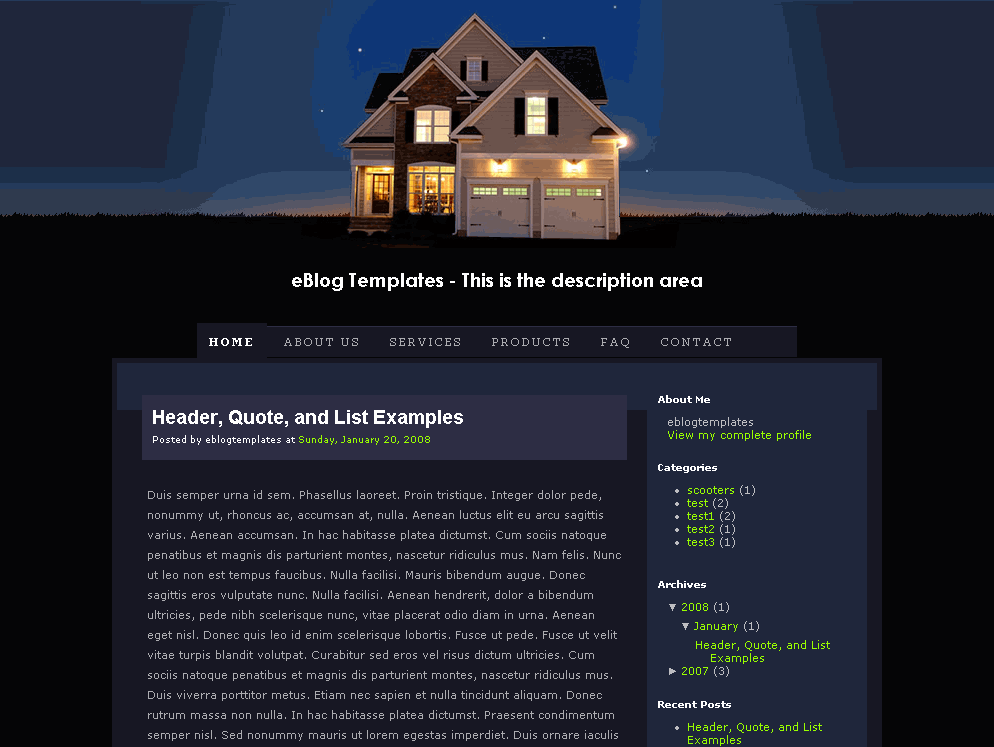
This cool house template is great for anyone looking to add a real estate or home-type theme to their Blogger/Blogspot site. The header comes with with a beautiful shot of a single family home at night time and includes a nice set of tabs for navigation.
Not only that but this baby comes equipt with the eBlog Template essential page elements like “Recent Posts” and “Recent Comments” which just need to be activated once you install this template. Make sure to read this blog page element article for instructions.
You also get an “Ads” page element which is easy to remove or add your own ads. The page element is just an html text box so you can paste in whatever banner ads (180 width) you like.
Template design by Six Shooter Media and converted into this lovely xml Blogger template by eBlog Templates.
Ready to super charge your blog? Check out our professional premium blogger templates or make money by joining our blog affiliate program!
Want to make your blog stand out from the crowd? I recommend giving your newly downloaded Blogger template a unique and personalized look. Read our Free Blogger Header Images article and find yourself a great custom header image!
If you like this post then please consider subscribing to our eBlog Templates RSS feed. You can also subscribe by email and have new templates and articles sent directly to your inbox.
Trackbacks
29 Responses to “Home”
Blogger Sponsors
- Improve Your Blog in 31 Days – Guaranteed
- Build a Better Online Business with WordPress
- Become a Blogger Just Reopened – 5 Days Only!
- Roadmap to Become a Better Blogger
- Free Image Hosting – Photobucket
- How to Install Google Analytics on Blogger
- Improve Your Google Rankings in One Easy Step
- 50 Excellent Blog Footers
- Free Instant Blog Logos
- Create Cool Images With a Wet Floor Effect Maker
 ads by google commented on
  huh commented on
  huh commented on
hi there. I’m so thankful that I find your site and particularly this blog template. I like it very much and it fits the theme I’m looking for. I already uploaded the template to my newly created blog. But I encountered some problems. The page elements on the right side won’t show up when I’ll click “view blog”. But i can see all of them in the page element edit section. Please advice me on what to do. Your help will be highly appreciated.Thanks.
hi there..I already figured out the problem with the template,but don’t know how to fix it though.:( I tried removing all the built in page elements and then I tried adding pge elements one by one. I added 1 PE and it showed in the sidebar, and i added a 2nd one, but didn’t show in the sidebar anymore. Only the first one is showed.
Hi Julai- I just looked at your blog and it appears you’ve got the categories and archives sidebar page elements working ok. Which other ones did you want to add?
hi David,
thank you very much for your reply. I’m just wondering because I can only see the “about me” sidebar page element when viewing my blog and can’t see the rest. I am viewing it through IE, so I’ll try with firefox if it will work.
I already tried viewing it with Firefox and I was able to view all the sidebar page elements. So, does it mean that those who will be viewing my blog with IE can’t view the entire blog?
Julai, do you mean you can’t see the sidebar page elements within the Blogger editor? I thought you couldn’t see them on your blog. Please clarify. 😉
Hi David,
I can’t see them in my blog, but I can see them all in my blogger editor with IE. But everything is ok now with Firefox. Thank you very much. More power.
hi,
thank you for such beautiful template. how can i edit the navigation tabs below the house?
regards,
vince
Vince, there should be a widget in your page layout screen called “top tabs”. That’s where you can create and or edit the tabs.
If the widget isn’t there then you’ll need to edit the template code. Make sure you check the “expand widget elements” checkbox before you try and find the tabs to edit.
hi david,
there is no widget on the layout page, so i just edited the html code itself.
thanks a lot!
vince
gentleman,
Where is the URL? Does it automatically appear on my blog later on? Anticipating your support.
Thanks
@Arjun, what do you mean “where is the url?”. Please be a bit more descriptive so I can try and help. 😉
Hi! Sure wish this were a 3-column template. It would be perfect for http://www.ahomestage.com if it were.
Thanks,
Christine Bean
http://www.christinebean.com
😯
thank………a lot
good idea thx
Hi,
I am totally new at this and I dont know how to write code to program the top tabs, can you show me what part of the code I can delete so just that top tabs bar disappears? and i read the comments above, and I use IE and cannot see my sidebar elements either. Any fixes for that yet?
This may be a dumb question, but I am completely new to this stuff. I get this response when trying to edit the template,
“The new widget id “Recent-Posts-Widget1″ is invalid for type: Feed”
What do I do to fix this?
Nice Template,A Nice Template help to make a meaningful sites,see also http://fileshous.blogspot.com
thank you eblogtemplates
veyr good templates
Hi Nice template there! But I have a problem-there is a big gap netween my blog posts because my sidebar’s length is more than my posts. How to solve this problem? Pls take a look at my blog to see the gap
Hi…i have a problem after i upload the template..
The response:
“The new widget id “Recent-Posts-Widget1″ is invalid for type: Feed”
Can you help me??
Regards…
Hi isn’t there anyone who can help me out here? I searched Blogger but no use.. What to do if there are large gaps appearing between blog posts???
Hello,This template is very nice, but
when i upload this template error is: “The new widget id “Recent-Posts-Widget” is invalid for type: Feed”
how i fix this problem
please help me…
bijaykp@gmail.com
I am trying to download the ‘home’ blog template and it keeps saving it in ITunes – any suggestions as to what I’m doing wrong.
“The new widget id “Recent-Posts-Widget1″ is invalid for type: Feed”
How can i fix dis?
I have exactly the same problem when I want to install this template on my new blog. Somebody to help me ? Cause I really do love this template !
Wow Very Nice
Thanks
so ive downloaded a link for a template on here however it doesnt look like what i need to put in my blogger html help???