
Isn't this free template worth at least $1? |
|
|---|---|
| Your support allows me to continue to provide free templates. Any donation is appreciated. |
Blogger Template Info
- Author: https://fpbisa.com
- Views: 11,404
- Downloads: 0
- Added: Jan 31st, 2008
- Rating:


- Live Demo
iWork Template
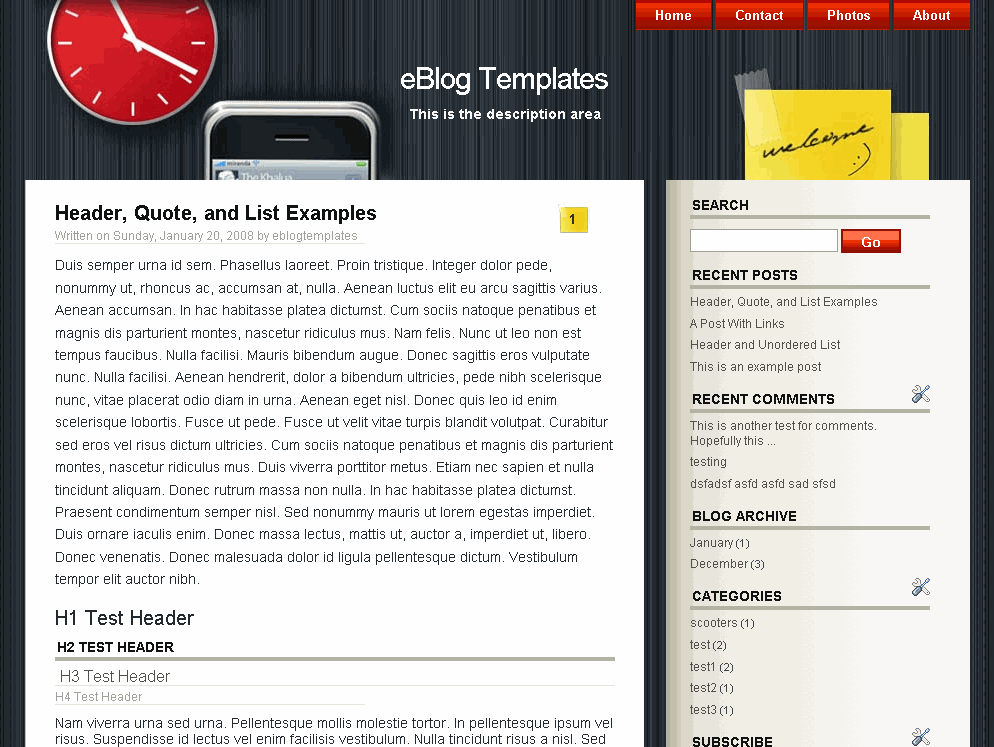
This fabulous, futuristic, and web 2.0 Blogger template is full of style and features. It’s an ideal template for someone who loves Apple’s look and or gadgets. Of course, if that it not your personality you can still download the template and use it however you like.
Some of the cool widgets this template includes are:
- Header Tabs
- Search Box
- RSS Feed
- Recent Posts
- Recent Comments
- AdSense
Everything works straight out of the box so no template code editing. You do have to configure some of these widgets before they will show up on your blog. To setup the recent posts and recent comments widgets please read “How to setup your recent posts/comments” article.
For the header tabs to appear, you need to edit that widget (it’s just a link list) within the Blogger page element screen. Just start adding new tabs and you’ll see them magically appear. No need to add a “Home” tab because it’s built into the default template.
All the widgets are movable (even the search box and rss feed) so you can reposition them to your heart’s content.
All images are hosted on our dedicated Pro photobucket account so you don’ t need to worry about broken images or hosting them yourself. If you’re more comfortable moving the images to your own server then go for it. I actually would just to know I’m in control of my images.
This template was designed by Nicola Di Trento (who for some reason is difficult to track down) for WordPress originally. Jacky or myself couldn’t find a link to his site to give him proper credit. iWork was converted into the new Blogger xml template by Jacky Supit and enhanced by eBlog Templates.
Revision History
4/16/08 – Created live demo site, Blogger AdSense code now works in between posts, added adstart & adend tags, added Feedjit widget, moved header title up.
Ready to super charge your blog? Check out our professional premium blogger templates or make money by joining our blog affiliate program!
Want to make your blog stand out from the crowd? I recommend giving your newly downloaded Blogger template a unique and personalized look. Read our Free Blogger Header Images article and find yourself a great custom header image!
If you like this post then please consider subscribing to our eBlog Templates RSS feed. You can also subscribe by email and have new templates and articles sent directly to your inbox.
Trackbacks
- 50+ Free High Quality 2 Column Blogger Templates | BLOGGER ONLINE on April 19, 2009
- Teme WordPress gratuite | Cotelin Ionut - Blog on May 26, 2009
- Blogger Templates Most Wanted Part. 2 on January 28, 2010
- 22 Wonderful Google Blogger Templates for Free Download « Designscape – advertising, branding, graphic design tutorials, news and inspiration on October 25, 2011
- 22 Wonderful Google Blogger Templates for Free Download | Top website Designing Company in India on December 16, 2011
- 45+ Beautiful Blogger Templates Free To Use | pixelpush design on June 30, 2012
- Mas de 45 themes para Blogger > Villarroel.net on July 14, 2012
- 100+ Excellent Blogger Templates on August 12, 2012
- 120 Best Free Blogger Templates Around P.II | Free template joomla, wordpress theme | wordpress tut | joomla extension | blogger blogspot on November 1, 2012
- iWork Blogger Template - BlogPublish on January 8, 2013
- 25 most viewed Blogger Templates on April 28, 2013
95 Responses to “iWork”
Blogger Sponsors
- Improve Your Blog in 31 Days – Guaranteed
- Build a Better Online Business with WordPress
- Become a Blogger Just Reopened – 5 Days Only!
- Roadmap to Become a Better Blogger
- Free Image Hosting – Photobucket
- How to Install Google Analytics on Blogger
- Improve Your Google Rankings in One Easy Step
- 50 Excellent Blog Footers
- Free Instant Blog Logos
- Create Cool Images With a Wet Floor Effect Maker
 ads by google commented on
  huh commented on
  huh commented on
You have to replace SearchSide by HTML2,,,,,,,,
and the error will go ,but you will again get further errors of same type ,means ” invalid for type”:HTML and feed error for recent comments ……..”
You have to replace same means
after widget id=”HTML3″ / “Feed1”
you can specify any mean Feed# or HTML# #=any number for above HTML and feed errors
My blog with above template………..above link is changed
http://indianactressingym.blogspot.com/
Can anyone tell me what to do? Because i paste the template codes on my template, when i press view only can see the weird codes or scripts.
If might be easier if someone can please post a reviewed and fixed template code with all the required adjustments to make the iWork template working as of 2009?
Many thanks
hye David..
this template is very nice and i really love it. but i had a problem that’s keep me wondering everytime i try to upload it.
the problem is for comment section. if i click comment button, nothing happen. i had try to configure the code myself but stil the problem happen.
i had same problem like Mark Kwan said before. i really appreciate ur help.
Nice Templates help to make a meaningful sites,see also http://fileshous.blogspot.com
very exclusive Templates
see this link to get more exclusive Template
This does not work for me.
Nice. I like!
Check out my blog with this template [spent quite sometime dong edits]
http://aserialconfessorsblog.blogspot.com/
don’t work.. 🙁
how did ya fix the eroor
The new widget id “SearchSide” is invalid for type: HTML
plz tell em what to do
Can you explain how do you resolve:
“The new widget id “SearchSide” is invalid for type: HTML”
I tried waht you wrote, but I’m afraid I didn’t understand very well.
Explain in other ways, please…
Can anyone at least provide a hint on how to solve this error ?
The new widget id “SearchSide” is invalid for type: HTML
You will get 5-6 errors with this template, here is how you can resolve:
Sample Error 1:
“The new widget id “SearchSide” is invalid for type: HTML”
Solution:
Replace “SearchSide” with “HTML7” (i have chosen no.7 u can choose any no.) Remember to write HTML in capslock as the case should be exact as given in type:, here type: HTML so u will replace by HTML7 if type was html then u will replace by html7
Sample Error 2:
“The new widget id “RSSFeed” is invalid for type: Feed”
Solution:
Replace “RSSFeed” by “Feed8” (again any no. can be used, i hv used 8) Again applying the case sensitive concept, if FEED then replace by FFED8 and if type is Feed then replace by Feed8
You will get 5-6 errors of this type, replace HTML by HTML7(use different no. evry time) & for Feed replace by Feed8(use different no. evry time)
feel free to email me at abhiraj.rathod@gmail.com
Great template, but after 2 incredibly frustrating days of attempting to get it to work, I’ve given up.
Good idea, but completely unfunctional!
I have to refresh my page between 10 – 25 times before the template shows up. Can someone tell me what is wrong.
Sometimes is shows up exactly as it should, but most of the time it has to be refreshed or it will simply look like text on a plain white background.
Yes, I got get 5-6 errors with this template when I install in blog and I follow this tutorial by abhiraj. It’s work for me! Thanks!!
Regards,
Fukuda Kejimi
http://www.varietyarticle.com
I can’t figure out how to add a date header for this. The template looks good, but installing it results in too many errors and you have to spend a lot of time fixing things. Something odd happens when I post as well, particularly in posts with photos, because the photos would overlap with the bottom part.
you have nice templates but very very non-user friendly. too many errors and if you are targeting new or amateur users of blogger, then this is sure-shot FAIL!
Congrats for the creator of the template. The design is really nice.
I intend to use it for my blog, but I have an important requirement: I want the articles to be seen only partially ( for example the first 500 symbols). I mean when you load a page to see the firs part of the article and to have the option ” See more” which will bring you to the full text of the article.
Is this possible for this template, are there any adjustments that I can make to fix that promblem?
Thank you in advance and kind regards,
Villy
Nice Theme.
The template isnt working in blogger
whats the reason
such a cool template but alas, I too am hitting sooo many errors! After getting through the “searchside” fiasco, I now have a “Recent-Comments-Widget is invalid for type: FEED”…. Ugh….. I just can’t get this.. I’m trying sooo hard.. Any more tips?? PLZ.
HOLY MOLY, I got it! UGH! Best of luck to all! =D
Darn, can’t “Comment” now!! (what gives??) HELP!
Hi,
Nice…
But how can I download this?
For all widget issues just do HTML then a number
I’m trying to use this template which is awesome, but I’m getting this error:
The new widget id “SearchSide” is invalid for type: HTML
Can you please help me.
very exclusive Templates
I fix all the problems in this template you can find it here .all you have to do is extract it and upload it. have fun
http://www.ziddu.com/download/11238973/iwork-blogger.rar.html
I cannot add a comments boxs so the visitors cant write their comment.Could you please tell me how to add the comments box
aaaaaaaaaagghhhhh i can’t change my template
nice Templates good work
appear:
The new widget id “searchside” is invalid for type: HTML
The new widget id “searchside” is invalid for type: HTML
How to fix it?