
Isn't this free template worth at least $1? |
|
|---|---|
| Your support allows me to continue to provide free templates. Any donation is appreciated. |
Blogger Template Info
- Author: Blog Crowds
- Views: 7,633
- Downloads: 0
- Added: Jan 14th, 2008
- Rating:


- Live Demo
Parchment Template
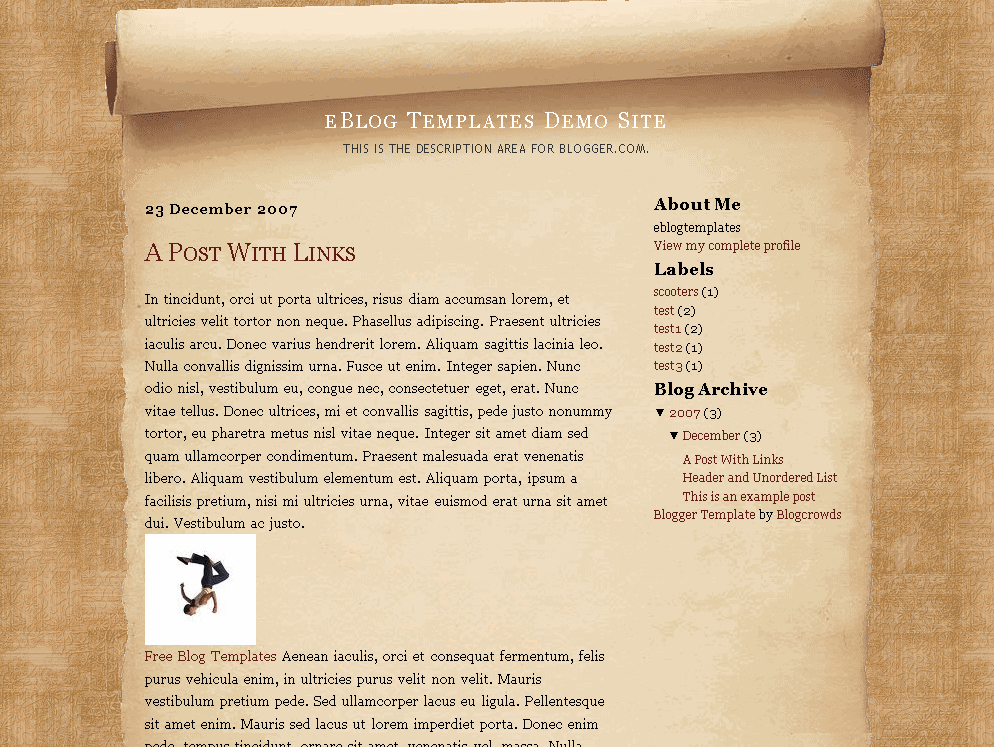
Are you a fan of Shrek or the Medieval Times? If so, then this is the perfect Blogger template for you! Write your posts on official parchment paper and let the king read it every day. Peasants are welcome to read your blog as well but are known to gossip amongst themselves after receiving the news.
If you liked this Parchment template then you also might like the Aspire blogger template. It’s also a medieval scroll-styled template that knights of the lore would enjoy using for their blog.
Lorraine Barte is the designer of this Blogger template and our friends over at Blog Crowds kindly converted into an xml Blogger template format.
Ready to super charge your blog? Check out our professional premium blogger templates or make money by joining our blog affiliate program!
Want to make your blog stand out from the crowd? I recommend giving your newly downloaded Blogger template a unique and personalized look. Read our Free Blogger Header Images article and find yourself a great custom header image!
If you like this post then please consider subscribing to our eBlog Templates RSS feed. You can also subscribe by email and have new templates and articles sent directly to your inbox.
Trackbacks
- 120 Best Free Blogger Templates Around | Showcases | instantShift on March 8, 2009
- Like This: Facebook as Business Marketing Utility- News Robot on October 6, 2010
- 33 Impressive Examples of Free Blogger Template Designs | DesignDune on October 17, 2011
- Top 20 Free Blogger Templates | Geeks Desk on March 18, 2012
- 120 Best Free Blogger Templates Around P.II | Free template joomla, wordpress theme | wordpress tut | joomla extension | blogger blogspot on November 1, 2012
49 Responses to “Parchment”
Blogger Sponsors
- Improve Your Blog in 31 Days – Guaranteed
- Build a Better Online Business with WordPress
- Become a Blogger Just Reopened – 5 Days Only!
- Roadmap to Become a Better Blogger
- Free Image Hosting – Photobucket
- How to Install Google Analytics on Blogger
- Improve Your Google Rankings in One Easy Step
- 50 Excellent Blog Footers
- Free Instant Blog Logos
- Create Cool Images With a Wet Floor Effect Maker
 ads by google commented on
  huh commented on
  huh commented on
hi! i like this template, it’s the one that would go well with the theme of the blog im thinking of making. my only suggestion is could you make it a 3 column template? i’d sure be the first to download it 🙂
good luck!
Hi Rhyz- Unfortunately I don’t have a three column version of this parchment template. It’s a good idea though and maybe the original author Lorraine Barte would be kind enough to create one for us. You’d have to ask her directly though.
I’m actually surprised this template is so popular. 🙂
hi again! i used this 2-column style instead. However, i’m wondering if you can help me out. I have a problem with the fonts and colors… I’ve already uploaded the template on my new blogger account, but when i click on the fonts and colors nothing shows so I cannot edit the Fonts on the header and the title of the entries. When i look at my blog the title of the entries are bigger than the header title… I hope you can help me..
you can see my blog …www.ryeza.blogspot.com.
tnx
Hi Rhyz, I tried to visit that url but it’s not working. Could you provide me another url so I can check it out?
Also, did you try looking in the actual Parchment Blogger template header code to see if the fonts are in there?
Thanks,
David
hello, its me again..
sorry, wrong spelling for the url… its http://www.rhyeza.blogspot.com.
I’m not sure about the actual header code in the template…, could you tell me please what code to look for? example of code something like that..
Thanks
Hmm…that url doesn’t work either. Is your blogger site currently down? You’ll need to actually edit the colors in the template code itself. Look for sections in the code like color:#000000; and you’ll need to change the colors there. Are you familiar at all with html and css?
~David
Rhyz, I believe this is the code you want to edit for the post title. Change the font from 1.8em to something like 14px.
.entry-header{
color: #330000;
font: 1.8em Georgia, “Times New Roman”, Times, serif;
font-variant: small-caps;
background: transparent;
padding: 0 0 10px 0;
margin: 20px 20px 10px 20px;
}
Hi David!
Thanks for all the help… I was able to find that code for adjusting the font of the header.
I also want to make the font of the sidebar titles smaller, coz they are really huge, what code do i have to look for?
Also how do i make some spaces for the elements on the side bar? they just look too close to each other.
and how do i put the “Older Posts” at the bottom of the page?
would sure be glad for more help 🙂
Thanks
my blog is http://www.rhyeza.blogspot.com so you can see
This is a very nice template but I would need some input so I can use it.
First when I went to the bottom part, there is no links to get to the older posts.
Second, I would like to use a kind of script font for the title. In order to do that I’d have to change the banner background and make sure the Title does not appear. Would you allow me to modify the background image and is there a way not to display the title.
Thank for any help
Hi JF, Thanks for catching the older posts link bug. I’ve updated the template so it should now appear so you should download it again.
Feel free to modify the background image and text. You can do it within the page element editor under the “Blog Posts” widget.
I like tis template very much. Thx
Oh lol, I did not know someone already ported “Parchment” to blogger. I also did a port from MT to Blogger (live demo – click my name).
Can’t help to notice that Blogcrowd’s version is using a light-brown parchment. My port was on November 2007, Blogcrowd’s Feb 2007.
Anyway, it’s a great theme/skin 😀 One of the few medieval templates available for public use.
I received the error: Your template could not be parsed as it is not well-formed. Please make sure all XML elements are closed properly.
XML error message: Content is not allowed in prolog. Can anyone help?
I like this one. Simple but nice.
Hi, I love this template but I can’t get blogger to accept it… Possibly because I’m doing something wrong? I’ve copied it into ‘edit template’ but when I try to preview it I get this message –
“We were unable to preview your template
Please correct the error below, and submit your template again.
Your template could not be parsed as it is not well-formed. Please make sure all XML elements are closed properly.
XML error message: Content is not allowed in prolog.”
I have read all the replies to similar questions in the forums & have tried out their suggestions but I still get the same error message.
I’m hoping you can help. Thank you.
Hi, i liked this parchment template very much. but i need it as a 3 column one. I think older post link is missing here. 🙁 , When i uploaded this i missed all my drop down boxes . can u plz upload the 3 column code.
plzzzzzzzzzzz,
preethi.
Hey now older post label isavailable but u missed the nav bar (that contains create a blog , sign in).plz give corrected code and try to post a 3 column code.
Hi,
I need urgent help. Downloaded your Parchment theme two days ago. It seems to work well on Safari but not too well on Internet Explorer 7. Well for starters, the links on the right hand side were displayed towards the bottom of the blog, and the central lighter colour side which contains the post, is coloured the same as the darker colour page. Please tell me what’s wrong with it, as most of the readers use Internet Explorer…
Cheers,
Ebi
I’m testing this template on a private blog, and for some reason images don’t show up… Any advice?
Hi There…
I am so blog dumb and I have downloaded the parchment design and I love it……. but how in the world do I put it on my blog? I will go to paypal and make a donation today…… but if you do not mind to tell me how to apply! Thanks
Denise
I’m testing this template and love it. But I’m having trouble with the Title text. It changes color and size when I click on an entry and it goes to that entry’s own page. Compare:
http://biblicalscholars.blogspot.com/
with
http://biblicalscholars.blogspot.com/2008/12/introduction.html
Any ideas about the problem?
Thanks.
I am assuming there is something else I need to know to open these files. I dl they are saved and when I click on the zip file to open the won’t all open The Parchment did when I went to get the error message for the others this one opened. The error message reads:
The XML page cannot be displayed
Cannot view XML input using style sheet. Please correct the error and then click the Refresh button, or try again later.
——————————————————————————–
The server did not understand the request, or the request was invalid. Error processing resource ‘http://www.w3.org/TR/xhtm…
Can someone help me?
I dl the tiger lily; peaceful rush; misty-look; hobbit; dfire; the ONLY one that did not give me this error is the parchement one above.
Thanks Brenda
kingsleyATaol.com
I guess I should have waited before I wrote: The message I get when I copy/paste the coding is:
Your template could not be parsed as it is not well-formed. Please make sure all XML elements are closed properly.
XML error message: Content is not allowed in prolog.
Hi,
I have newly started blogging. I didn’t want to use blogspot’s default templates so I downloaded the “Parchment Template” from your site. But I am not able to apply the template. I don’t know what is the exact problem but errors come which I don’t understand. So please help me in this and if possible send me step by step procedures to apply the template.
Anjali
It seems that no one can solve the Blogger error:
We were unable to save your template
Please correct the error below, and submit your template again.
Your template could not be parsed as it is not well-formed. Please make sure all XML elements are closed properly.
XML error message: Content is not allowed in prolog.
This one is Cool 🙂 i have downloaded the theme and its the time to upload in my blogs cpanel.. will get back to share the experience
Best Regards
Leif
very exclusive Templates
see this link to get more exclusive Template
I have the same problem with Parchment as I do with all these other templates you can download for Blogger: I want to replace the title (text only) with my own banner, but when I try this in Blogger’s “Configure Header” feature (under Add & Arrange Page Elements), bring in the image, and choose Instead of Title and Description, I never see my banner on the blog.
Once with a different template I managed to figure out where in the code to put it, but code varies so even that’s not consistent, and when I did succeed in getting it in there it still retained the title.
Any help greatly appreciated.
johntowsen@gmail.com
hi
first of all thanx a lot for providing me chance to communicate my problem with blog creater….i instantly fall in love with this template the second i saw it……its a perfect match for my books blog http://bookshive.blogspot.com/
plz visit my site & see urself that comment option of this template is not working so i’ve to install disqus comment widget which i dont like much…i cant change this template & upload another one cause i just love this template….plzzzzzzzzz help me & guide me what to do to make its comment option working
Where did the navigation bar go? How do I get the navigation bar back????
I love this template, but I have the same problem most people here. I’m having trouble with the Title text. It changes color and size when I click on an entry and it goes to that entry’s own page.
Hi,
Does this theme work on a self-hosted wordpress blog?
Thanks
i like this one very much..
thanks alot david 🙂
I solved the font tittle problem by myself! What you have to do is:
Search this text in the section BANNER BITS
#banner h1 a:link, #banner h1 a:visited{
color: #000;
text-decoration: none;
font-size: 1.4em;
}
and remove the font-size order, like that:
#banner h1 a:link, #banner h1 a:visited{
color: #000;
text-decoration: none;
}
What is happening is that in the main page, the tittle is not a link, but it is in all the others pages (link to “Home”), so it’s affected by this rule.
It works! You can see it in my site.
Hello: I started using this template last December, and I loved it. However, last week I started to encountered some problems,
-The comments started to appear on the top of the post.
-The date on the top of the entry disappeared (I started doing manually).
-Last night when I was trying to post my daily entry, I discovered that the new entry section is not giving me the option to download images/pictures.
Please help.
Hello guys,
I really need help, on how to replace my template to this one?
I always received this error message,’ Your template could not be parsed as it is not well-formed. Please make sure that all XML elements are closed properly.
XML error message: Content is not allowed in prolog’.
I am hoping that someone will help me.
Yours,
Vicky
I would love some help with the margins on both the left and right side. When I originally started using the Parchment template, there was a comfortable margin for the text of say 1/4 inch or so on both sides. Now there appears to be no margin at all.
I’ve scrolled through the code, but am not really sure where I could edit the numbers so a better margin appears.
My site URL is: http://privateyogainstruction.blogspot.com/
Hi,
I like this template very much. I used it for my blog. But unfortunately, the comments are not working i.e., the viewer is unable to post the comments. When the viewer clicks on the Post Comment link there is no action happening. Can you help me to fix it?
Thanks in advance…
Murali
Hi,
I like this template very much. I used it for my blog. But unfortunately, the comments are not working i.e., the viewer is unable to post the comments. When the viewer clicks on the Post Comment link there is no action happening. Can you help me to fix it?
Thanks in advance…
Murali
http://kadambakusumam.blogspot.com/
Hi!
Forgive me for my ignorance but can someone give me a step by step process as to how I can download this theme? Please. Thank you!
Hi again!
I downloaded this theme and copied it in the “edit HTML” section and I got this message: Your template could not be parsed as it is not well-formed. Please make sure all XML elements are closed properly.
XML error message: Content is not allowed in prolog.
What do I need to do? Please help.
i want to use this template but how do i put it in?
i managed to download it, but i cant change the font and stuff. pls help