
(Don't have an account yet?
Register for free!)
Blogger Template Info
- Author: Info Creek
- Views: 18,932
- Downloads: 0
- Added: Feb 7th, 2008
- Rating:


- Live Demo
Aspire Template
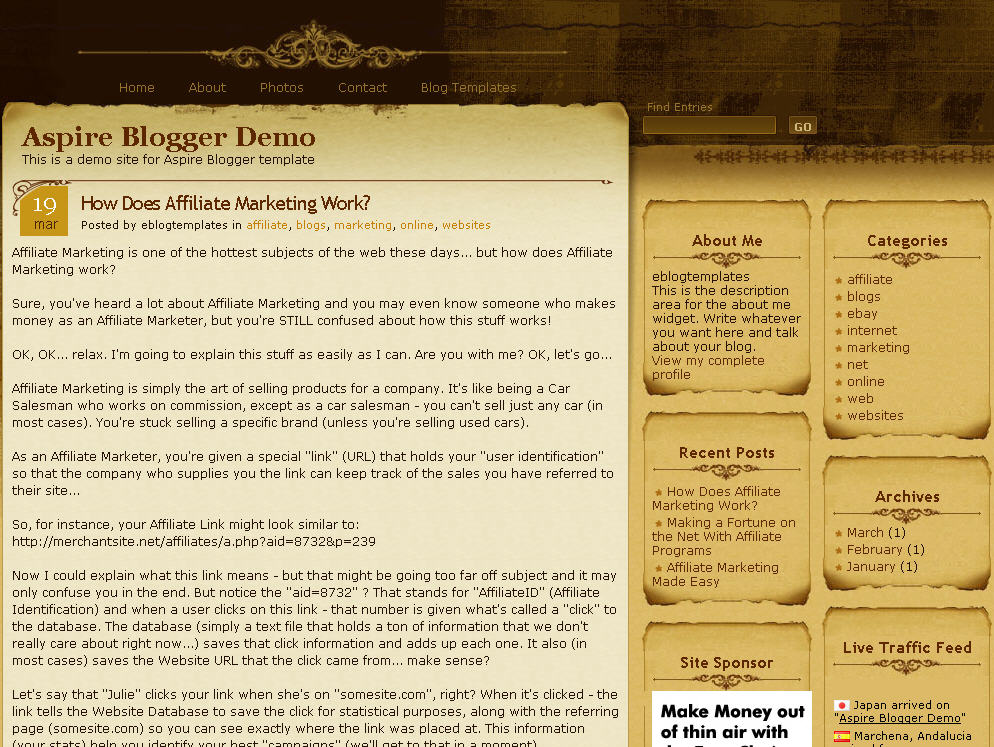
Medieval, parchment, and scroll blogger templates seem to be very popular these days so we’ve taken the liberty to find another great one called Aspire. This three-column Blogger template comes dressed up with all the goodies a knight of the round table would want for his blog. You get a search box, recent posts and comments widgets, a custom built date stamp for each post, and more.
In order to get the recent posts and recent comments widgets working, you’ll need to read “How to setup your recent posts and comments” post.
Not to worry, all the images are hosted via our Pro Photobucket account so you won’t experience the “End of the month blogger blues” which happens to thousands of Google Blogspot Bloggers every month.
The dynamic date on each post is handled by a custom written javascript function which is embedded into the template as well. Most other templates you download link to an external .js file so at any point the date might stop working on your blog.
If you like this template you might also enjoy the Parchment Blogger template as well.
Thanks to Info Creek for designing this great theme and also porting it over to the new xml Blogger template for you Blogspot users!
Revision History
4/13/08 – Fixed individual post date so it is center aligned in the date box. Also added new demo site, fixed the layout blogger screen, and added several cool widgets.
5/17/08 – Fixed the “next” and “previous” posts buttons at the bottom of the page. If you downloaded this template prior to this date you can easily fix it yourself. Just search your template code for “.navigation” and then remove the “position:absolute;” entry. Thanks to Allen for finding the bug.
Ready to super charge your blog? Check out our professional premium blogger templates or make money by joining our blog affiliate program!
Want to make your blog stand out from the crowd? I recommend giving your newly downloaded Blogger template a unique and personalized look. Read our Free Blogger Header Images article and find yourself a great custom header image!
If you like this post then please consider subscribing to our eBlog Templates RSS feed. You can also subscribe by email and have new templates and articles sent directly to your inbox.
Trackbacks
- 16 Premium Look Free Blogger Templates - Wordpress themes Converted to Blogger - TechStrokeTechStroke on June 30, 2012
256 Responses to “Aspire”
Blogger Sponsors
- Improve Your Blog in 31 Days – Guaranteed
- Build a Better Online Business with WordPress
- Become a Blogger Just Reopened – 5 Days Only!
- Roadmap to Become a Better Blogger
- Free Image Hosting – Photobucket
- How to Install Google Analytics on Blogger
- Improve Your Google Rankings in One Easy Step
- 50 Excellent Blog Footers
- Free Instant Blog Logos
- Create Cool Images With a Wet Floor Effect Maker
 ads by google commented on
  huh commented on
  huh commented on
@Angela — > Thanks you soooooo muchh…i made ittt !!!!!! wooohoooo
wow wow beautiful theme
i like
thank you
Your template does not work..
I use the Aspire template. Sometimes the parchment design elements disappear for no apparent reason, then reappear. All the texts and images I input remain but the background goes. This happened the first time for several months, then the parchment came back for a couple of months, then yesterday it disappeared again. Should I try to download the template on to the blog as it now exists (with just the images and texts)or is there a simpler fix that I’m overlooking? Thank you for any help you can give.
Valuable ideas . Coincidentally , if someone are looking for a service to merge are interested in merging of , my husband encountered a service here http://goo.gl/vXcVnY