
Isn't this free template worth at least $1? |
|
|---|---|
| Your support allows me to continue to provide free templates. Any donation is appreciated. |
Blogger Template Info
- Author: Madeline D'Amato
- Views: 5,968
- Downloads: 0
- Added: Feb 14th, 2008
- Rating:


- Live Demo
Quirky Valentine Template
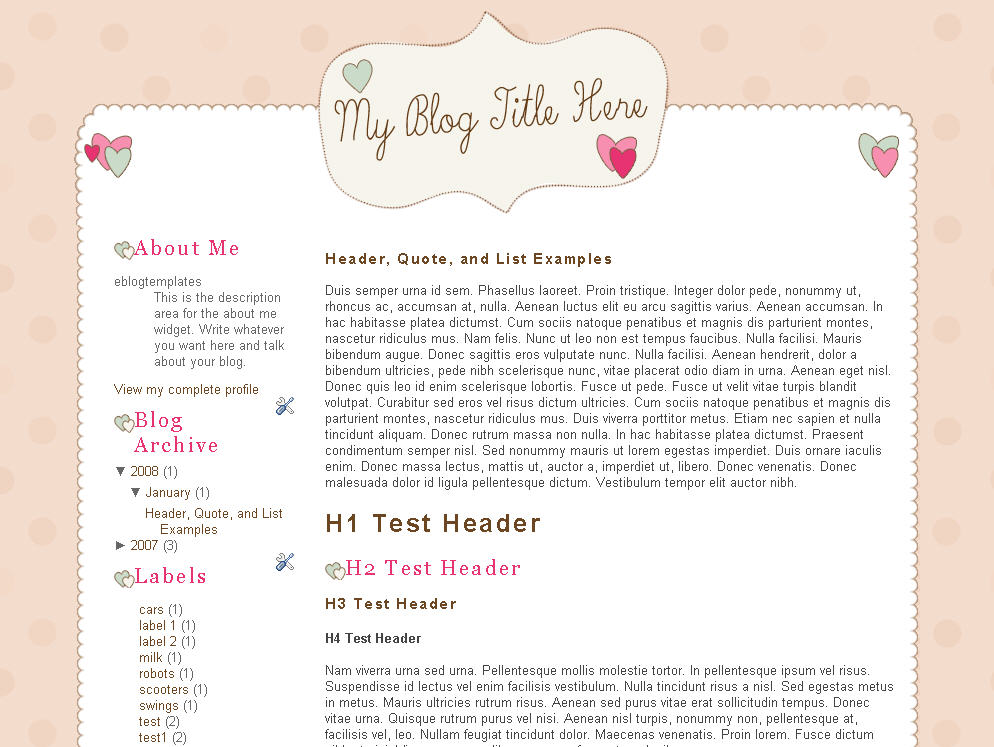
In honor of Valentine’s Day, eBlog Templates is releasing a heart-themed Blogger template called Quirky Valentine. It’s got a very pink and white look and comes with the standard template widgets. The header you see in the screenshot is only an example since you’ll need to edit and add your own text.
The font used for the sample blog title image is called “Skryptaag Tryout” (font color: #663A15). It is available for free download here. You’ll need to install the font and then you can edit the image in Adobe CS or whatever photo editing software you prefer to use. If you don’t have any fancy image editing software, you can just use MS paint or download paint.net for free. You can also use whatever font you like.
All images are hosted on our Photobucket Pro account so there’s no need to worry about putting the images somewhere else. Just download, install, and setup your widgets and you’re good to go. You’ll probably want to edit the header image as well since a blank header isn’t much fun.
Many thanks to Maddie from betterinpink.com (formerly Girliebits Designs) for designing this cute pink template just in time for the Valentine’s Day season.
Ready to super charge your blog? Check out our professional premium blogger templates or make money by joining our blog affiliate program!
Want to make your blog stand out from the crowd? I recommend giving your newly downloaded Blogger template a unique and personalized look. Read our Free Blogger Header Images article and find yourself a great custom header image!
If you like this post then please consider subscribing to our eBlog Templates RSS feed. You can also subscribe by email and have new templates and articles sent directly to your inbox.
Trackbacks
- 16 Best Free Valentine Blogger Templates on February 14, 2010
- Free Blogger Template | SEO Amazon Adsense รายได้จากเนต ร้านค้าออนไลน์ Internet Marketing Affiliate Marketing on February 16, 2010
- Pink Love – Girly Blogger Template | BestBloggerTemplates.Net on April 26, 2015
32 Responses to “Quirky Valentine”
Blogger Sponsors
- Improve Your Blog in 31 Days – Guaranteed
- Build a Better Online Business with WordPress
- Become a Blogger Just Reopened – 5 Days Only!
- Roadmap to Become a Better Blogger
- Free Image Hosting – Photobucket
- How to Install Google Analytics on Blogger
- Improve Your Google Rankings in One Easy Step
- 50 Excellent Blog Footers
- Free Instant Blog Logos
- Create Cool Images With a Wet Floor Effect Maker
 ads by google commented on
  huh commented on
  huh commented on
hi, can the hearts be removed or replaced with something else?
thank you
I like quirky valentine template
Simple n sweet 😳
how to edit the header image? i mean, where do i find the image to edit, and then do i need to host the image again. i dont understand. help!
I can’t figure out how to add my name in the header. Pleas help! 🙂 😡
I really want to use this, too…but why can’t I access the codes?
i don’t know how to change the header image too… how to do that? i found the url in the xml i downloaded but cannot edit. pls help. i don’t leaving the header blank.
its easy, just open the xml with notepad, and then find this line here ”http://i254.photobucket.com/albums/hh92/eblogtemplates/quirkyvalentine/header_blank.gif” copy it to your address bar, and when the image loads, save it on ur desktop. and then open the image with any editing software. after that safe it, and then upload it in your edit layout section, the header section. thats all.
Hi, i like to change to this template but i dont know how. can you pls teach me? Thanks lots
It did not appear. Is it just copy and paste ? or do I still need to edit anything
Hello to Maddie (Madeline),
Just so cute ! A very good job, waw…
A lot of thanks for this nice template !
I think to personalised it just little, don’t be afraid, I will not remove your credits 😉 It’s normal.
Thanks again !
T-T.
i can’t use in my blog!!!
help me!!!
I love this template, and many of the other ones provided. But there are so many that I have downloaded that when I extract them it opens up as a XML Document and then I have no access to the code. I was wondering what I need to do?
with the bit in the preview where it says “My blog title here” how do i change that??
very exclusive Templates
see this link to get more exclusive Template
Hi I am trying to put my name in the header but having no luck.. Can someone please let meknow how to do this it? as i looooovvveee this template and I’m trying to get my blog started!
Thanks
Awesome, sweet perfect i luv this thank you my blog won’t look boring anymore!!!
i did try to use this one for my site but it was not showing the title of the blog. I like the style so much but the title is not showing so its no use!
Hi, how do i change the title??? I would like to put my blog’s name… how do i do this??? Help, please!!!
叛逆xiiaohuii
Hi. I am also confused about how to put my name in the header image. I copied the url that Lea suggested and found that the image would not allow me to insert my name in it. Please help!
nice template!!
i love it!
it so…girly)))))))) nice 🙂 thanks a lot!!!!
it still cannot work on my blog..help…my blog is without header..no head..help..
– novice blogger-
Hi, u have gadgets on the left side, like About me or Labels and a couple of hearts above each. Well if i add some gadgets (like amazon music or counter), i cant see the hearts anymore, not entirely anyway, just an edge. check my site.
Please help!
i could use it to my blog at blogspot.com it required the html codes..may i get the code? thanks
finally i cold make it..beautiful!
Karina> try to fix it using edit HTML codes, search for padding and margin BELOW the ‘heart shaped url’ search, you can change the margin untill it match with your widget~
hey can you help me? i dont know how to use this template on my blog. help me plis,
Wow! Beautiful templates. Thanks for sharing:)