
Premium Template Info
- Views: 10,459
- Added: Jan 1st, 2009
- Rating:


- Price: Unlimited Use: $19.95
- Live Demo
Revolution Church Blogger Template

Ready to get your hands on the coolest premium Blogger template in the blogosphere? Introducing the Revolution Church premium template for Blogger!
After getting dozens of emails from people offering to pay us to convert this amazing theme into Blogger, we decided it was time to make it available to purchase for everyone. Well, not only has eBlog Templates ported this over to Blogger, we’ve added some great features to really turbo-charge and make this the best premium Blogger template yet!
This is the first and only premium Blogger template that is virtually plug and play. No images to host or have to worry about the links breaking after a few months. No mucking with the template code to change colors, add tabs, modify AdSense code, etc. We’ve designed this template with the ease of usability in mind so Bloggers of all levels can utilize the full power of this premium template. Not only do you get this amazing template but you also get the full installation video series which walks you through configuring every gadget step-by-step.
Don’t be fooled by those free Church Revolution templates that are poorly converted to blogger. They might look nice from their demo but those templates usually require you to make all the changes within the code and stop working properly after a few months. They also don’t include a step-by-step video series.
You don’t have to take our word for it though. Here’s what a few of our many satisfied buyers had to say after purchasing and using this template:
“Purchased today and I LOVE IT! Fantastic job!” — Christopher
“Thank you for the great template!” — Martin
“I have greatly increased my earnings from AdSense” — Dennis
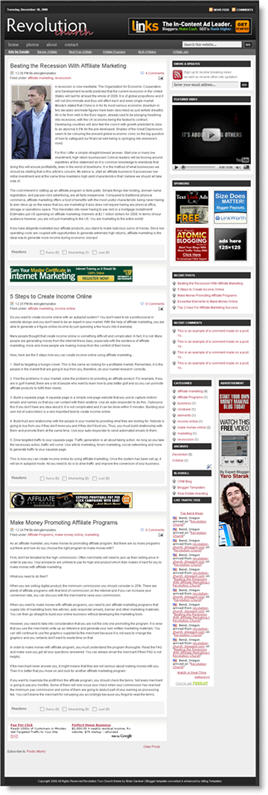
This Blogger template comes with a ton of advanced features including:
- Hosted images on Photobucket. Free use forever!
- Favicon support so you can add your own url icon
- Compressed CSS to speed up your page load times
- SEO-friendly page titles to help you rank higher in Google
- Multiple AdSense gadgets already included in prime locations
- Automatically highlight author comments
- Embedded JavaScript date code showing current day
- Fonts and colors support so you can change on the fly
- YouTube video gadget to show off your favorite video
- Link list gadget to easily setup your header tabs
- Recent comments and posts gadgets
- Integrated Blogger reactions support (new!)
- Built-in Feedburner RSS feed and email gadget
- FeedJit live traffic feed gadget
- Bonus – FREE 125 x 125 ad gadget!
- Bonus – FREE Step-by-step installation video series
I promise that you’ve never seen such a complete and professional Blogger template like this one. With the amount of time and effort we’ve put into this, it’s easily worth more than the cost. Ready to turn your blog into a masterpiece? Check out the live demo or buy this premium Blogger template now!
Important – Please Read Before Purchasing
This template does NOT work with the older Blogger Classic layout. Please make sure you are NOT using Classic layout before purchasing this template. Most bloggers are now using the newer layout so you most likely don’t need to worry. Also, eBlog Templates is not the original designer of this template. It was originally designed by WordPress theme mastermind, Brian Gardner. We have spoken directly with Brian and with his approval, have converted it to Blogger and made it available for sale. If you are a WordPress user, you can download his theme for free without any support (only works on WordPress not Blogger).
So why do I have to pay for this template then?
The cost of this template covers the many days of labor and effort put into converting this amazing design into a premium Blogger template as well as building the step-by-step video series. Your purchase does include the complete instructional “how to install and configure” the Revolution Church Blogger template video series. If you think about it, it’s actually a small price to pay for such a functional, advanced, and professional Blogger template. Buy this premium Blogger template now!
Refund Policies
Since this is a digital product there are no refunds after payment has been made. Please make 100% sure you want this template before making the purchase. You also need to be willing to spend 30-60 minutes configuring the template before it looks like the live demo. Our free video installation series will make it easy. We want you to be successful!
Since we can’t test every single Blogger gadget (including 3rd party gadgets) we can’t promise they will all work with this template. Every blog is different and some of your existing gadgets might not be compatible which means either the gadget will need to be removed or modified accordingly. We do provide community-level support which means posting your questions as comments. The installation videos that accompany this template are designed for skills of all levels.
Affiliate Program
Want to put some extra money in your pocket? Why not join our affiliate program and become part of the eBlog Templates sales team! You will earn 30% for each sale you make (i.e. $20 template = $6 for you!) We use E-junkie which is the industry standard for handling affiliate sales. Join now and start making money selling this premium template today!
Buy this premium Blogger template now!
If you like this post then please consider subscribing to our eBlog Templates RSS feed. You can also subscribe by email and have new templates and articles sent directly to your inbox.
Trackbacks
- Celebrating My Birthday & The Newly-Launched KidTechGuru Site : TechXav on February 7, 2009
363 Responses to “Revolution Church Blogger”
Blogger Sponsors
- Improve Your Blog in 31 Days – Guaranteed
- Build a Better Online Business with WordPress
- Become a Blogger Just Reopened – 5 Days Only!
- Roadmap to Become a Better Blogger
- Free Image Hosting – Photobucket
- How to Install Google Analytics on Blogger
- Improve Your Google Rankings in One Easy Step
- 50 Excellent Blog Footers
- Free Instant Blog Logos
- Create Cool Images With a Wet Floor Effect Maker
 ads by google commented on
  huh commented on
  huh commented on
Does anyone know what the font is for the Revolution logo?
David–
A couple quick questions before I take the plunge.
1) If I choose, could I remove all advertising from this template? For example, I’d really like to remove the banner at the very top, which is next to the blog name. Is this possible?
2) If I decide to keep the advertising, can I move things around? Can I move ads to the lower half of the page instead of them being at the top?
3) Is it easy to create pages with the two Revolution templates? I’d like to use this template as both blog and web site.
4) If so, is there a finite number of pages that one can create?
This is by far the best-looking template I’ve seen to do what I want, and well worth the price. If all these questions are a go, I’ll be ordering it asap.
@maffetina, Those are all fair questions. Yes you are free to remove one or all of the ads in this template. They are just placeholders showing you how those spots can be used. The ads are setup as gadgets within Blogger so it’s very simple to move them up or down the sidebars.
Creating pages can’t really be done with Blogger. What you instead do is create a post and set the date to a few years ago (so it doesn’t show up as your latest post). Then link to it from the top navigation or wherever you want. I wouldn’t create more than just a few pages otherwise you won’t have room in your top nav bar.
Glad you like the look. It’s the cleanest and easiest to setup premium blogger template you’ll come across (well besides our revolution lifestyle template…hehe).
Great Template! A must for every blogger! I’m new to blogging, but when I followed the step by step video it made me look like a pro! Thanks!
Ocie Maddox Jr.
OMJ Media Design
Hi david thanks for your kind reply but I want to know that when I will use this theme on my adult blog , you guys will get backlink from that blog too because of footer links .
I think it is against adsense rules and we must not promote and get back links from adult sites . I just want to confirm that don’t you have any problem with that and Brian link is also placed in this theme . I don’t want to get you guys in trouble .
Or can I remove links before using it on my adult blog . If you think Brian and you don’t face any problem if I use it on my adult blogspot blog than I will buy it for sure . Waiting for your reply .
Thanks
Hey David,
Thanks you for this template. I had been using the revolution code grey for a while and decided it was time for a change. I downloaded the (non-premium) rev. church template from another site, and I cant figure out how to change the link colors from red to black. I have to edit the HTML for colors because the template doesn’t let me edit it from the fonts and colors tab in blogger. I cant seem to find the red HMTL color code to replace for the black code. Can you please tell me what the HTML color code is for the red on this template?
Thanks,
S.T.
I can say Great Template! A must for every blogger!
@S.T. I’m sorry but I am not familiar with templates from other sites. All I can say is you can easily change the colors with our Premium Revolution Church template (among other things). You might want to try posting a comment on the site you downloaded it from. Good luck!
@onlinebadmash, thanks for your concern. Just to be safe let’s remove the footer links. It won’t affect adsense at all but rather Google search if anything.
Hello David.. I have a query.. My site is in php and I want to upgrade to WordPress.. Can u pls tell me whether this is possible or not?
This is my site in case you want to have a look.
http://www.softwaretestinggenius.com
Also, I hope switching over to wordpress doesnt affect my traffic base..Hope dats possible.
How to insert 648 X 60 ad banner on header and bottom of entry, anyway can’t remove its on bottom.
Ready thank if it solved please send mail to peakna@gmail.com
I am using it now at http://bestsoftware2day.blogspot.com/
Recently Blogger made a change affecting thousands of 3rd party templates like ours. Their intentions were good but it’s caused more harm than anything. I have since fixed the problem for our premium templates so anyone purchasing this template or the Premium Revolution Lifestyle template will not be affected. If you purchased it in the past and are now having problems, please let me know and I will provide you with the latest fixed version.
I sure hope Google realizes the mistake they made and switch it back soon. Thanks for being patient and understanding.
Hi David, I purchased this template on Feb 14 and was out of town for a few days – I have been trying to load but am having problems with the Navlinks-linklist issue and was wondering if I could get the new fixed edition. Many thanks.
@Susan, I’ve just emailed you the latest fixed version.
Dave–I bought the Revolution Church template on February 12. I haven’t started working with it yet, so if I need the new fixed edition, could you kindly send it to me? Thanks so much.
Hi David,
Just purchased this template and love it! One question…how do I add the “read more” hack? Most of the hacks require a line of code which seems to not be used with this template. Any idea on how to do it? or a link to instructions on another site?
Thanks!
@maffetina, I just emailed you the fixed version. Good luck!
@danny, I’ve written an article on how to do this here.
How long after purchase will I be able to download the template. Usually when you pay for something like this, you are able to download right away! This makes me rather suspicious, that I wasn’t able to download right away.
@daydreemny, as soon as you make your payment via PayPal, the template download link is available on the confirmation screen. You also get a link directly to it. Sometimes the email might get caught in your spam folder so make sure to check there too. If you still haven’t gotten it just let me know and I’ll send it to you.
Bought this template. When uploading revolution church blogger template, i get this error: The new widget id “NavLinks” is invalid for type: LinkList
I Don’t know what to do. Need help. i can give order receipt number if you like.
David,
I listed the email through which i ordered the template in this message. The above one is my other email address. I am hoping to recieve a fixed version of this, as i tried changing ‘linklist’ to ‘linklist1’ and no name changes are working at the moment. Thanks
What a great template it is.. Im looking forward to try this out..
@Ryan, I’ve just confirmed your purchase and emailed you the latest version.
Hi David,
I bought your Revolution Church template on friday and watched all 4 videos on youtube, but im still having problem linking my top tab to my site. how do you create an additional page from this template?
thank an advance for your help.
Paul
Hi David,
One more thing David how do i add my bottom footer in this template.
thanks
Paul
Hi David,
I purchased the template a few weeks ago and I love it, thank you! The videos were very helpful at getting the installation just right.
Two questions:
How can I change the cross icon on lists?
How do you put the timestamp, labels, posted by, comments, etc. below the body? I set it up in the post area but it is not changing.
Thank you!
Torie
http://www.asuccessexperiment.blogspot.com
@Torie, If you want to change the cross icon, just replace the image url (
http://i254.photobucket.com/albums/hh92/eblogtemplates/revolution-church/icon.gif) with the one you want to use. Make sure you replace it with an image similar with dimensions though otherwise it won’t line up properly. Re the post labels, they are designed in this template to be at the top.I tried to install this theme for my new blog but I get the following message:
The new widget id “NavLinks” is invalid for type: LinkList
Please help.
@Sunga, you need to rename “NavLinks” to “LinkList33”. When did you purchase this template anyhow? The latest version fixes this bug.
All, I am going to be on the road from 3/5 – 3/15 and will try to respond to any support comments when I can. Please understand if it takes a few days to get back to you.
Thanks….
This is one of my faovarite template, Thanks to David
I purchased shortly after it was released. I will try and do what you have said.
have a great trip
Now I get the following message:
The new widget id “Linklist33” is invalid for type: LinkList
Actually bought the template on January 16
Hi David,
displaydate javascript doesn’t seems to be working. Can you check my site? Your template is awesome.
displaydate is working now. I don’t know what happened. It automatically works now.
Recent posts, Recent comments widgets are not working for me. If I Click “Edit” to update my feed URL then I am getting blank page. I mean the configure feed pop up is coming as blank for me. Also, sometimes the displaydate javascript doesn’t seems to be working. Please guide me.
I’ve got the same problem with recent posts and comments. Can’t change them and they don’t show..
Please explain how to fix this.
Thanks!!
Menno – I still could not fix that. So, I added “Feed” widget in blogger itself. But, the problem is I am not getting the “+” image while doing like that. Also, the feed is not updating quickly. For example: If I delete some post it is taking more time to get updated in recent post. David’s help is much appreciated. I think he is travelling somewhere. He may reply us soon
Hello.
Just purchased the theme and I love it but I have a couple questions/issues.
The big one is this. When I try to edit ‘recent posts’ and ‘recent comments’, it opens up an empty un-editable window. Doesn’t even have a text entry field. I tried Safari, Firefox, and Opera and none work. All other widgets work fine.
I was also wondering how to add the ‘reactions’ bar to the bottom of the posts?
Thanks…
Hi David,
Another problem I’m having is with the favicon. I uploaded a very small picture to photobucket and copied the link just as described in the video.
The problem is that my picture doesn’t show and I still have the blogger symbol. Can you help me out with this one, because i want my own favicon.
Thanks and regards,
Menno.
@menno, what’s your blog url? It might be working already but the old logo is cached on your local computer. I’ll see how it looks from mine.
@Andy, For some reason Blogger in general has been doing this with their feed gadgets (which includes recent posts and comments). I’m not sure why but it was happening to me a while ago. I just waited a few days and then it magically fixed itself. I hope it will be the same case for you. If time doesn’t remedy this, I will look into it further when I get back from my travels next week. Thanks for being patient Andy.
@Sunga, try using a different number instead of 33 then…like 2 or 3.
Now I am getting the following message:
We were unable to save your template
Please correct the error below, and submit your template again.
The new widget id “Categories” is invalid for type: Label
Hi David, I was mistaking, since the favicon does show in other webbrowsers. Hopefully you’ve got a solution for the recent posts and comments issue, since the rss feed i’m using instead now is loading very slowly.
thanks and regards,
menno
Hi David,
Just Like Andy, i am receiving the same problem with recent posts and comments. Nothing loads, but an empty uneditable blank window with no text field entry.I have tried continuously for about a week now, but there’s no automatic remedy. Perhaps when you get back from vacation, we can look into it further. Thanks.
Prabu and Menno seem to have the same problem with recent posts and comments. The other issue is the Date Header Format. It only shows time under each post title. Cannot get it to display, day, month and year. Even in your live demo, there is only time.