Welcome, visitor! [ Login | Sign Up ]
You need to login first before you can download this exclusive template.

(Don't have an account yet?
Register for free!)

Blogger Template Info

Aspire Template

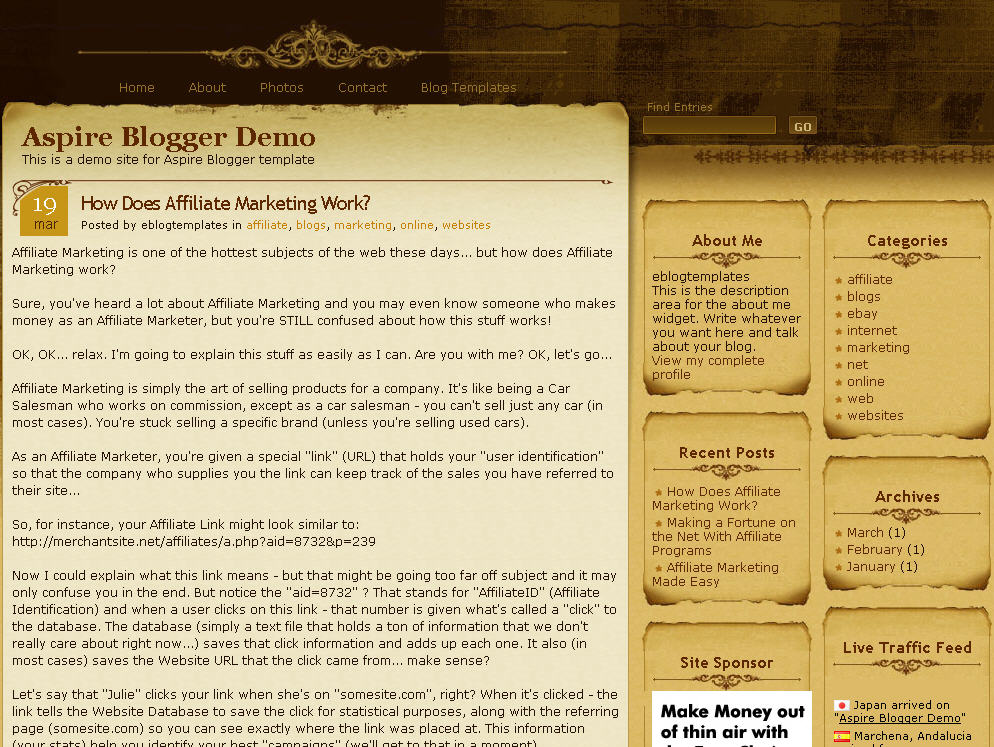
Click to enlarge Aspire Blogger template


Medieval, parchment, and scroll blogger templates seem to be very popular these days so we’ve taken the liberty to find another great one called Aspire. This three-column Blogger template comes dressed up with all the goodies a knight of the round table would want for his blog. You get a search box, recent posts and comments widgets, a custom built date stamp for each post, and more.

In order to get the recent posts and recent comments widgets working, you’ll need to read “How to setup your recent posts and comments” post.

Not to worry, all the images are hosted via our Pro Photobucket account so you won’t experience the “End of the month blogger blues” which happens to thousands of Google Blogspot Bloggers every month.

The dynamic date on each post is handled by a custom written javascript function which is embedded into the template as well. Most other templates you download link to an external .js file so at any point the date might stop working on your blog.

If you like this template you might also enjoy the Parchment Blogger template as well.

Thanks to Info Creek for designing this great theme and also porting it over to the new xml Blogger template for you Blogspot users!

Revision History

4/13/08 – Fixed individual post date so it is center aligned in the date box. Also added new demo site, fixed the layout blogger screen, and added several cool widgets.

5/17/08 – Fixed the “next” and “previous” posts buttons at the bottom of the page. If you downloaded this template prior to this date you can easily fix it yourself. Just search your template code for “.navigation” and then remove the “position:absolute;” entry. Thanks to Allen for finding the bug.

Ready to super charge your blog? Check out our professional premium blogger templates or make money by joining our blog affiliate program!

Want to make your blog stand out from the crowd? I recommend giving your newly downloaded Blogger template a unique and personalized look. Read our Free Blogger Header Images article and find yourself a great custom header image!

If you like this post then please consider subscribing to our eBlog Templates RSS feed. You can also subscribe by email and have new templates and articles sent directly to your inbox.


Trackbacks


251 Responses to “Aspire”


cybertyper on Oct 20, 2008, 8:45 am  

Please see post #91 and let me know if this is correct….please :neutral:


Rabia on Oct 20, 2008, 7:25 pm  

This is user frndly blog.greattttttttt


JR on Oct 24, 2008, 6:06 pm  

Your template could not be parsed as it is not well-formed. Please make sure all XML elements are closed properly.
XML error message: Content is not allowed in prolog.

WHAT DOES THAT MEAN?!?!


Brent on Oct 25, 2008, 10:17 pm  

Aspire is great. It would be nice if you could provide some information in the readme to tell users how to change or turn-off the bullets in the link lists and archive. If the entries get very long they look really tacky with the * embedded in the text.


Christy Lockstein on Oct 27, 2008, 11:42 am  

Hi, I love the layout, but I’ve tried uploading the file and copy & pasting, and with both I get error messages on Blogger. When uploading the xml file, I get this error: Your template could not be parsed as it is not well-formed. Please make sure all XML elements are closed properly.
XML error message: Content is not allowed in prolog.

What am I doing wrong?


Dana on Oct 31, 2008, 7:50 pm  

Love the template. But I can’t figure out how to get the date in the box. Tried some of the things above, but nothing seemed to work. Any ideas? Thanks!


cybertyper on Nov 5, 2008, 11:24 pm  

PLEASE, SOMEONE PLEASE HELP. Stuck and can’t proceed until I get help.
Aspire template is awesome but date is being stubborn.
My settings are:
(date header) “Sep 13, 2008″
(timestamp format) “Saturday, September 13, 2008

Isn’t this correct?
PLEASE SOMEONE HELP! thanks


Joe on Nov 7, 2008, 2:01 pm  

Love the look and feel of this template. Was extremely tempted to use it but because of the way it reads the DATE, it does not put a TIME on the posts. Sorry, have to pass. I want the time AND the date on my posts.


Cybertyper on Nov 8, 2008, 9:57 am  

VERY HAPPY! I just reinstalled the template and the date works perfectly! However, I no longer have the horizontal links at the top (header? nav?). I do not “do code” very well. This template is the best ever and is worth these little things to fuss over. Please help asap so I can “keep on going.” Thanks so very, very, very much.


chethan on Nov 11, 2008, 12:25 am  

Hi there, Can i post the template in my new post as one of the best blogger templates of 2008. I will put a backlink from my blog as well


zura on Nov 11, 2008, 6:55 pm  

Hi david..
thanks for the great template..
anyhow.. how can i change the font size for (About Me, Categories,Site sponsor and son on )?
How to i make it smaller.
Is it i have change at this section?

.content h1 {font: 18px “Trebuchet MS”; color:#602600; letter-spacing:-1px; padding-top:10px;}
.content h2 {font:bold 18px “Trebuchet MS”; color:#602600; padding:10px 0px 2px 20px;}
.content h3 {font:bold 16px “Trebuchet MS”; color:#602600; padding:10px 0px 2px 20px;}
.content h4 {font:bold 14px “Trebuchet MS”; color:#602600; padding:7px 0px 2px 15px;}
.content h5 {font:bold 10px “Trebuchet MS”; color:#602600; padding:5px 0px 2px 10px;}
.content h6 {font:bold 8px Verdana; color:#602600; padding:5px 0px 2px 0px;}
.content h2.pagetitle {position:absolute; top:0px; right:30px; padding:0px; font-size:13px;}

I would like also to change font size for the comment. which i think the font is verdana


Lyle on Nov 12, 2008, 1:21 pm  

I am having trouble with the Date appearing in the posts, and have tried all above mentioned fixes. I’m not sure I am missing something or what. Can someone help me?


jaff on Dec 2, 2008, 9:21 pm  

:razz:
Hello!ASPIRE is a very good template!
but I have a question about TOP MENU. How can I add a EMAIL LINK in my TOP MENU? Can somebody help me?


p4ladin on Dec 10, 2008, 7:08 am  

thx… blogger…
this is my site..
http://songvanias.blogspot.com


zylime on Dec 11, 2008, 8:18 am  

Hello,
This template is absolutely beautiful, but everytime I download it, I get an error message saying:

“Please correct the error below, and submit your template again.
Your template could not be parsed as it is not well-formed. Please make sure all XML elements are closed properly.
XML error message: Content is not allowed in prolog.”

I have absolutely no idea what I am doing wrong, so if someone could PLEASE help me, I would really appreciate it. I already read everyone elses comments, and I noticed that some other people had the same problem….but I didn’t read any solutions.

Thanks so much!


Anwar on Dec 14, 2008, 5:32 am  

I want used your template!!! thanks…beauty themes…
Anwar


cholent on Dec 15, 2008, 4:10 am  

If I download this do the blog sponsors stay on or can I get rid of them and add my own?
Great template!


freak on Dec 26, 2008, 5:34 am  

great template!! its jus wat i was lookin for.. have a prob tho..

i tried copying the images onto photobucket so tht the links don get broken if u change the location of d images… but i have a prob with one particular image.. sidebarbottom.jpg it ends up becoming smaller than the top and looks bad.. pls help.. my blog:

aravenshagsaman.blogspot.com


freak on Dec 26, 2008, 5:57 am  

this is wat it looks like when i use photobucket:
http://i379.photobucket.com/albums/oo235/avinash88/aspire%20img/error.jpg


Pranav on Dec 26, 2008, 11:07 pm  

Hi,

This is really a Nice Template. I am using this template on my blog @ http://directlinksheaven.blogspot.com , which provides download links to latest movies and games.

Thanks for the Template.


sishyphos on Jan 6, 2009, 1:54 am  

Hi and thanks for this nice template.I started to use its 3 columns blogger version.And my problem is the very first top post is not clickable.When i post a new one and it becomes second post then its ok.I saw that someone mentioned the same issue as a problem but could not see the solution.Thanks for any help in advance.


natupatu on Jan 7, 2009, 6:18 am  

Hi! how can i install this template in my blog?
im a noob……


Pranav20 on Jan 10, 2009, 12:37 am  

Hi David,

Thanks for the Great Template :-) . But since I have started using it, it failed me to show the post date :-( . My blog is at http://directlinksheaven.blogspot.com . So could you please review it and let me know the error please ? That is much appreciatable.

Also I have uploaded my Aspire template to http://www.mediafire.com/?zdwzwylygqo . Please see it and correct it and send me to my mail at ghananisnow@yahoo.com .


Evolution - World on Jan 13, 2009, 7:14 am  

hey David thnkoO for such a nice piece of ART!!!


Rafter17 on Jan 15, 2009, 10:16 pm  

Pranav20 and I are both having the same problem, the date is not showing up on the top left corner of the new posts. Everything else is wonderful and it’s by far the best blog format I’ve seen so I’m very reluctant to switch, but that big empty box is distracting and really destroys the flow of the blog.

Please let me know if there is an anticipated fix, or how the problem can be resolved.

Thanks.


Jahyra on Jan 15, 2009, 10:31 pm  

In first, sorry for my bad english…
I have download Aspire , but when I want to open the XML page, Explorer said:
The server did not understand the request, or the request was invalid. Erreur de traitement de la ressource http://www.w3.o...

I fall in love with this them, I want it ;p


Jahyra on Jan 16, 2009, 2:54 am  

I have find a solution ;p
*now searching for change coulour of font*
*reading last comments*


Jahyra on Jan 16, 2009, 3:53 am  

…other question now ^^
How can I do some pages, appears as “home”, “about” or “contact” in the exemple image?
thanks for your answers.


sishyphos on Jan 16, 2009, 4:56 am  

@jahyra
you have to edit link bar from page elements part.eg:for manin page add your mani page url and give name as main page.or for contact,write your contact adress as url give name as contact


Anna on Jan 16, 2009, 4:12 pm  

I love this template. I have tried everything, but the date does not appear. My template also looks different from the template most of you have. I can’t find in it any place where to put the codes for date.

I’d very very thankful for advice.


Jahyra on Jan 16, 2009, 11:06 pm  

ah ok! thanks sishyphos !! <3


Rafter17 on Jan 17, 2009, 10:35 am  

Still hoping for a fix for the missing date on the posts.

Any ideas/fixes/suggestions??


here-under on Jan 24, 2009, 7:51 am  

Nice template.

Thanks


deroc on Jan 28, 2009, 3:23 pm  

Thanks for the creator of this template. I’m using this template and my friends said its nice. I have the same problem with the date before but now the date is showing up. I tried to change the setting of the date in my blog, that is setting > formatting and it works. (Sorry for my bad English).


Jac on Feb 4, 2009, 4:23 pm  

really great template! luv it!
but my ‘post comment’ button doesn’t work…
in other words.. no1 can post any comments..
can any1 help me with tat please? thx


May Bukas Pa on Feb 8, 2009, 2:08 am  

To make the date on your posts work:

- Go to your Blogger’s “Settings” tab
- Click on “Formatting”
- Change the “Timestamp Format” (the 4th one from the top) to this format => “Wednesday, February, 2008″.
- Make sure you change the “Timestamp Format” and NOT the “Date Header Format”

You may check out my site using this template at May Bukas Pa On Primetime Bida


tantricvanity on Feb 16, 2009, 12:12 am  

Prolog error: Please extract file and upload xml file only to blogger template


tantricvanity on Feb 16, 2009, 12:19 am  

Nice template, I would like to help you guys iron out the following issues and can be available to modify code and test it out. I am somewhat code savvy, though not in touch with web programming.

Assistance needed:

1) Upload to blogger gave me an error saying type=HTML not allowed. So I had to drop several widgets from the code – EasyChari, Ads and FeedJit

2) Fonts and Colors – Tried clicking on this tab under layout, it is empty and I am unable to make any change

3) Recent Posts and Recent Comments – empty, cannot edit anything within since nothing is shown – dont know if this is related to the above issues

Thanks in advance.


sm69 on Feb 21, 2009, 8:25 am  

Nice blog.I found here gorgeous Blogger templates.Its very useful.Thanks for your templates


rosepetalkitten on Feb 24, 2009, 10:05 pm  

Tried more than four different ways of installing this. Blogger won’t take this. It says it’s badly formatted. Copy and pasted the thing (with difficulty) in pieces. It doesn’t show up.


tantricvanity on Feb 26, 2009, 10:14 pm  

Rosepetalkitten,

There are three versions of this blog code lying around on this site, if Im not mistaken. First, find the two that are for blogger and not the one for wordpress. Then, open the zip files, there should be one with “a text user instructions file and an XML” and another with “only the XML”. Use the instructions from the text file and the XML from the other zip file and thigns should work. Note, my other comment above where I could not get certain parts to work without removing some of the widgets. Otherwise my blog is working just fine. Check it out at sternmystic.blogspot

Thanks to whoever created this. I only wish you could spend somemore time to iron out a few remaining bugs and add enhancements to allow some popular features.

regards, tanticvanity.


Escriba on Feb 28, 2009, 5:11 am  

xml doesn’t open, i can’t use this template…what to do???


themailmann on Mar 3, 2009, 9:50 am  

It’s telling me that it cannot save the template due to an error.

Please correct the error below, and submit your template again.
The new widget id “EasyChair” is invalid for type: HTML


Judy H on Mar 3, 2009, 9:52 am  

Ok, maybe I’m just not as smart as I would like to think. There is not a single blog on here that I can get to download. They all tell me the XML page cannot be displayed.
What am I doing wrong?


David on Mar 3, 2009, 6:08 pm  

@themailmann, rename the “EasyChair” widget to “HTML33″ and it should fix it.


hometowncafe on Mar 4, 2009, 7:50 am  

i like aspire templates. but how can i download it to my blog? im new. thanks
my blog: hometowncafe108.blogspot.com
my email: hometowncafe@yahoo.com


Lexono on Mar 6, 2009, 8:41 am  

It was almost a month I do to find how to post comments from this aspire template. Finally, I could make it! I can make my date show up exactly like what it supposed to be, and people can post their comments again!!! If you like to know more, please feel free to go to the link below :


Lexono on Mar 7, 2009, 6:56 am  

   
sm69 on Mar 7, 2009, 9:49 am  

Hi,
wonderful templates.Here are some gorgeous Blogger templates.Its very helpful.Anyone can try.


jkacie on Mar 11, 2009, 9:03 pm  

I’m not sure what I’m doing wrong, but I cannot figure out how to download/upload(?) this template onto my blog. I have a mac. Can anyone give me directions? Thx.


annurupm on Mar 12, 2009, 12:39 am  

Hi everyone. I am Normi.
Iâ??m not sure what Iâ??m doing wrong, but I cannot figure out how to download this template onto my blog. Can anyone give me directions?
Thank yOU.


Judy H on Mar 12, 2009, 6:24 am  

Well,
I have finally realized this template is not real. I have asked the same question everyone else seems to be needing an answer to. How do I download this to my blog?
I asked a month ago and apparently there is no answer to this question.
Obviously there are alot more problems with this template than just the downloading part. Kinda scary there guys.


Lexono on Mar 12, 2009, 6:53 am  

Judi, I do able to download the aspire template. You can see my blog to proof it. If not, I would be likely to share with you.


KateKeller on Mar 12, 2009, 7:50 pm  

I am using the Aspire template. I have been recently told that no one can leave me comments. How do I fix that?


Lexono on Mar 17, 2009, 7:17 pm  

Kate,

Feel free to see my blog. It is an aspire template.
Or go to this link to fix the comments widget :

http://lexonos.blogspot.com/2009/03/post-comments.html


dealercub on Mar 25, 2009, 3:20 am  

The answer is right in the beginning of each line….where you find the # and PX after it…reduce that # to whatever size you want and the text will follow.

It would help if you go into a spreadsheet or word processing program like Excel or Word and test font sizes so you can get an idea on how big letters should be.


P3epe on Mar 31, 2009, 1:43 pm  

I recently installed this template, works like a charm!


ssiidd on Apr 8, 2009, 6:16 am  

I just installed this template!It is wonderfull!Most of my friends said that!Thank you all!
http://icynric.blogspot.com/


tj644 on Apr 26, 2009, 11:12 am  

It�s telling me that it cannot save the template due to an error.

Please correct the error below, and submit your template again.
The new widget id �Feedjit� is invalid for type: HTML


wanwarlock on May 5, 2009, 12:27 am  

i have this error while trying to upload this theme:

The new widget id “EasyChair” is invalid for type: HTML

any help?

thanks


fassy4u on May 8, 2009, 10:44 pm  

thanx for all this information
even i have my own blog for the Magazines ,movies, games, software, TV Shows, eBooks, Misc

even every one can get the benefits frm this blog

http://www.fassy-downloads.blogspot.com


sancafe02 on May 12, 2009, 2:13 am  

Hi. .I’m not able to install this template into my blogger. Plz guide me step by step

http://www.message.blog.co.in


Ci_mOet on May 21, 2009, 10:28 pm  

Hi..
I am very not understand with system template blogger,,
Always,i’m just coy-paste HTML tempelate..
Can you help me..?
How to tell for me about system template now?


Revidall on May 23, 2009, 12:22 am  

hello. is this blog template broken? i got the same message as others do. this message appears after uploading aspire template.

Your template could not be parsed as it is not well-formed. Please make sure all XML elements are closed properly.
XML error message: Content is not allowed in prolog.

what does it mean? could somebody help me? PLEASE?


Revidall on May 23, 2009, 12:24 am  

i’d be waiting for your opinions about the dilemma I’ve encountered above. thank you.


saifimam on May 23, 2009, 12:58 am  

I cant install…it says -

“We were unable to save your template
Please correct the error below, and submit your template again.
The new widget id “EasyChair” is invalid for type: HTML”

what should i do now?


Revidall on May 23, 2009, 5:33 pm  

why is the system keep on teeling this message?

We were unable to save your template
Please correct the error below, and submit your template again.
The new widget id “Feedjit” is invalid for type: HTML

should i change FEEDJIT to HTML33 just like as the EASYCHAIR? please answer this ASAP.


Brian on May 25, 2009, 1:10 pm  

David – I love this template but I cannot get my date to appear. I followed all of the instructions on what format to use in the settings but still no luck. Can you help please????!


Bindu on May 26, 2009, 4:29 pm  

   
fixnwin on May 26, 2009, 9:37 pm  

@REVIDAL as you change easychair to html33,you also can change the feedjit to html34 and ads to html35. this work fine with me


Videolar on May 28, 2009, 12:39 am  

thank you eblogtemplates
veyr good templates


varsh on Jun 9, 2009, 9:36 pm  

This Template Is Not Working. Its Not Displaying Devider, Border Etc From Photobucket. Any Help?


David on Jun 9, 2009, 10:00 pm  

For some reason Photobucket is having problems serving up images for all templates on this site. I’ve contacted them directly and it should be resolved soon.

Short-term solution – If you move all the images to your own image hosting site (photobucket is free) then you won’t have to rely on our images (which have never been a problem up until today.

Thanks,

David


Boticselli on Jun 9, 2009, 11:35 pm  

Dear Sir!

The theme is fantastic! :)
I’ve been using Aspire theme in my blogger site since 2008 may, and there was no problem at all. Until now!

Today the whole design losts from my site!

Take a look at: http://www.boticselli.net

OK! I see your latest post on Jun 9, 2009, 10:00 pm

Please inform me, what the Photobucket guys told about the problem.

Thank you for your help, and sorry for my bad english!

Sincerely yours: Botond Springer

…and my email adress: <a href=”mailto:sbotond@invitel.hu”sbotond@t-email.hu


varsh on Jun 10, 2009, 9:02 am  

OK, All I See Is, The Template Is working Fine Now. Gotta Backup It Soon.

Thanks David For your Prompt Reply.


nyq on Jun 12, 2009, 9:10 pm  

I cant install�it says -

�We were unable to save your template
Please correct the error below, and submit your template again.
The new widget id �EasyChair� is invalid for type: HTML�

what should i do now?

answer : change ‘easychair’ to html33. work fine after it


elred on Jun 23, 2009, 7:21 am  

thanks


Nabindra on Jun 26, 2009, 5:21 pm  

The template is really fantastic.


Ron on Jun 26, 2009, 6:47 pm  

Why does the title of the first entry for this template is not clickable? I think it is on the template/xml code it self.

Please help.


Ron on Jun 28, 2009, 6:12 pm  

David, kindly help me.

Why does the title of the first entry for this template is not clickable? I think it is on the template/xml code it self.

Please help.


Gloria on Jul 10, 2009, 2:42 pm  

I am having problems with the date on the the blog posts and it also says undefined under it.

I found out how to get rid of the undefined, but it does not work with your template.

I would appreciate some help on getting the date corrected.

Otherwise I will have to use a different template.


Aswani on Jul 12, 2009, 9:01 pm  

Hello, I have installed this template. Everything is working fine except – Post a Comment – link. Post a Comment link is not at all working. Please help me out as soon as possible as I am unable to get any comment for my posts :(


jtwombly on Jul 13, 2009, 3:55 pm  

I have this error message trying to install template:

Please correct the error below, and submit your template again.
The new widget id “Feedjit” is invalid for type: HTML

Pls advise….thank you


Gary on Jul 14, 2009, 11:17 pm  

Can anyone tell me how to enable the header image box? I have a banner to put at the top of my blog, but the aspire template apparantly disables it because even though I put an image in the header box it won’t show it.


kC on Jul 15, 2009, 8:45 pm  

how can i change the layout into 2 column..?


ymmstmary on Jul 21, 2009, 1:35 am  

actually how do i upload it to my blogspot as a template ? tq


ymmstmary on Jul 21, 2009, 2:05 am  

well, i have uploaded to my blogspot. but how to put photo/banner on top of the template..? tq


sree on Aug 1, 2009, 6:30 am  

thank u very much :D


revenge on Aug 23, 2009, 8:27 pm  

Buenísima!
Que plantilla más exquisita =D

Muchas Gracias


revenge on Aug 24, 2009, 12:29 pm  

Hello
I hope that someone could help (my english is not very good).

I have installed the template without major problems, but the date is not visible and commentary cannot be left s either.

I have followed the steps on that they comment more up to solve these problems but it has not given me result.


Ahmet Hakan Subasi on Sep 13, 2009, 3:15 pm  

Hi…

This template is very good. I like this template. But I have a mini problem.

First post is not clickable. Why?

Please help me.


Ahmet Hakan Subasi on Sep 14, 2009, 3:10 pm  

David is sleeping… May be :)


LarryWestfall on Sep 15, 2009, 12:44 pm  

I would like to have the date posted in the top left hand corner, but it is currently showing the time it was post (i.e. 09 AM). Could you tell me how to get the date to post?


LarryWestfall on Sep 15, 2009, 4:56 pm  

Aswani… I visited your blog and see that you were able to fix the comment link. I would love to know what you did to fix the problem.


LarryWestfall on Sep 15, 2009, 4:59 pm  

Ron… I looked at your blog and I see that the date is posted in the small box to the left of your post title. My blog is displaying the time that it was posted. Could you offer any suggestions on how I could get the date in the box?


auntie_biotic on Sep 17, 2009, 9:23 pm  

Hi, I love the aspire template I am trying to use it but gosh soooo many problems. The date is not showing. I followed instructions and changed “easy chair” to HTML33 and then “feedjit” was not allowed so change that to HTML 34 then “ads” were not allowed so change them to html35 and now instead of undefind were the date should be there is a blank space.

So frustrated. Any help PLEASE

http://captainclawgame.blogspot.com/


LarryWestfall on Sep 18, 2009, 8:12 am  

Hey everyone…

Here is some help I recieved from a help forum that allowed me to make the first post clickable. As far as I can tell there has been no cosmetic changes to the blog. Below is a simple fix.

You can view my changes @ http://larrywestfall.blogspot.com

That may be a template feature.

I seem to remember looking at the template before and the source of the problem may be that
and its background image, cover the top of the post column.

That style seems to primarily provide the dividing line that extends from the corner image. If you look at the other posts, the corner image (above the date) is there, but not the line. .begin contains a complete image with the corner and line.

Here’s the style that provides the corner plus the line at the top of the post column:
.begin {background: url(http://i254.photobucket.com/albums/hh92/eblogtemplates/
aspire/begin.gif) 10px 0px no-repeat; position:absolute; top:10px; left:0px; width:100%;
height:40px; z-index:10;}

If you change that height:40px; to height:5px, the title will become clickable (it is a link, like the other post titles.)

I’m not sure that is a proper fix. When you do that, you actually see parts of two images. 5px of the one above and the rest from the one below. You probably should contact the template designer and point out the problem.

The corner image on the other posts is in this style:

.content .date {font:normal 24px/47px Georgia; margin-right:10px; color:#ffffff;
float:left; width:59px; height:56px; overflow:hidden; text-align:center; background:
url(http://i254.photobucket.com/albums/hh92/eblogtemplates/aspire/date-bg.gif) no-repeat;}

I’ll add that that whole top section seems to rely on a css error in this style:
.content-wrapper {position:relative; width:627px; overflow=hidden;}

There is no overflow=hidden in css and changing it to overflow:hidden causes the top to reformat in an undesirable way.


LarryWestfall on Sep 18, 2009, 8:19 am  

Go to layout:setting:formatting

On the formatting page go to the fourth category down. It is labeled Timestamp Format and change the format to: Friday, September 18, 2009.

This worked for me and seems to be the only setting that will put the date in the box. This worked for me. I also just posted a fix at the bottom of the page to make your first link clickable.


Pierre on Sep 22, 2009, 12:18 am  

I have the same problem, the “Date” didn’t display on my blog, but after reading the suggestion from May Bukas Pa, finally the “Date” already appears again on my blog….Thanks May Bukas Pa for your suggestion…

Regards,
Pierre
Nice Inspiration


Kelsey on Sep 23, 2009, 4:07 pm  

Is there a way for me to shift one of the side bars to the left of the blog posts? So I could have left sidebar-blog posts-right sidebar instead of blog posts-sidebar-sidebar?

Thanks


Leave a Comment or Review

So what do you think of this Aspire Blogger template? Any suggestions on how to improve it? Feedback is a valuable way to communicate directly to our staff and Info Creek, the template author.

Note: We receive dozens of comments on a daily basis and can't always respond to each and every one. Please only post relevant comments regarding this Blogger template.

If you have questions regarding general Blogger settings, you should visit the Blogger Help site. The Blogger Help Group is also another good resource for finding an answer to your question.

The eBlog Templates Blog Forum is also a great place to look for help from other members.

You can use these tags: <a href="" title=""> <abbr title=""> <acronym title=""> <b> <blockquote cite=""> <cite> <code> <del datetime=""> <em> <i> <q cite=""> <strike> <strong>

Putting spammy or irrelevant links in your comments will result in deletion and potental banning.