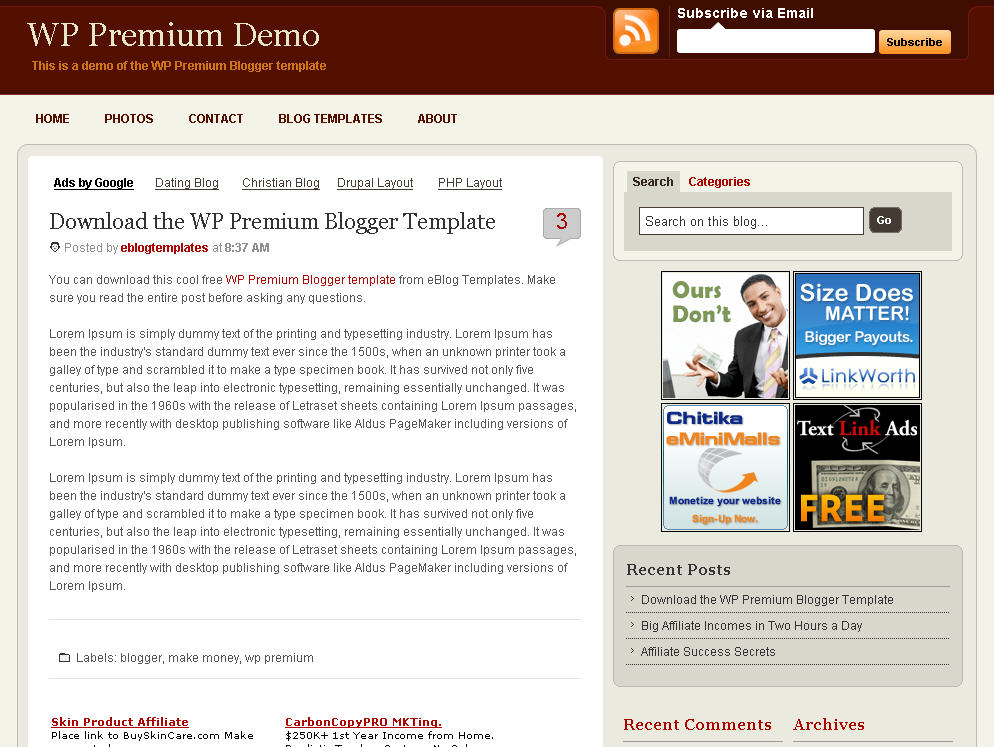
After hours of code editing and tweaking, I’d like to welcome WP Premium Red to the eBlog Templates library. This gorgeous and powerful three column fixed width template originally designed for WordPress, can now be yours for free (all I ask of you is to please keep the footer links intact as a token of our hard work making this for you).
I’m sure most of you have seen this premium free theme before and wished it was available for Blogger. Many WordPress users were shocked to see this theme available by R.Bhavesh for free, including myself. I love the simple yet nicely laid out design. It reminds me a lot of the ProBlogger site which is in a league of it’s own.
I’d also like to note that there are no javascript external file dependencies in this Blogger template. Most free templates you download with javascript features link out to an external .js file and while the template might work well at first, it’s only a matter of time before it breaks.
All of the template images are also hosted on our Pro Photobucket account which has unlimited bandwidth. For you that means the images will always be there and not suddenly disappear at the end of the month. You might want to copy these images to your own server regardless just so you’ve got complete control of them.
This Blogspot template includes all the features of the original WordPress theme (even the javascript side bar tabs!) and all you need to do is configure them.
Features include:
This template was built to make it easy for you to setup without touching much of the code. Most sections were built using widgets so you’ll just need to edit each one accordingly. Follow the steps below to correctly setup the template so it will look like the screen shot above.
Before we begin, I want to point out the very cool sidebar tab switching feature. You probably didn’t notice it right away so look at the search box on the right side. Notice the second tab called “Categories” and click on it. Assuming you’ve got at least one category, you’ll instantly switch without the page reloading. Pretty cool huh? This was part of the original design for WordPress and eBlog Templates specially converted it over to Blogger using Javascript.
When you first load up the template, you won’t see any tabs. Don’t worry, it’s working properly and you just need to add new tabs. Unlike other Blogger templates, you don’t need to edit the code to add or remove tabs. Just go into the page element area and click on “edit” within the “Top Tabs” widget. Surprise, it’s a simple link list widget so just add as many tabs as you want with ease.
This section you actually need to edit the code to make it work properly. It’s wired up to work with Feedburner and all you need to do is pop in your id. Edit the template code and look for this section:
<input type="hidden" value="http://feeds.feedburner.com/~e?ffid=YOUR-FEED-ID-HERE" name="url"/>
<input type="hidden" value="YOUR BLOG NAME HERE" name="title"/>
Replace the YOUR-FEED-ID-HERE and YOUR BLOG NAME HERE with the appropriate values given to you from Feedburner.
If you have an Feedburner account, you’ll want to setup your RSS feed as well. Right above the section you just edited, you’ll find this code:
<a expr:href='data:blog.homepageUrl + "feeds/posts/default"'><span class='rss'/></a>
Replace <a expr:href='data:blog.homepageUrl + "feeds/posts/default"'> with something like this <a href="http://feeds.feedburner.com/YOUR-FEED-HERE">. Read our “How to Setup Feedburner on Blogger” article for more details.
This section is just an html widget so you can either delete it or paste in a few ads. The default ads will disappear once you fill the html widget box so don’t worry about touching the code. There’s nothing special about the ad formatting. The current ad code looks like this:
<a href="#"><img src="http://i254.photobucket.com/albums/hh92/eblogtemplates/wppremium/thumb1.gif"/></a>
<a href="#"><img src="http://i254.photobucket.com/albums/hh92/eblogtemplates/wppremium/thumb2.gif"/></a>
<a href="#"><img src="http://i254.photobucket.com/albums/hh92/eblogtemplates/wppremium/thumb3.gif"/></a>
Next we’re going to move down the sidebar and setup the recent posts and recent comments widgets. Instructions have already been written in another article so please read “How to Setup Your Recent Comments & Posts” post.
These are just simple link lists so feel free to remove them or add links to them. There’s plenty of sidebar space since there’s two sidebar columns.
This small html widget defaults to a Text Link Ads button as an example. Once you put something in the html box, this default ad will disappear. If you haven’t heard of Text Link Ads before you might want to take a look. It’s a great site which allows you to sell links on your blog. Read more about Text Link Ads for Blogger.
Just like the original WordPress design, this template also has the option to add footer links to match the top tabs. Unfortunately there isn’t a way in Blogger to automatically print out the same set of tabs so if you want to use this feature you’ll just need to enter the exact same tabs in this link widget.

This is what it should look like once you’ve added a few links. Some people don’t bother even using this widget so feel free to remove it or just not add any links to it.
Thanks to R.Bhavesh for the amazing design and deciding to give it away for free. I’d also like to thank Ivan over at Zona Cerebral for which portions of his template were used in creating this enhanced version. Template was converted into the new xml Blogger format by eBlog Templates.
Update (2/15/08): This template has been updated to include the Blogger page element layout editor missing scrollbar fix. I’ve added several new css elements like body#layout CSS selector to add CSS styles that adapt templates to the editor.
Update (2/17/08): A bug was found in the search widget of this template (thanks Kenneth) which has been fixed. Anyone who downloaded this template prior to 2/17 will need to either re-download the template or make an easy one character fix to their existing template. I recommend backing up your template before you make this change. The fix is as follows:
Search your existing template for the following bit of code and replace the “s” with a “q“.
value="Search on this blog…" name="<strong><font color="#ff0000">s</font></strong>"
should be
value="Search on this blog…" name="<strong><font color="#ff0000">q</font></strong>"
After you make this change, save your template and the search box should now work properly. Sorry for the bug but at least it’s an easy fix right?
Update (2/18/08): A new bug was found in the individual posts section (thanks Nick). The date was being shown twice in the post header. If you downloaded this template prior to 2/18, you can easily fix this without downloading it again. Go into your template layout editor and edit the blog posts module. Uncheck the 3rd box down and save. It should now be fixed.
Update (4/22/08): The previous 100 x 100 ad spots weren’t very popular and have been replaced with 4 of the more standard 125 x 125 size banners. The default comes with four great ads which you can either keep or replace with your own. I recommend keeping them if you currently don’t have any ads to use. Then click through and sign up with each of the 4 ads and put your own version on your blog instead.
Want to make your blog stand out from the crowd? I recommend giving your newly downloaded Blogger template a unique and personalized look. Read our Free Blogger Header Images article and find yourself a great custom header image!
If you like this post then please consider subscribing to our eBlog Templates RSS feed. You can also subscribe by email and have new templates and articles sent directly to your inbox.
3 columns,ads,blogger template,feedburner,Fixed width,Red,Right sidebar,tabs,WP Premium
152 Responses to “WP Premium”
9:42 am on February 13th, 2008 (subscribed to comments)
are u sure that the Top Tab is working proprely ?
a friend
9:44 am on February 13th, 2008 (subscribed to comments)
upssssss…sorry ! i was thinks the HEADER TABS …
the Top Tab don’t accept any new element ??? Strange
a friend
9:53 am on February 13th, 2008 (subscribed to comments)
yeap it’s right. The Top Tabs don’t have the parte were you can EDIT elements … like the other section.
a frind
11:15 am on February 13th, 2008 (subscribed to comments)
Thanks for this template. I was searching for something professional for hours, it still needs some customization but I can do it myself
P.S: @ A FRIEND : are there more persons inside ur head? In ur comments u look like ur talking whit urself. Strange NET
12:06 pm on February 13th, 2008 (subscribed to comments)
No i m alone … but i wrote more messages. Just try this template because i have problem to EDIT some links in TOP TABS … there is no EDIT SECTION !!!!
1:32 pm on February 13th, 2008 (subscribed to comments)
@friend: Are u using Firefox? Couse I am using it and
I know how it shows
Use Internet Explorer to log in to ur blogger account and from there edit the TOP TABS
It worked for me
4:54 pm on February 13th, 2008 (subscribed to comments)
Thanks for confirming it works AG. The template was tested before it was released especially the widgets. As you can see from the screen shot, the top tabs worked for me as well.
A Friend - in IE you might need to scroll to the right in edit mode because the “edit” link on some of the page elements are covered up.
2:06 am on February 14th, 2008 (subscribed to comments)
incredible but true: with IE i don’t have any horizontal scroller … like with firefox ;-(
I know that normaly there is but in this case there isn’t.
Where is the matter ????
A Friend
4:13 am on February 14th, 2008 (subscribed to comments)
Whit Firefox the Layout>Page Elements have the EDIT section covered up so u can’t add TABS
In IE the Layout>Page Elements are shown in full and you can see the EDIT button for the TABS
@friend: I don’t understand ur problem. Don’t u see the Edit section for the TOP TABS?
U might want to check ur IE version because the template works fine
I even added some new stuff like: READ MORE sintax, a rating possibility for the posts, Social Bookmarks
The Template is awesome, I just have to figure out how to change the looks to make it a little more futuristic because of the nature of my content
@eblogtemplates: I must congrats u for this site, it got lots of templates and premium ones
But if I can make a sugestion, you should have some articles related to hacking, there are some simple blogger hacks that really makes a template look more professional and some articles like those will deliver full service and some people won’t bother searching o other sites
6:15 am on February 14th, 2008 (subscribed to comments)
Hello,
thanks for this wonderful template… One thing doesn’t work for me though: I have deleted posts and comments that keep showing up in the Recent comments and Recent posts widgets. Any suggestion?
Many thanks
6:17 am on February 14th, 2008 (subscribed to comments)
…Oooops, forgot my site link http://regoladelsedici.blogspot.com/
6:59 am on February 14th, 2008 (subscribed to comments)
@A.G. - Thanks for your suggestion. This site is only a few months old but the plan is to write more articles as well as include new templates. I’d love to see your blog and what you’ve done using this template thus far! I appreciate your feedback.
7:02 am on February 14th, 2008 (subscribed to comments)
@Silvia - The recent comments and posts widget pulls the content directly from your RSS feeds so for some reason it’s just not getting deleted from your blog. I looked over your blog and it’s still under construction so it’s hard to really figure out what else it could be. Your blog is coming along though!
8:27 am on February 14th, 2008 (subscribed to comments)
which came first, the chicken or the egg?
Look at that:
http://zonacerebral.com/2008/01/plantilla-para-blogger-wp-premium-red.html
I want to use this template on my Blogger site, so…
Who is the true autor of this adaptation of the WP Premium template?
Greetings from Spain!
10:59 am on February 14th, 2008 (subscribed to comments)
Hello David. I have reasons to think that you take my adapted template for Blogger WP Premium and copy to publish it again in your blog. I see your template code and it’s the same of mine, in the name of the sidebars for example (rsidebar and lsidebar) or in the order of the codes.
I don’t need your credits because i’m not the author of the template, but i think the people should know who make the work of adapt a template for Blogger. Copy it’s so easy, but not all the people can tell the truth about the content.
See you!
11:10 am on February 14th, 2008 (subscribed to comments)
Sorry, that’s only my opinion, not is an accusation. I see you recognize and publish the credits in the other Blogger templates.
Regards from Spain!
6:45 pm on February 14th, 2008 (subscribed to comments)
Hi I really need help installing “Subscribe to Feed Via Email” thing. I can’t seem to find it in the code/xml. Please help and give me a simpler explanation
7:25 pm on February 14th, 2008 (subscribed to comments)
@Ivan- Thanks for the note. I must say, you have a good eye.
I did use a few sections of code from your WP Premium template to save time when I built this one. However, as you can probably tell, the code is quite different and there are numerous additional features and enhancements which took many hours to build in. I wanted this template to be as close to the original WordPress theme as possible which required a lot of work.
All design credit is always properly given to the original creator. I am in no way trying to steal other people’s work and have no problem mentioning you as a contributor. I’m more interested in creating a friendly blog community than having people think I’m poaching their work. I will update the page now. (virtual handshake)
7:29 pm on February 14th, 2008 (subscribed to comments)
@ Baloo - Ivan should get credit for being the first to convert this WP Premium template but since this template is free, anyone can adapt and have their own flavor of it. Feel free to download them both and use whichever one you like. His is already translated into Espanol so it might suit your needs better.
7:39 pm on February 14th, 2008 (subscribed to comments)
@ Kenneth - Open your template in a text editor and do a search for the phrase “Subscribe via Email”. It’s all the way down on line 1200. This is the section you need to configure. There are two hidden fields that need the proper FeedBurner information to work properly.
8:50 pm on February 14th, 2008 (subscribed to comments)
@ David - Hi I did everything that you said and it still doesn’t show up. I took a picture of it. Please take a look and see if I have done anything wrong. Thx
http://i34.photobucket.com/albums/d150/zixpk/help.jpg
12:21 am on February 15th, 2008 (subscribed to comments)
@David - Hello, now my recent posts widget seems to work. I just added ?alt=rss to the end of the feed url. The recent comments label keeps showing deleted comments, even with the ?alt=rss … Any suggestion welcomed!
1:55 am on February 15th, 2008 (subscribed to comments)
@Kenneth - The code looks fine. I’d remove your header image and then try it. It seems to be laying on top of the subscribe box so every time you click it, it uses your header image link.
1:56 am on February 15th, 2008 (subscribed to comments)
@Silvia - Glad you were able to get one fixed but I really have no clue about the other. Sorry….
3:00 am on February 15th, 2008 (subscribed to comments)
Hello David! Thank’s for your comprehension. You can take any template you want from my blog to make your adaptations or versions, only need to talk me and recognize the work in your post. I only want to make community friends too and i think you are making a really nice content blog mate
I go to make a review of your site, because i think the spanish people would like your web for know new Blogger and Wordpress templates.
Regards from Spain! Ciao.
7:08 am on February 15th, 2008 (subscribed to comments)
I have a problem,
It seems theres a bug whit IE
The left sidebar sudden brakes ( RECENT COMMENTS), it supposed to show 10 comments but if u can see, it just shows 1 and a half comments.
In Firefox theres no problem.
Does anybody knows why there is this error in IE ( I have the latest version
of IE so this shouldn’t be the problem, I guess…)
the site adress is http://www.unlimitedgadgets.com/
7:58 am on February 15th, 2008 (subscribed to comments)
@E.S. Not sure what the problem could be. It works fine on my test blog in IE. http://wp-premium.blogspot.com/. It looks like you made some other changes to font sizes and also got the widget from another site so the formatting isn’t quite the same.
8:02 am on February 15th, 2008 (subscribed to comments)
@Ivan, Thanks Ivan. You’ve got some other great templates I might need to add to the site library. You of course can put my templates on your site as well.
Thanks for the compliment and I look forward to reading your review of my site!
Ciao!
8:41 pm on February 15th, 2008 (subscribed to comments)
@David- Thanks for all your help. This template is wonderful. As you can see from my website http://www.zixpk.com/ im still customizing it. Thanks again for all you help.
10:07 pm on February 15th, 2008 (subscribed to comments)
No problem Kenneth. Glad you were able to fix the feed and subscribe issue. Your blog is coming along great!
3:00 pm on February 16th, 2008 (subscribed to comments)
Thanx for the fantastic pro template!
Can you please go shortly in details through the “Subscribe to feed via e-mail” step. I can’t set it up. Maybe with an example of a few lines of code?
I do not get what to put instead of “YOUR-FEED-ID-HERE”, “YOUR BLOG NAME HERE” and “YOUR-FEED-HERE”? Thanx in advance.
3:48 pm on February 16th, 2008 (subscribed to comments)
This may help:
“The feed does not have subscriptions by email enabled” is the report that I get every time I try subscribing.. Help?
4:41 pm on February 16th, 2008 (subscribed to comments)
If I only knew how to delete my posts.. Going through xml code of the two blogs with the template helped a lot. Plus some research @feedburner. Thanx for the template again!
10:13 pm on February 16th, 2008 (subscribed to comments)
@David- Hi David. I have just noticed that my search on my blog does not work. Do you know what the problem could be,? because every time that I search something it takes me to my homepage. Thnx
4:46 am on February 17th, 2008 (subscribed to comments)
@Mirza, when you sign up for Feedburner, you need to make sure to enable email subscriptions. It’s an option within your account. Then you’ll get the url to use for the template.
5:00 am on February 17th, 2008 (subscribed to comments)
@David, thanks. That’s what I did. Now, the same question as Kenneth L. The search bar. Does it actually work? Thx
5:09 am on February 17th, 2008 (subscribed to comments)
I have replaced the search bar with this one and it seems to work: http://widgetsforfree.blogspot.com/2008/01/blogger-search-bar-form_24.html
Silvia
6:59 am on February 17th, 2008 (subscribed to comments)
@Kenneth- You just found a bug…thanks for letting me know. It’s an easy fix and I will write about it above. I’ve already updated the download file so it’s working properly for anyone else who downloads it going forward. You just need to change one character from a “s” to a “q” in the search code.
value=”Search on this blog…” name=”s”
should be
value=”Search on this blog…” name=”q”
7:13 am on February 17th, 2008 (subscribed to comments)
One Q more: anyone else having problems with the recent comments? I do get absolutely nothing there… no matter how I follow your guide.
9:57 am on February 17th, 2008 (subscribed to comments)
Thanks David, Great template-work!
Just a note:
In order the search bar to show up you need at least one category.
It took me a lot of time to find out
what was the problem since my blog is brand new and didn’t had any categories. In the “configuration” paragraph you mention sth about having at least one category but I didn’t understand that this would affect the search bar too.
Anyway, thanks again!
1:38 pm on February 18th, 2008 (subscribed to comments)
When I post the date shows twice and I’ve noticed this on other template users as well.
It looks like this:
Posted by Nick at Friday, February 15, 2008 at Friday, February 15, 2008
How can we fix this?
5:36 pm on February 18th, 2008 (subscribed to comments)
@Nick: Wow I didn’t noticed that.LOL. Thanks for pointing it out.
@David- Do you know what could be wrong?
7:45 pm on February 18th, 2008 (subscribed to comments)
What hexidecimal color is used for the two right columns? I’m using “EEE9E9″ for adsense but as you can see it is a little pink.
8:38 pm on February 18th, 2008 (subscribed to comments)
@Nick and Kenneth- Gentlemen, it’s an easy fix. Go into your template layout screen and edit your main blog posts module. Uncheck the 3rd box and save. I’ll have to fix this in the template for anyone else who downloads it. Thanks for letting me know.
9:31 pm on February 18th, 2008 (subscribed to comments)
@Nick, not sure if adsense will allow it but try #ebeadf
4:44 pm on February 19th, 2008 (subscribed to comments)
Thank you David. Both suggestions worked!
4:52 am on February 20th, 2008 (subscribed to comments)
just a simple question.
can we download the template css code now with all the correction on ?
Thanks
a Friend
5:42 am on February 20th, 2008 (subscribed to comments)
@a Friend, yes. All the updates are built into the latest download.
9:48 pm on February 26th, 2008 (subscribed to comments)
Hi! I just downloaded the theme a while ago (February 27, 2008, Philippine time) but I can’t seem to find the feedburner line in the code. Please help. Thanks!
9:51 pm on February 26th, 2008 (subscribed to comments)
I mean I can’t find the ‘your blog name here’ and ‘your feed id here’. Thanks!
7:20 pm on February 27th, 2008 (subscribed to comments)
@Dyimz, make sure you check the “Expand Widgets Templates” checkbox on the “Edit HTML” layout screen. That should reveal all the widget information. Then search for “YOUR-FEED-ID-HERE” with the dashes and you should find it.
4:41 am on February 28th, 2008 (subscribed to comments)
Thanks a lot!
12:13 pm on March 7th, 2008 (subscribed to comments)
Hi, I love your template but I am new to building blogs and want to know how to how to use the link lists. I am trying to build a golf website for example and want to add different topics in the “Top Tabs” like “courses” “Equipment” and maybe a “rating” tap. I want them all to be an additional page of the blog but don’t undertand how to do this without actually creating a new blog so that I can add the link to it.
Would you or someone please expalin to me how exactly to do this.
Thank you for your help.
Case
4:41 am on March 8th, 2008 (subscribed to comments)
@Case, the best way I’m aware of is to create new labels called “Equipment”, “rating”, etc. Then create new posts which will serve as your new page and put them in each label (category). Then create the tab link directly to the label results page. Hope that makes sense.
7:54 am on March 13th, 2008 (subscribed to comments)
Thanks
Lucho
sorry, but my english is not good.
3:46 pm on March 13th, 2008 (subscribed to comments)
First of all thank you for this template. This real looks like good.
I want to ask; ” How can we use other WP premier Black and Brown in Blogger?” (Especially Black one.)
4:20 am on March 14th, 2008 (subscribed to comments)
I found other templates but they aren’t work properly with blogger.
WP Premium Black.
http://zonacerebral.com/2008/01/plantilla-para-blogger-wp-premium-black.html#comment-1942
WP Premium Brown.
http://zonacerebral.com/2008/01/plantilla-para-blogger-wp-premium-brown.html
WP Premium Red.
http://zonacerebral.com/2008/01/plantilla-para-blogger-wp-premium-red.html
8:39 am on March 15th, 2008 (subscribed to comments)
Gi…
Thanks for the tempelate..
Can i add one more item to the top side list.. other than categories..?
I need to add a link list.. Is it possible..?
One more problem is that… at the end of every post, the text, “Links to this post” appears in four lines.. How to get rid of this..?
Help me out.
1:18 am on March 16th, 2008 (subscribed to comments)
Yeah.. it’s fine now..
I edited posts widget in the layout and unchecked the “links to this post”
And now.. the blog seems good.
Still, need to improve a lot… i’m learning..
8:34 am on March 18th, 2008 (subscribed to comments)
Great thanks for your help
9:59 pm on March 18th, 2008 (subscribed to comments)
Is regarding subscribe to feed,we should copy and paste the code to our website or we just edit from website,because i cant find any code and i paste to code,it shows “the features is not activated”please assist
3:55 am on March 19th, 2008 (subscribed to comments)
@Felex Tan
Sign into ur feed burner.. and “activate the email subscriptions”
And only then it works.. It’s working fine with mine..
7:52 pm on March 19th, 2008 (subscribed to comments)
I’ll be converting this into a Black/Gray/White theme soon for my blog. I will also be turning the B/G/W version into a one column theme for my Tumblr blog if everything goes as planned.
I suck at this sort of thing but I know it can be done!
2:16 pm on March 20th, 2008 (subscribed to comments)
I just converted this theme into Gray/Black/White.
Spread the link like wildfire! FREE New Blogger Template!
http://blog.chvnx.com/2008/03/free-blogger-theme.html
11:47 pm on March 20th, 2008 (subscribed to comments)
Chvnx, that’s nice work. Feel free to convert any other of our templates as well.
5:19 am on March 24th, 2008 (subscribed to comments)
My subscribe email is not working,i cant find any “subscribe email”at editor,pls assist/jk
7:12 am on March 24th, 2008 (subscribed to comments)
felextan, make sure you click the checkbox on the top right of the html template editor window. That will expand all widgets and should display the subscribe email info for you.
1:49 pm on March 24th, 2008 (subscribed to comments)
Thanks for this great template. I did some modifications and here it is.
You will also see my modified WP Premium black version here.
Both have multi-level dropdown CSS menus and you may freely download the templates.
8:16 am on March 25th, 2008 (subscribed to comments)
how come i can’t find this portion?
1:51 am on March 26th, 2008 (subscribed to comments)
Hello Buddy
just check out my blog at
http://arnolds-universe.blogspot.com/
i uploaded the xml file.
With this error pressing confirm, i uploaded the xml file
this was the error
Widgets are about to be deleted
Please confirm that the following widgets should be deleted. All the widgets’ configuration data will be lost.
Feed1
LinkList2
HTML1
Feed2
LinkList4
HTML2
Confirm & Save Cancel
but look at my blog total disaster i lost all the
recent comments part,topics and i cant find the majot part of the code its gone missing even after checking the expand widget box.Help me out Buddy i am new to blogspot
1:57 am on March 26th, 2008 (subscribed to comments)
japa, did you not make a backup of your template before uploading the WP Premium template? I sure hope you’ve got one otherwise you’ve lost your old widgets. If that’s the case, you’ll need to set everything up again and once you’re done, make sure to create a backup in case this happens again in the future.
2:27 am on March 26th, 2008 (subscribed to comments)
can u tell me the correct procedure to upload the xml file everything plzzzzzzzzzz
i created the blog again this time i have the backup file of the original blog but still resulted in disaster
2:43 am on March 26th, 2008 (subscribed to comments)
http://i284.photobucket.com/albums/ll30/venki4united/gen/image.jpg
see this is wat i am got after uploading
2:56 am on March 26th, 2008 (subscribed to comments)
Steps in using WP Premium templates.
I’ll be here to assist because I feel responsible. But I assure everybody everything can be fixed.
1) Go to Edit HTML
1)Back your original template (Download full Template)
2)Browse for the new template then click Upload
3) If asked to delete existing widgets, click Confirm and Save
4) Click Save Template
5) After a successful Save, you have to reconstruct your previous widgets, including link lists, feeds, recent comments, etc. Your template back up comes handy if you have to copy/paste some scripts or html back to your new template. (You may open your xml back in Excel or notepad).
6) Be sure to put a widget below the Ads widget so that the 3 graphic frames become visible (I usually put their my Most Recent Feeds using a widget of my own RSS Feeds
7) To reconstruct the CSS Menu you have to edit the HTML. Click Expand Widget Templates and edit the <ul class below Replace all the http:// links by your own urls.
2:59 am on March 26th, 2008 (subscribed to comments)
thanx trying it out ….
love ur template
3:22 am on March 26th, 2008 (subscribed to comments)
Sorry I feel I rushed my previous post a little bit. Here is a better instruction:
I’ll be here to assist because I feel responsible. But I assure everybody everything can be fixed.
Steps in using WP Premium templates.
1) Go to Edit HTML
1)Back up your original template (Download full Template)
2)Browse for the new template then click Upload
3) If asked to delete a list of widgets, click Confirm and Save
4) Click Save Template
5) After a successful Save, it is better to remove all widgets below Ads widget. Do not delete the Ads widget. Click Save Template then reconstruct your previous widgets, including link lists, feeds, recent comments, etc. Your template back up xml comes handy if you have to copy/paste some scripts or html back to your new template. (You may open your xml back up in Excel or notepad). Do not worry if blogger experiences hiccups when saving. Close then open blogger until you make a successful save.
6) Be sure to create a widget and drag it right below the Ads widget so that the 3 graphic frames become visible (I usually put there my Recent Posts, a feed widget of my own RSS Feeds.
7) To reconstruct the CSS Menu you have to edit the HTML. Click Expand Widget Templates and edit the <ul class below . Replace all the http:// links by your own urls.(Include the links in your original LinkList menu, which is now non-functional).
3:25 am on March 26th, 2008 (subscribed to comments)
7) To reconstruct the CSS Menu you have to edit the HTML. Click Expand Widget Templates and edit the “<ul class” below “”. Replace all the “http://” links by your own urls.(Include the links in your original LinkList menu, which is now non-functional).
3:27 am on March 26th, 2008 (subscribed to comments)
<ul class below div id=’crosscol-wrapper’
3:29 am on March 26th, 2008 (subscribed to comments)
if u dont mind can u please send me the text document which contains the final code so dat i can copy n past in the html editor ,did u get wat i meant…
3:31 am on March 26th, 2008 (subscribed to comments)
my email id japa_bits@yahoo.co.in
3:54 am on March 26th, 2008 (subscribed to comments)
Great template. Thanks. I can get the “Links to this Post” to work. If I turn it on it tries to display with a comments bubble. Any ideas? Thanks.
4:58 am on March 26th, 2008 (subscribed to comments)
Comment bubble is part of R.Bhavesh’s original design. You may turn off comments, post links, etc under Settings. The template is all yours so you may modify it as you like. Let us know if you find something great.
6:22 am on March 26th, 2008 (subscribed to comments)
Thanks. I understand that. Any idea what I could do to prevent this from happening? My last post may not of been clear on the problem. See blog:
http://mytemplatetester-tcf.blogspot.com/ and notice what the “link to this post” looks like between the two posts.
6:36 am on March 26th, 2008 (subscribed to comments)
Yes I take note of those overlapping texts and graphic when the Links to this Post feature is enabled. Try editing the body CSS. I’ll check it too.
6:52 am on March 26th, 2008 (subscribed to comments)
Tony, the template wasn’t styled to use the “links to this post” feature so that’s why it’s not working for you. You’ll need to create a new .css element and style that yourself if you want to use that.
Andy Gimpaya, thanks for your support thus far.
I usually can’t get to and personally reply to all the comments here.
12:54 pm on March 26th, 2008 (subscribed to comments)
Andy and David - thanks for the quick responses. Andy, I saw your black editions - very nice work along with David’s here.
8:14 pm on March 26th, 2008 (subscribed to comments)
@andygimpaya
thnx man for the help
80% work done need small help with my recent posts widget i cant see the posts in the widget.can u please give me the xact code so dat i can add it from html/javascript page element.
9:17 pm on March 26th, 2008 (subscribed to comments)
@andygimpaya
hello buddy,:) may be i am learning a lot my problem is solved 100% Thanx for the help love
ur template design…..waiting for ur next release
i will try out different things n if i come out with something new i will inform you
have a nice time guys
2:11 am on March 27th, 2008 (subscribed to comments)
@japa
You are welcome. I am glad you are ok. Recent Posts are your own RSS feeds. Go to
http://www.feedburner.com, register yourself, follow the instructions to get the Feed url for your sites/s. Open your blog in design view, drag a Feed widget to your Layout,enter the Feed url given to you by Feedburner, save, then see the result.
9:31 am on March 27th, 2008 (subscribed to comments)
My version of this template has now been moved to:
http://chvnx.com/2008/03/free-blogger-theme.html
The link in the comment I made above is not valid.
7:58 pm on March 28th, 2008 (subscribed to comments)
@andygimpaya
hell0 pro there,
need a small help i need to put the archives widget just as one more tab beside the Categories can u help me out
6:21 am on March 29th, 2008 (subscribed to comments)
@japa
Will try, but it may take time. The original Wordpress template indeed has three tabs but it is not designed for Blogger. Let’s ask David too if your request is do-able. This template is ideal for bloggers who have lots of stuffs to organize.
9:36 am on March 29th, 2008 (subscribed to comments)
I really like this template but I’m confused with the
125 x 125 Ad Spots. How can I change them and add my own ads? Can somebody halp me please?
10:18 am on March 29th, 2008 (subscribed to comments)
Simply, you need to go into the template code and replace the ad urls with your own. Make sure you host the images somewhere before you try to link up the ads. Also make sure to check the “expand widget elements” checkbox before you try and find the template code to edit.
12:32 am on March 30th, 2008 (subscribed to comments)
@andygimpaya
have a nice day
check out my blog at http://ondemandhelp.blogspot.com/
ne suggestions??
2:47 am on March 30th, 2008 (subscribed to comments)
Search on this blog…
when i put my cursor on this the text box must be clear but the search on this blog text remains
u have to delete it manually can this problem be solved out….looking for a reply fat
2:50 am on March 30th, 2008 (subscribed to comments)
@all pros here
Search on this blog…
this text remains in my search text box ,i have to remove it manually cant it be cleared when i click the cursor in the text box waiting for a reply…
10:58 am on March 30th, 2008 (subscribed to comments)
“Simply, you need to go into the template code and replace the ad urls with your own. Make sure you host the images somewhere before you try to link up the ads. Also make sure to check the “expand widget elements” checkbox before you try and find the template code to edit.”
I’m not sure I understand. Let say I want to add 2 little square banners at top right,the place where are the 3 spots saying “your ad here”.
How am I going to do that?
Copy and paste the banner code, right?
But how am I going to remove the 3 grey images?
If I open and edit the template with Notepad, how will I find them. Do they have a name or something?
Sorry for my stupid questions but I am new to this.
2:23 am on March 31st, 2008 (subscribed to comments)
Clyde, before you upload your template you should open it in Notepad and search for http://i254.photobucket.com/albums/hh92/eblogtemplates/wppremium/thumb1.gif
That is the first of three of the ad placeholders you need to replace. Then paste in your new ad banner in place of that code. Do the same for the other two spots. The banner images you use need to be hosted somewhere first though. You can test this if you first just paste the raw url into your browser location bar and see if they work.
If you don’t even have ads to use, it might just be better to remove this section all together and avoid having to host the images and paste them in.
12:43 pm on April 1st, 2008 (subscribed to comments)
@japa
Here comes what you were asking—additional tab for blog archive. This 3-tabbed version comes in red, black and brown themes. You find the download site here.
6:21 pm on April 1st, 2008 (subscribed to comments)
@andygimpaya
hmm can u give me only the code
and tell me where to replace the code in this template..waiting thanx for the above help but still that cant help me
8:27 pm on April 1st, 2008 (subscribed to comments)
@japa
Codes were modified in several places. Better create a test blog site then use any of the downloadable templates. I’ll email you the full xml.
8:21 am on April 2nd, 2008 (subscribed to comments)
Thank you
7:31 pm on April 6th, 2008 (subscribed to comments)
hi,
this template is cool but i would like to know how to change the ads size 100X100 to 125×125..
thanks..
5:47 am on April 7th, 2008 (subscribed to comments)
katy, yeah it seems like 125 x 125 ads are the norm these days. The original designer should go back and revise these spots. If you’re not a designer I’d recommend just using two 125 x 125 ads instead of three and see how that works.
1:21 pm on April 8th, 2008 (subscribed to comments)
I need help please.
I have uploaded the xml document just fine. But i cannot get the top tabs to work.
Please visit the site (very raw) and see how the top tabs are showing?
How can i fix this.
Any help would be greatly appreciated.
1:22 pm on April 8th, 2008 (subscribed to comments)
I forgot the site:
http://www.investemg.com
Please help
7:15 pm on April 8th, 2008 (subscribed to comments)
@ Sara,
Your site looks fine. I have no idea what you’re talking about.
If you want, you can visit my site, get my contact info (in the sidebar), and send me a detailed description of your problem.
I will help you out, although I do not see a problem other than one of the link urls appear to be wrong.
6:08 am on April 10th, 2008 (subscribed to comments)
I am a newbie at all this blogging stuff and I have been looking for a way to impress my readers with a new professional outlook. I have hit the jackpot with this one. Great work. Now I will be testing it.
More later
7:19 am on April 10th, 2008 (subscribed to comments)
@ chnvx
Yes, right after I posted,it started working. Thank you for looking.
Now I need help with the subcribe via email. I read all of the posts but can’t figure it out.
This is the html code I found:
Subscribe to LIBERATION by Email
It looks nothing like the on the example shown on this page.
My original feed is: http://www.investemg.com/feeds/posts/default?alt=rss
And my feed address is:
http://feeds.feedburner.com/investemg/VRSC
The error i am receving: The feed does not have subscriptions by email enabled
I enabled in on feedburner.
Any suggestions?? I love this template!
7:22 am on April 10th, 2008 (subscribed to comments)
this is the html code i found…
Subscribe to LIBERATION by Email
this showed as a link in the last post! Sorry
8:00 am on April 10th, 2008 (subscribed to comments)
@Sara, you need to log in to your feedburner account and turn on email subscriptions. It’s a quick and easy “activate” button you need to press which will then fix your error. I don’t remember the exact location otherwise I’d tell ya but you should be able to find it.
8:52 am on April 10th, 2008 (subscribed to comments)
@David - yes, i already activated that.
But I cannnot figure out the correct html code to put in blogger. I believe that is the last step, am I right?
The html code I am finding is not the same one that is listed at the top of this page.
thanks for the help!
9:29 am on April 10th, 2008 (subscribed to comments)
I’m really new and read over this entire site 2 times before asking my questions that are probably silly, but here goes…
1. before configuring the top tabs –do you have to set up a new “blog” page in blogger in order to have somewhere to link the tab to? Is that how people make more than 1 tab??? am I missing something
like i said —unfort. really new!
2. Also, once you upload the template (which i love!!!), do you have to do all the steps at that very time before hitting preview? meaning, top tabs, ads, configure everything mentioned or can you work on it as you go?
Thank you so much!
Meredith
7:00 am on April 11th, 2008 (subscribed to comments)
Hi,
had been looking for good template for three months and I found it. I am still tweaking it but I like it already. Great work. I am helping others improve their blogs and that means I have found a place for them to get great templates!
Once again, great site and very helpful!
1:20 am on April 12th, 2008 (subscribed to comments)
How can I add the FEEDIT (for live traffic feed?)
3:38 am on April 12th, 2008 (subscribed to comments)